

 eBay
eBay
[golden_toolkit] Font is not loaded for Debug Banner (defaults to Ahem for missing styles)
Even when await loadAppFonts() runs before all testGoldens calls, the Ahem font is still used in for most texts, e.g. the debug label, in version 0.3.1.

@creativecreatorormaybenot, thanks for submitting this. Could you provide some details about the app/package you are trying to test?
Did you by chance check out this issue? It may be related: https://github.com/eBay/flutter_glove_box/issues/31
There is a workaround posted in there that might address your issue.
Please let us know.
Thanks

@coreysprague Yes, I did check out #31. However, there are already assets in the project where the tests are in.
There is no error message and the loadAppFonts is executed; if I add a print statement in the config file, it shows before the tests.
This issue is present both in a Flutter package I am trying to test (package with widgets) and a Flutter module.
@coreysprague I just noticed some additional behavior and how you can also test this:

As you can see, the app bar title text is rendered correctly with the Roboto font, however, both the debug label (which you should also be able to reproduce) and our content uses the Ahem font.
Interesting. Thanks for the details @creativecreatorormaybenot --- I can run with the debug one easily enough.
I suspect we might just be missing a variant of Roboto (italicized, different weighting, etc). Is this code that generated the above golden open source or could it be shared?
For context, in order to get the material fonts, this package actually duplicates the ttf files. Flutter doesn't bundle the fonts and instead pulls them from the underlying platform in a normal app... in the test context, there is nothing to pull from.
I'm guessing these font variants never came up in our use case.
@coreysprague You are right - I should have noticed this.
The CheckedModeBanner uses a bold font weight.
Furthermore, our (closed source) widgets use other fonts. I assumed that loadAppFonts would apply the Roboto font to all texts (as the Ahem font is also used for all texts). However, should it not load the fonts specified in our Pubspec? I will have to check that again because our widgets do use different font weights than normal, however, they are all included in the Pubspec of a package (will get back to you).
okay, I'm guessing we need to grab the Roboto bold font and include it.
What is your app architecture like?
In ours, we have a top level "app" package, and then lower level packages where most of the code lives. We include our custom fonts in a low level package that everything else depends on.
There is a "test" in this repo that demonstrates the pattern
check out this file: https://github.com/eBay/flutter_glove_box/blob/master/packages/golden_toolkit/test/sample_dependency/pubspec.yaml
there is a test in the golden_toolkit repo that depends on this dependency and references a font.
all that being said... this part is definitely clunky. Thanks for sharing your experiences so far. it's a major sticking point
@coreysprague I had forgotten to include some fonts 😅 (which caused some of the issues). The reason I did not notice this is because Flutter will default to Roboto when running the app in that case.
Remaining issues:
- Debug banner (bold Roboto)
- Passing our custom fonts to a
MarkdownStyleSheet. Potentially, the package uses some font style that our custom fonts do not support and thus it will default to another font in our app and to Ahem in goldens.
Would be super awesome to either default to Roboto in goldens or (maybe even better?) to mention in the README that every time you see Ahem in a golden file, you are missing a font and should address that 🙃
@creativecreatorormaybenot -- bad news... we might not be able to address the bold Roboto fonts yet due to this Flutter issue: https://github.com/flutter/flutter/issues/42084
I'm exploring workarounds at the moment
Actually... here is a breakthrough... while I can't load the other *.ttf glyphs for Roboto... I did verify different weights & italics do work or at least fallback to the default.
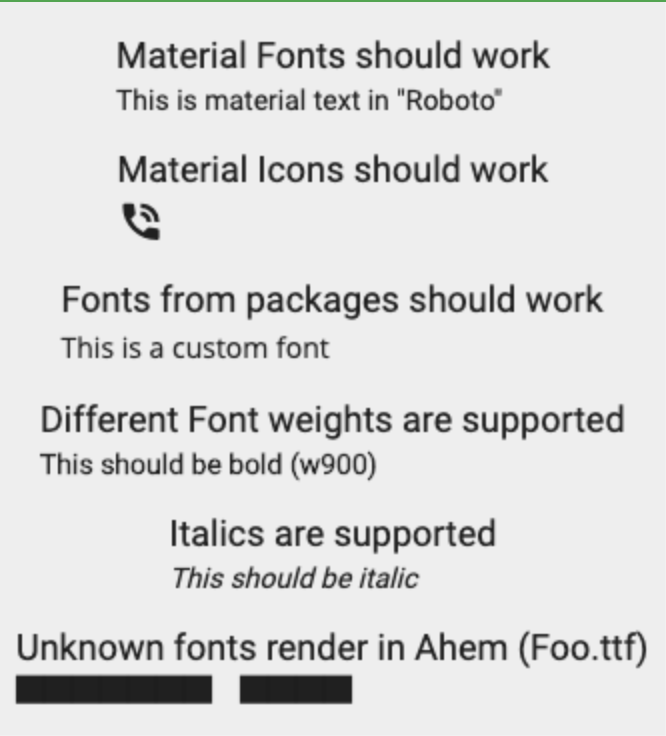
I believe the issue with the Debug Banner is that it doesn't actually specify a font family... so it defaults to the default font in skia... which in a test context is Ahem -- with no known way to override.
I'm adding some documentation updates to document the limitation in the meantime. Going to leave this ticket open.
https://github.com/eBay/flutter_glove_box/pull/39
I think I found a bug that we can fix related to the Roboto fonts. If you have a font name that includes Roboto like RobotoMono or RobotoBold they will not load.
String derivedFontFamily(Map<String, dynamic> fontDefinition) {
  final String fontFamily = fontDefinition['family'];

  if (_overridableFonts.contains(fontFamily)) {
    return fontFamily;
  }

  if (fontFamily.startsWith('packages/')) {
    if (_overridableFonts.any(fontFamily.contains)) {   <- bug is here
      return fontFamily.split('/').last;
    }
  } else {
    for (final Map<String, dynamic> fontType in fontDefinition['fonts']) {
      final String asset = fontType['asset'];
      if (asset?.startsWith('packages') ?? false) {
        final packageName = asset.split('/')[1];
        return 'packages/$packageName/$fontFamily';
      }
    }
  }
  return fontFamily;
}

const List<String> _overridableFonts = [
  'Roboto',
  '.SF UI Display',
  '.SF UI Text',
  '.SF Pro Text',
  '.SF Pro Display',
];
should look like
...
  if (fontFamily.startsWith('packages/')) {
    final fontFamilyName = fontFamily.split('/').last;
    if (_overridableFonts.any((fontOverride) => fontOverride == fontFamilyName)) {
      return fontFamilyName;
    }
  }
...

@NickalasB I think this issue covers what we found. Wanna make a PR?
@NickalasB I think this issue covers what we found. Wanna make a PR?
Yep will do
