

 dynamiquel
Widget transparency settings don't work
Widget transparency settings don't seem to apply to this widget, is this a bug or some inherent limitation of the Edge webkit?

Which transparency settings are you referring to?; I didn't know Game Bar Browser had transparency options.

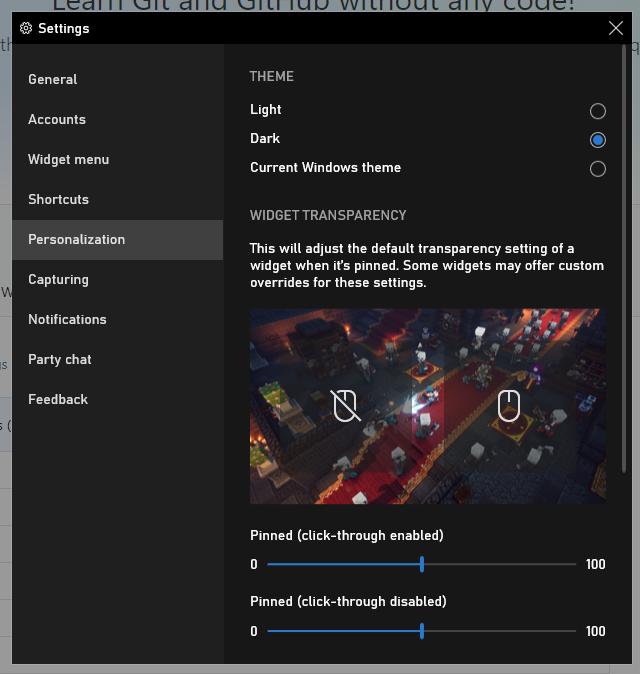 These settings in the game bar options allow you to pin widgets to the screen to show up even when the overlay is not in focus. Opacity settings are really helpful for having something open as you play the game. If you don't see it, it might be exclusive to the v2004 update for Windows 10
I see it. I believe the reason why is because the latest version of Game Bar Browser is using an older version of the Game Bar SDK, before transparency options were added. The latest version of the browser isn't using the latest version of Game Bar SDK because there were issues I didn't know how to fix at the time.
When I update the browser next, I will attempt to use the latest version of Game Bar SDK so these transparency options work.
Please take another look at this issue, I've looked everywhere for something exactly like this

Same here, add transparency. I will even buy it from the store. There is literally NOTHING out there that can overlay a web browser on windows with transparency to watch yuutube/netflix/twitch, this would be massive.
I believe the Xbox Gamebar SDK has been updated quite a bit since your last post @dynamiquel.
I am on hand to test beta versions if you need me.
James.
