

 dylanaraps
[Terminal] After a reload, colors acts strange
Hello,
I've been using pywal for a few days now. But yesterday, I notcied a really weird bug. Looks like that, if you reload the system (in this case, I'm talking about reloading a WM) or set the window in fullscreen, terminal's colors changes.
Comparison
Here are some screenshot:
Before reloading
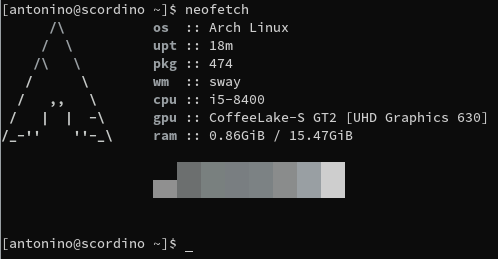
After reloading
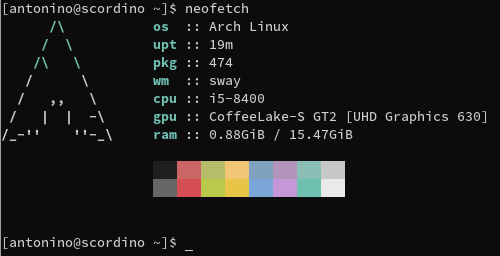
This is issue is really weird and specific. First of all, you'd have to have any text editor with syntax colors enabled (in this example, I used nano), reload the WM (but also make the window fullscreen) and then re-run any program to check the colors. I have no idea how and why this happens, I tried on bot X.org and Wayland, yet I get the same effect.
The only way to fix this is by manually adding colors to the configuration file. If you are using alacritty, you may be interested in egeesin/alacritty-color-export.
Infos
walversion: 3.3.1- Tried bot "git" and "stable" version
- WM tested:
sway,i3-wm - Terminals tested:
foot,alacritty


do you got a pywal postrun script? you know the kind that is called with the -o flag and the path to the script.
if not use this as postrun script, or if you got one add the lines after the shebang to it and make sure the shebang points to bash #!/bin/bash
#!/bin/bash
fix_sequences() {
        e=$'\e'
        sequences=$(cat)
        foreground_color="$(echo -e "${sequences}\c" | grep --color=never -Eo "${e}]10[^${e}\\\\]*?${e}\\\\" | grep --color=never -Eo "#[0-9A-Fa-f]{6}")"
        background_color="$(echo -e "${sequences}\c" | grep --color=never -Eo "${e}]11[^${e}\\\\]*?${e}\\\\" | grep --color=never -Eo "#[0-9A-Fa-f]{6}")"
        cursor_color="$(echo -e "${sequences}\c" | grep --color=never -Eo "${e}]12[^${e}\\\\]*?${e}\\\\" | grep --color=never -Eo "#[0-9A-Fa-f]{6}")"

        for term in /dev/pts/{0..9}*
        do
                echo -e "\e]4;256;${cursor_color}\a\c" > "${term}" 2>/dev/null
                echo -e "\e]4;258;${background_color}\a\c" > "${term}" 2>/dev/null
                echo -e "\e]4;259;${foreground_color}\a\c" > "${term}" 2>/dev/null
        done
}

fix_sequences <"${HOME}/.cache/wal/sequences"
if this does address the issue then i will know what is it that i need to do in pywal16