

 dxc-technology
Phone Number Field ( ❗ Important Feature )
Is your feature request related to a problem? Please describe. PhoneNumberField allows users to input phone numbers.
Describe the solution you'd like Import the PhoneNumberField component and provide a label for accessibility/usability as well as a defaultDialCode which will auto-populate the dial code select field.
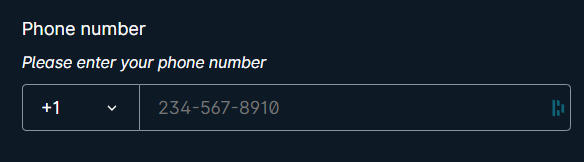
Additional context https://ui.docs.amplify.aws/react/components/phonenumberfield#dial-code-select-properties
Demo
https://ui.docs.amplify.aws/react/components/phonenumberfield#demo

We understand the value of this component and can be a good proposal. We will investigate it and think if it fits our design system form components.

This issue is stale because it has been open for 15 days with no activity. If there are no further updates or modifications within the next 15 days, it will be automatically closed.
![github-actions[bot] avatar](https://avatars.githubusercontent.com/in/15368?v=4 "Published by a pub.dev verified publisher")
Hello @hanoj-budime!
We have no plans to add a Phone Field Input shortly since it can be achievable by combining our DxcTextInput with the DxcSelect. Here is a short example:
import {
  DxcContainer,
  DxcFlex,
  DxcGrid,
  DxcInset,
  DxcSelect,
  DxcTextInput,
  DxcTypography,
} from "@dxc-technology/halstack-react";

function App() {
  return (
    <DxcContainer width="50%">
      <DxcInset space="2rem">
        <DxcFlex direction="column">
          <DxcTypography fontSize="0.875rem" fontWeight="600">
            Phone number
          </DxcTypography>
          <DxcTypography fontSize="0.75rem" fontStyle="italic">
            Please, enter your phone number
          </DxcTypography>
        </DxcFlex>
        <DxcGrid gap={"0.5rem"} templateColumns={["1fr", "5fr"]}>
          <DxcSelect
            defaultValue={"1"}
            options={[
              { label: "+1", value: "1" },
              { label: "34", value: "+34" },
            ]}
            size="fillParent"
          />
          <DxcTextInput placeholder="234-567-8910" size="fillParent" />
        </DxcGrid>
      </DxcInset>
    </DxcContainer>
  );
}

export default App;
I hope this helps!
@GomezIvann,
I know that DxcSelect and DxcTextInput are combined to create the phone number component, but what about width control for DxcSelect? Didn't you notice that DxcSelect is taking up too much width? What will you do about this?
@GomezIvann,
I know that DxcSelect and DxcTextInput are combined to create the phone number component, but what about width control for DxcSelect? Didn't you notice that DxcSelect is taking up too much width? What will you do about this?

I updated the example above. Use size="fillParent" and a DxcGrid to manage the sizes.