

 dwilhelm89
Just one in each slider changs
Hello everyone, someone knows how to display just 1 marker instead of the current and the before of it?
Eg: M = Marker M1 -> M2 -> M3 -> M2
How to display M2 without appearing M1? Or... how to display M3 without appering M1 and M2? Am I clear enough?
The slider must show just 1 Marker in each slider change
I tried follow:1 but it display the current marker and the before of it.

Pls try it with the updated version: https://github.com/Falke-Design/LeafletSlider
Do I understand it right ,you want that only the current Marker is displayed?

That's right!! Ok thanks, i will check it out and keep you in touch
PS: 2032917 its me btw >.<

Hey, i checked it out and the version you show me is more complete. However I still didn't get make it works.
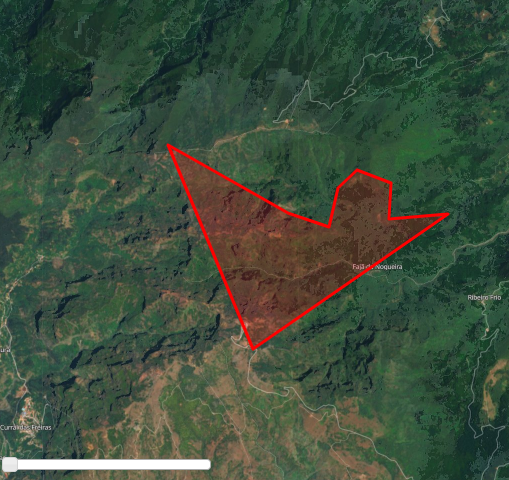
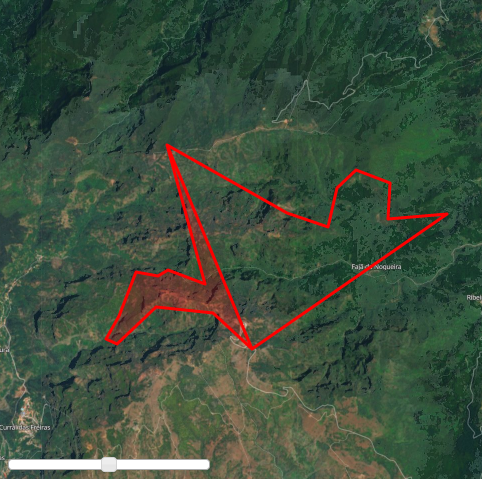
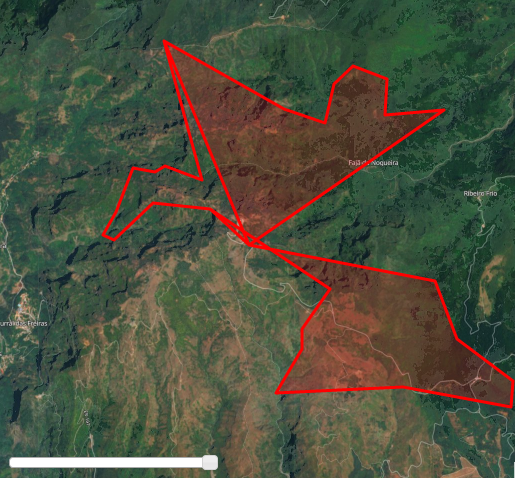
What I am trying to do is the following:
- Everytime I change the slider, the Polygon will change right? But i want the polygon change at all, i dont want to display the polygon before of it. I am not getting it, so... if you check the second image, it should look something like this:
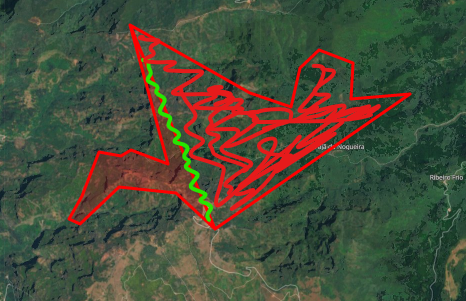
- The red line in 2nd image must dissapear as shown with the green line, and the polygon must be filled with red, as shown.
I am creating the polygons dynamically with coordinates from local database
/*
...
getting data from database
coordinates = [coords[1], coords[0]]
LatLng.push(coordinates );
...
*/

var polygon = L.polygon(LatLng, { color: 'red' }, { time: result[i].date })
                layersGeoJSON.addLayer(polygon);
            }
        }
    });

    setTimeout(function() {
        var sliderControl = L.control.sliderControl({ position: "bottomleft", layer: layersGeoJSON, follow: 1 });
        mymap.addControl(sliderControl);
        sliderControl.startSlider();
    }, 1000)
Pls post also the output of the console:
setTimeout(function() {
   console.log(JSON.stringify(layersGeoJSON.toGeoJSON()));
   var sliderControl = L.control .....
}
Here:
{"type":"FeatureCollection","features":[{"type":"Feature","properties":{},"geometry":{"type":"Polygon","coordinates":[[[-16.893112,32.751589],[-16.903291,32.7509],[-16.902947,32.756097],[-16.908789,32.757974],[-16.912054,32.755376],[-16.9136,32.749745],[-16.920664,32.75182],[-16.941184,32.7616],[-16.92671,32.732156],[-16.893112,32.751589]]]}},{"type":"Feature","properties":{},"geometry":{"type":"Polygon","coordinates":[[[-16.893112,32.751589],[-16.903291,32.7509],[-16.902947,32.756097],[-16.908789,32.757974],[-16.912054,32.755376],[-16.9136,32.749745],[-16.920664,32.75182],[-16.941184,32.7616],[-16.92671,32.732156],[-16.893112,32.751589],[-16.893112,32.751589],[-16.903291,32.7509],[-16.902947,32.756097],[-16.908789,32.757974],[-16.912054,32.755376],[-16.9136,32.749745],[-16.920664,32.75182],[-16.941184,32.7616],[-16.934735,32.741515],[-16.941092,32.743537],[-16.94281,32.74267],[-16.946591,32.743248],[-16.949512,32.736895],[-16.951745,32.733574],[-16.949855,32.732852],[-16.943154,32.738194],[-16.93336,32.737328],[-16.92671,32.732156],[-16.893112,32.751589]]]}},{"type":"Feature","properties":{},"geometry":{"type":"Polygon","coordinates":[[[-16.893112,32.751589],[-16.903291,32.7509],[-16.902947,32.756097],[-16.908789,32.757974],[-16.912054,32.755376],[-16.9136,32.749745],[-16.920664,32.75182],[-16.941184,32.7616],[-16.92671,32.732156],[-16.893112,32.751589],[-16.893112,32.751589],[-16.903291,32.7509],[-16.902947,32.756097],[-16.908789,32.757974],[-16.912054,32.755376],[-16.9136,32.749745],[-16.920664,32.75182],[-16.941184,32.7616],[-16.934735,32.741515],[-16.941092,32.743537],[-16.94281,32.74267],[-16.946591,32.743248],[-16.949512,32.736895],[-16.951745,32.733574],[-16.949855,32.732852],[-16.943154,32.738194],[-16.93336,32.737328],[-16.92671,32.732156],[-16.893112,32.751589],[-16.893112,32.751589],[-16.903291,32.7509],[-16.902947,32.756097],[-16.908789,32.757974],[-16.912054,32.755376],[-16.9136,32.749745],[-16.920664,32.75182],[-16.941184,32.7616],[-16.934735,32.741515],[-16.941092,32.743537],[-16.94281,32.74267],[-16.946591,32.743248],[-16.949512,32.736895],[-16.951745,32.733574],[-16.949855,32.732852],[-16.943154,32.738194],[-16.93336,32.737328],[-16.912686,32.725776],[-16.917498,32.719999],[-16.917498,32.717111],[-16.921965,32.710756],[-16.900315,32.711622],[-16.881758,32.708733],[-16.881414,32.712489],[-16.891037,32.718555],[-16.894817,32.726931],[-16.92671,32.732156],[-16.893112,32.751589]]]}}]}
The silder is working correct, your data from the db are wrong.
Second polygon:
var data = "{\"type\":\"FeatureCollection\",\"features\":[{\"type\":\"Feature\",\"properties\":{},\"geometry\":{\"type\":\"Polygon\",\"coordinates\":[[[-16.893112,32.751589],[-16.903291,32.7509],[-16.902947,32.756097],[-16.908789,32.757974],[-16.912054,32.755376],[-16.9136,32.749745],[-16.920664,32.75182],[-16.941184,32.7616],[-16.92671,32.732156],[-16.893112,32.751589],[-16.893112,32.751589],[-16.903291,32.7509],[-16.902947,32.756097],[-16.908789,32.757974],[-16.912054,32.755376],[-16.9136,32.749745],[-16.920664,32.75182],[-16.941184,32.7616],[-16.934735,32.741515],[-16.941092,32.743537],[-16.94281,32.74267],[-16.946591,32.743248],[-16.949512,32.736895],[-16.951745,32.733574],[-16.949855,32.732852],[-16.943154,32.738194],[-16.93336,32.737328],[-16.92671,32.732156],[-16.893112,32.751589]]]}}]}"
// Add polygon
var geojson = L.geoJSON(JSON.parse(data));
mymap.fitBounds(geojson.getBounds());
Then you see that the polygon has already the line in the middle and only one side is filled out.
Hey, i spend lot of time checking where was my mistake in the data from db... making a simple test with the coords: [ [0,0 , [0,1] , [1,1], [1,0], [0,] ] and then [ [0,0 , [0,1] , [1,1], [0,] ] its looks like is not a 100% data problem, am i right?
Check this:
The GeoJSON give me this:
{"type":"FeatureCollection","features":[{"type":"Feature","properties":{},"geometry":{"type":"Polygon","coordinates":[[[0,0],[0,1],[1,1],[1,0],[0,0]]]}},{"type":"Feature","properties":{},"geometry":{"type":"Polygon","coordinates":[[[0,0],[0,1],[1,1],[1,0],[0,0],[0,0],[0,1],[1,1],[0,0]]]}}]}
But the db is this:

I realize that.. its repeating the data, that's why the polygons appears wrongly.
So, is not a problem from DB but GeoJSON
Maybe this is not a problem of geojson:
getting data from database
coordinates = [coords[1], coords[0]]
LatLng.push(coordinates );
You pushing the data to the LatLng array but maybe you never clear them before you fetch the next data from the db.
But this is no problem of the Silder, I'm right?
Omg yes! You are right! Thanks my friend, i will resolve this in1sec, big mistake by me! Thanks thanks !!
Edit:
Solve! =) All credits @Falke-Design