

 dvf
dvf
TypeError: argument of type 'NoneType' is not iterable
I have following error:
ERROR in app: Exception on /transactions/new [POST]
File "C:/Users/小草/Downloads/Compressed/blockchain-master/blockchain-master/blockchain.py", line 237, in new_transaction
if not all(k in values for k in required):
File "C:/Users/小草/Downloads/Compressed/blockchain-master/blockchain-master/blockchain.py", line 237, in

I made the following changes and the issue is solved. Please see below. I got the same error you did when I ran the program. I believe it was caused by the get_json function not recognizing your transaction input format.
@app.route('/transactions/new', methods = ['POST']) def new_transaction(): values = request.get_json(force=True) required = ['sender', 'recipient', 'amount'] if not all(k in values for k in required): return 'Missing Values', 400

@deion1130 Thank you very much! I tried your suggestion. It works good.But another question troubles me:
- when I debug this program with pycharm,following question appears:
Traceback (most recent call last):
File "C:/Users/小草/PycharmProjects/untitled/block.py", line 6, in
- when I debug this program with command line, it works good.
Can you give me some suggestions? Thank you!
Probably because in your PyCharm settings for the used project interpreter the package requests isn't installed. You should add it by going to Settings>Project:project_name>Project Interpreter. Click on the green plus, type 'requests' and install it.

I have the same issues :/ Adding args force=true for get_json functions dosen't help me at all.
DId you found the solution ?

@F0lamie - The solution above just yielded more problems for me. I finally fixed the issue when I specified in my API call that "Content-Type": "application/json"in the Header.
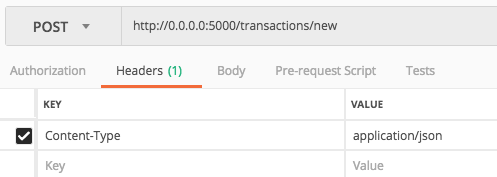

@F0lamie - The solution above just yielded more problems for me. I finally fixed the issue when I specified in my API call that
"Content-Type": "application/json"in the Header.
This worked for me aswell.
