

 dvanoni
APIResponseError: API token is invalid.
Hi! Thank you so much for this helpful tool.
I'm in the process of trying to link Notion and Zotero but keep getting the following message when "Saving items to Notion..." -- "APIResponseError: API token is invalid". Is this something you've come across before? I've already checked to make sure I'm sharing my database with the integration and that the integration token and database ID are the same as what is provided by Notion. Any idea where I might be going wrong?
D

Hi @danielleeleblanc, thanks for reaching out!
I think I've seen this error message when I've copied the token incorrectly. If it was a valid token but the integration wasn't properly shared with your database, then I think you'd see an error message along the lines of "database not found."
So, my best guess is that there might have been a slight typo when the token was copied from the Notion integrations page into Zotero. Perhaps a space snuck in at the beginning or end of the token?

Maybe related maybe not. I got APIResponseError: API token is invalid too. I made a mistake and copied too much off the database link. I correctly started after https://www.notion.so/ but I didn't stop before the ? mark. Hope this helps anyone else.
Once I removed the extra digits, all seems to work as intended.

Thanks for getting back to me on this @dvanoni and @gregdyche !
I tried re-copying and pasting both the Database ID and the Integration Token ID (re: your suggestions) into Notero Preferences. However, now I'm getting a new error message (see below).
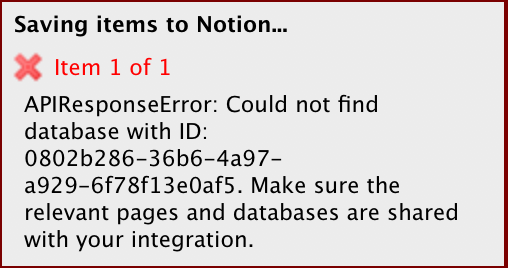
@danielleeleblanc this is progress! This error means your API token is working correctly, but there's still something missing that's preventing access to the database you want to use.
Have you gone through the steps in the "Could not find database" FAQ in the README?
@dvanoni good to hear! I have followed the steps from the FAQ you shared but am still getting the same warning for some reason?
@danielleeleblanc would you mind sharing a couple things with me so I can see if something is off?
- The link to your database
- A screenshot of the share menu for your database (like this)
Thanks!
@dvanoni sure thing, please see below!
Database: https://www.notion.so/0802b28636b64a97a9296f78f13e0af5?v=9726e4251e564b5d9bafd7bf3bcd1214
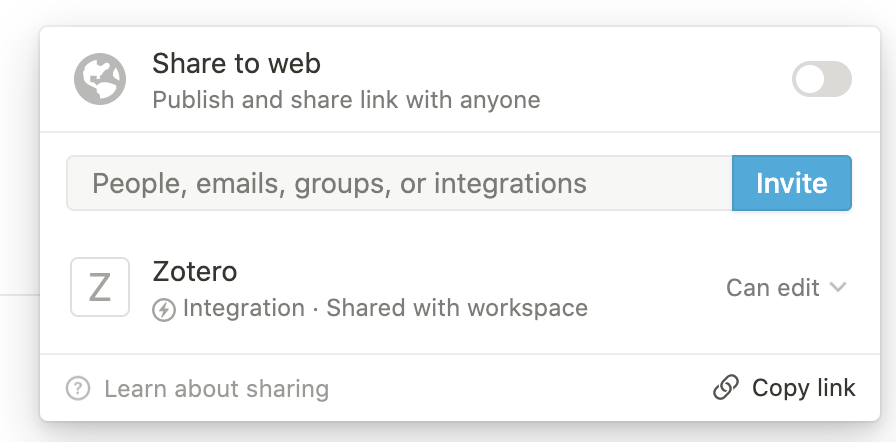
@danielleeleblanc darn, I'm really stumped on this one! Everything looks good to me.
The only other thing I can think to ask at this point is: do you happen to have multiple integrations set up with Notion? I'm just wondering if there's any chance a different integration token was copied into Zotero.
@dvanoni No, just the one integration. Although I'm wondering if I'm copying the database ID correctly. I should be just copying between the 'https://www.notion.so/' and the ?, right?
@danielleeleblanc yeah, it looks like you've copied the database ID correctly.
One other thing I just thought to check. When you view your integration at https://www.notion.so/my-integrations, are these boxes all checked?
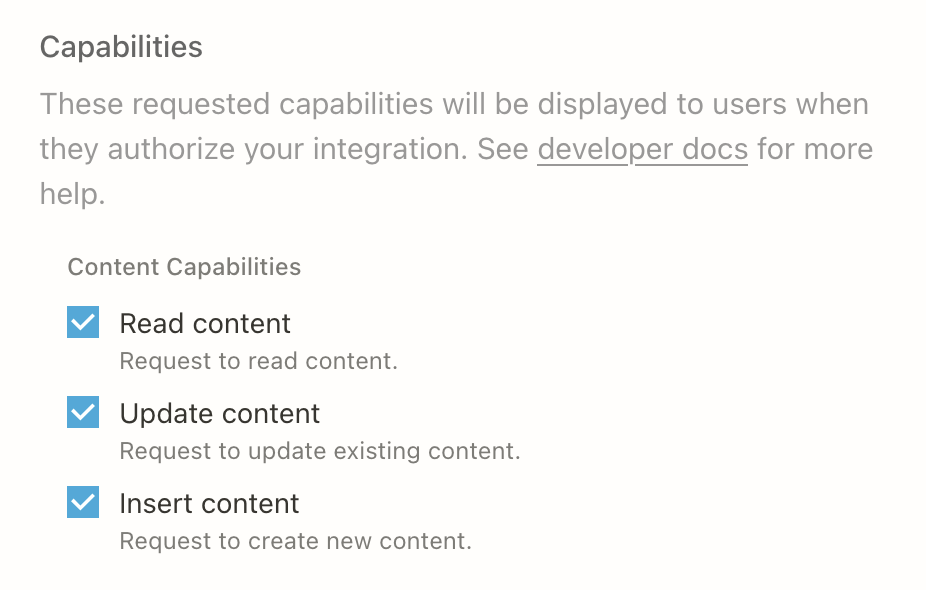
@danielleeleblanc I'm quite baffled! I think all I have left at this point is the "turn it off and back on again" approach...
Would you mind trying the following to see if it helps at all?
- Uninstall the Notero plugin, restart Zotero, and reinstall Notero again
- Create a new Notion integration and put that new token into the Notero preferences
- Create a new Notion database and put its ID into the Notero preferences
I apologize for the hassle. I really haven't seen something like this before! 😕

@hutianzhen just to clarify, are you seeing the API token is invalid error or the Could not find database with ID error?
I'm struggling to figure out how to debug this. To try ruling out something specific with Notero, would you be able to run a network request directly from you terminal? For example, using cURL:
curl 'https://api.notion.com/v1/databases/NOTION_DATABASE_ID' \
  -H 'Authorization: Bearer '"NOTION_INTEGRATION_TOKEN"'' \
  -H 'Notion-Version: 2022-02-22'
You'd need to replace NOTION_DATABASE_ID and NOTION_INTEGRATION_TOKEN with the values that you pasted into the Notero Preferences.
I solve this by unlocking the advanced template. When I duplicate the advanced example to my own notion account, a locked button(prevent accidental editing) appears next to the title, click the button.
@hutianzhen that's an interesting discovery! To be honest, I'm not entirely sure why having the database locked would cause these API errors. I thought locking only impacted the ability to modify properties of the database rather than adding pages to the database. But I'm glad you were able to get things working!
@danielleeleblanc is it possible that you're running into the same issue?
@hutianzhen could you elaborate on where you're seeing a locked button? I'm not sure I see this on my page.
@danielleeleblanc Please see below
- Duplicate the advanced example to your own notion account.
- Open Notero advanced. Notice the red box in the picture.

@hutianzhen hm, just tried this, and i'm still getting this message.
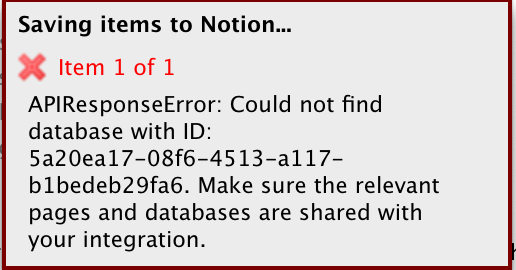
got the same errors as @danielleeleblanc had. did all the measure mentioned above still getting the same API Response Error. My guess is the database ID format or atleast the shared link has changed compared to what is found on @dvanoni 's docs.

@mpmangubat would you mind sharing the link to your Notion database and also the value that you've entered for the Database ID in the Notero Preferences window? I'm curious if something has indeed changed as you mentioned. Thanks!

you should just bind you dataBase with your integration by going to your dataBase and click on tree point up in right choose add connection then you can connect it with you integration.

I may have found the problem. In my case I copied the Notion page ID instead of the database ID. It appears that when you first create an empty page and then add a database to it, the IDs will be different. I got the database ID by copying a link to a specific view and then extracting the ID from the link. Now it works :)

Hello, I have the "APIResponseError: API token is invalid". I double-checked the token, and it is correct. However, my databaseID is not like what's expected... I have "https://www.notion.so/{numbers}?v={other}" without my workspace name. I tried with {numbers}, {numbers}?v={other} and it's not working.

Hi @cbeaumard, the {numbers} part of the URL should be correct.
I just performed some tests to see what scenarios would trigger the "API token is invalid" error, and it only occurred when I modified the integration token (rather than the database ID).
I generated a few different tokens on https://www.notion.so/my-integrations, and it looks like they're all 50 characters long.
Here's a screenshot of what the values look like for me. Do yours look similar?
Hello @dvanoni. Thanks to your message, I understood my Integration Token was wrong (I thought it was the name and not the secret key). Now it's syncing ! Have a good day!
@dvanoni I solved it, but in a less than straightforward fashion. The token I copied directly from the key generator was wrong, apparently. What I did to make it work was open up the account settings in Notion, opened the connections side bar, then I clicked the individual ... settings for my notero connection and copied the token information from there.
Thanks for the help

I'm glad you solved it, @vlwbirds!
I'm hoping to making this process much less error prone by changing Notero to be an integration that can connect directly to your Notion account so that you don't have to copy and paste the token or database ID.