

 dvanoni
APIResponseError but object syncs anyway. It also duplicates
Hi!
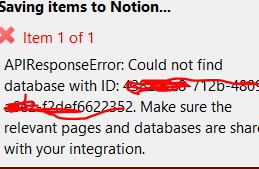
I am seeing an issue where I get an API response error but the object syncs anyway.
The database ID in the error code is not even the correct database ID. Another thing that happens is each time I tried to sync the item, it created duplicates, most likely because notero does not know that it is successfully syncing.

Hi @jigarp12892, thanks for reaching out!
Out of curiosity, were you previously syncing items to a different Notion database? I'm wondering if that's where the database ID is coming from that you see in the error message. If that's the case, I think what might be happening here is that Notero is still trying to sync items into that database based on the "Notion" link attachment that's saved in Zotero. (See the How Notero Works section in the README.)
Assuming the above is what we're seeing, I think there must be some sort of error condition that Notero isn't handling correctly right now. When it encounters an error that a page doesn't exist in Notion, it's supposed to create a new page and then update the link attachment in Zotero with the URL of the new page. However, it looks like we're running into something slightly different in that we're encountering a missing database rather than a missing page, and I think that's causing the trouble here.
Can you provide more details about what steps you've taken? E.g., did you end up changing databases, did you delete an old database, did you move pages from an old database to a new database? I'm hoping we can narrow down the specific scenario we're encountering here so we can get a fix (or at least a workaround) in place.
Thanks!

@dvanoni, weirdly, turning the whole thing off and turning it on again somehow fixed the integration.
I closed notion and zotero and stepped away for a while, came back and tried to push a change by editing a tag in Zotero, and it went through just fine.
To answer your question, nope. My notion database was unchanged completely. I was trying to sync to the same database ID as always. I don't know what database notero was trying to find when it was erroring out. Can you think of any way in which it was trying to sync to someone else's database somehow?
@jigarp12892, huh, that's super weird! I'm honestly not sure how a different database ID would get in there...
Zotero saves that preference in a file in the profile directory on your computer. I wonder if the profile got switched up somehow? Do you share the computer with any other users, or do you happen to use multiple Zotero profiles?