

 dvanoni
Notion title name without brackets
Hi @dvanoni, firstly, thank you so much for building and maintaining this extension, it is a lifesaver!
I've been using this extension, and was wondering if it's possible to have the citation name without the brackets. This would make in-line cross-referencing within Notion cleaner, as brackets can be added whenever needed outside of the link. Moreover, the Notion database would look better without brackets in all the entries, in my opinion.
Since many feature requests ask to modify the title property, a customizable option within the preferences may be beneficial. In the codebase, I see a getInTextCitation variable which can be modified as a possible resolution for this enhancement.
Best, Darshan

Hi @shahdv, thanks for the feedback!
Can you share a little more about the exact format you'd like to use for the Notion page titles? Is one of the options mentioned here something that would work for you, or are you looking for something else?

I agree that this would be so helpful for in-text citations. The current structure (Author, YEAR) works great if you only have one work to cite and you don't need to provide the page number. But in APA, if you want to cite multiple works or include the page number, then that material needs to go inside the parentheses. For instance, (Author, YEAR, pp. 2-3). If the page title in notion was just Author, YEAR (no parentheses), then it'd be much easier to integrate a variety of in-text citation formats into papers in Notion.
Love Notero, but this would be the biggest improvement for my own writing needs (and perhaps others'). Thanks!

@shahdv @tccorrigan123, I've just pushed a new test build in #14 that now has an "Item Author-Date Citation" option that I hope will meet your needs. Feel free to give it a try and let me know what you think!
@shahdv @tccorrigan123, I've just pushed a new test build in #14 that now has an "Item Author-Date Citation" option that I hope will meet your needs. Feel free to give it a try and let me know what you think!
I tried out v0.4 and it works well! For new items, the beginning and ending parentheses are not added in the title field within Notion. I tried out the other page type options within preferences, and all of them work fine. Thanks for this much-needed update!
Just a couple of follow-up queries:
- How do I modify the hundreds of older pages whose titles have parentheses?
- Is there an option to revert back to the older format? (I checked the other options, but couldn't find the older format with brackets)
Once again, thank you so much for actively maintaining this extension!
@shahdv, good questions!
How do I modify the hundreds of older pages whose titles have parentheses?
The easiest way to currently modify many pages is to use a temporary tag as described in this section of the readme: How to bulk sync existing items
Is there an option to revert back to the older format? (I checked the other options, but couldn't find the older format with brackets)
It is possible. It requires you to set the "Quick Copy" format to American Psychological Association 7th edition in the Zotero preferences (which unfortunately may not be the format you really want to use). Once you select that format, you can achieve the previous Notion title format (with parentheses) by using the Item In-Text Citation option in the Notero preferences.
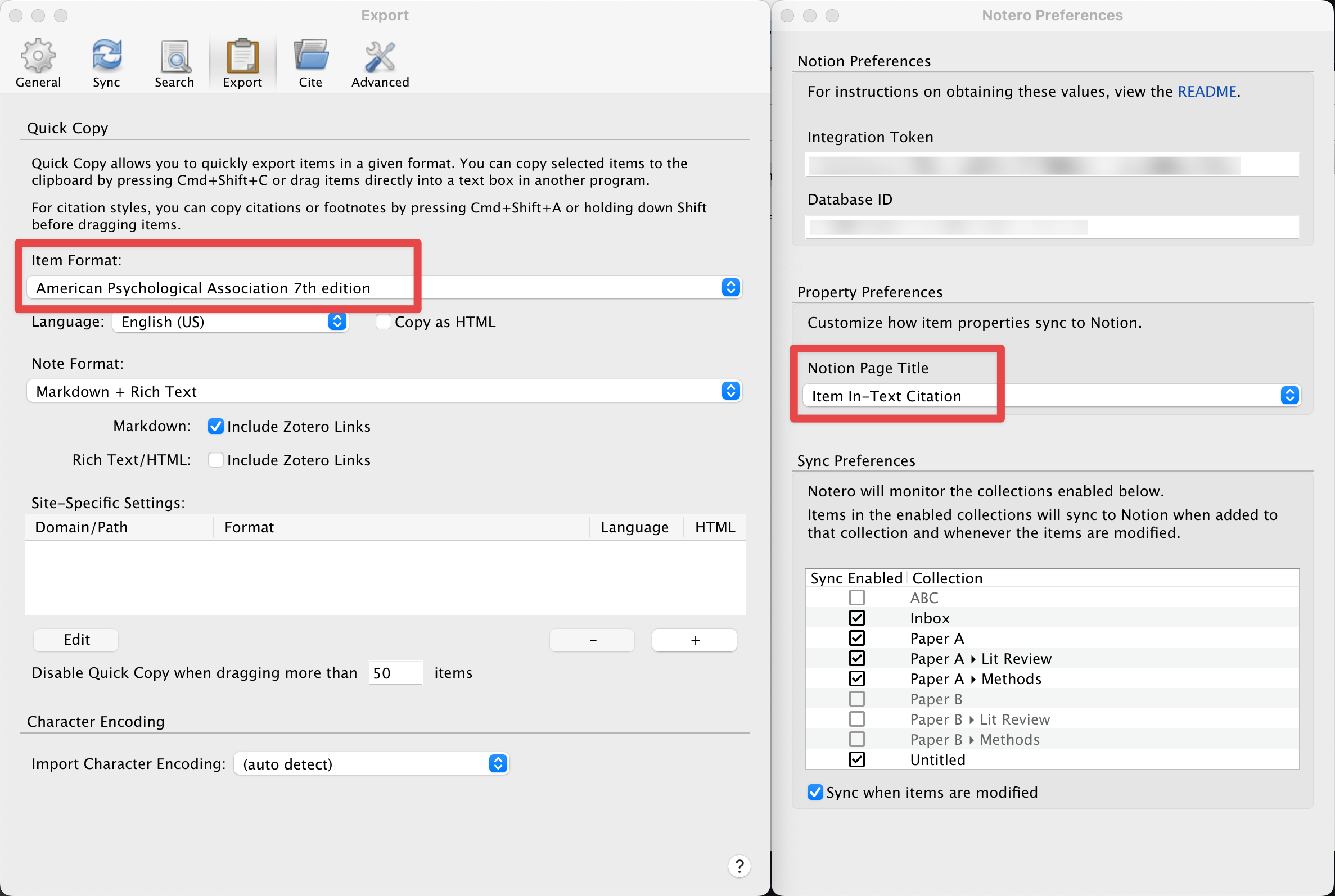
Let me know if this helps!