dukelec
Printer doesn't work any more after trying to update firmware
Hi there my printer stopped working after updating firmware
I already tried the USB cloner but I don't know what to do and what files need to be placed where
Please help me

At this moment:
Please download last burn tool from: https://github.com/dukelec/mb/releases/tag/4.30_4.16
Burn tool is cloner-2.5.8-ubuntu_alpha.tar.bz2 or cloner-2.5.8-windows_alpha.zip.
(You need install driver for windows first.)
Then download last firmware from: https://github.com/dukelec/mb/releases/tag/4.32_4.16
The firmware for burn tool is: cloner_fw_4.32_4.16.zip
Unzip the firmware to any where you want.
Run the burn tool, re-select the location of the 3 files in the settings, and point to the files you just unzipped.
(There are two ubifs files after decompression, you can use either one of them.)
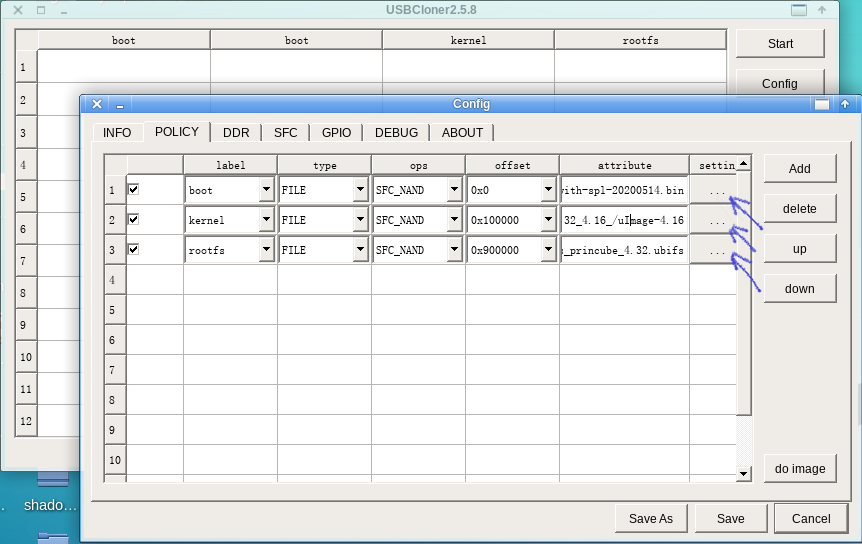
Then, click the Start button in main window, then connect printer which already in programming mode.
(Enter programming mode: Press and hold the top button, then turn on the power switch to enter the programming mode.)

Hello, I got the printer on Aliexpress and it would turn on but won't work. Lights will not turn green and make the sound, they are always white. I have mac, is there any burner for mac? Thank you

Hello, I got the printer on Aliexpress and it would turn on but won't work. Lights will not turn green and make the sound, they are always white. I have mac, is there any burner for mac? Thank you
Hello, i got a Windows computer to do It, but It doesnt detect the device, i already installed the drivers but USB Port doesnt recognice anything 😢
@lilyrose5 Did you follow this instruction: "Press and hold the top button, then turn on the power switch to enter the programming mode" ? Connect USB cable before or after printer enter the programming mode, open the Windows device manager, see if it refresh when printer enter the programming mode.
Sorry, the CPU manufactory only provides Linux and Windows burning tool.
Which Windows version did you use?
@lilyrose5 Did you follow this instruction: "Press and hold the top button, then turn on the power switch to enter the programming mode" ? Connect USB cable before or after printer enter the programming mode, open the Windows device manager, see if it refresh when printer enter the programming mode.
Sorry, the CPU manufactory only provides Linux and Windows burning tool.
Which Windows version did you use?
Hello,
I tried again and I was able to solve it. The problem was with the drivers:
- First I installed the driver for win32 but it didn't work OK. The device appeared in the USB area but had an exclamation mark, and indicated some kind of issue. Maybe it is because the computer was win64. We tried, but the burner didn't work
- Then we installed the drivers that came with the burner, the device appeared in some other area without any exclamation mark and the burner worked OK.
Thank you so much for your help!
Make sure you use latest release from github's releases page not the links above from second message. Then it works. Phenomenal support @dukelec - Thank you.


I also have the same situation. I have tried all firmwares and the PrinCube keeps restarting. How should I deal with it?
USBCloner:2.5.24 Use config:x1021_sfc_nand_ddr2_linux.cfg.txt Tried firmwares list:
- usb_cloner_fw_4.37_4.19
- usb_cloner_fw_4.36_4.17
- cloner_fw_4.33_4.16
- cloner_fw_4.28_4.15
- cloner_fw_4.26_4.11
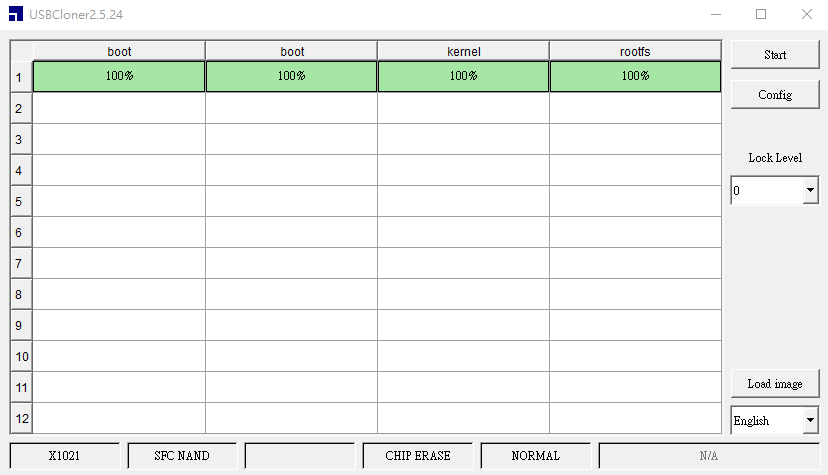

hold wait time.........................(https://upload.cc/i1/2023/01/30/8hpH9Z.jpg)

USBCloner:2.5.24 Use config:x1021_sfc_nand_ddr2_linux.cfg.txt
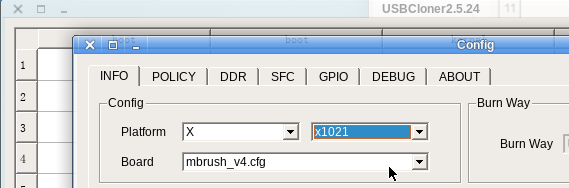
Please select mbrush_v4 in 2.5.24 USBCloner's Config page.
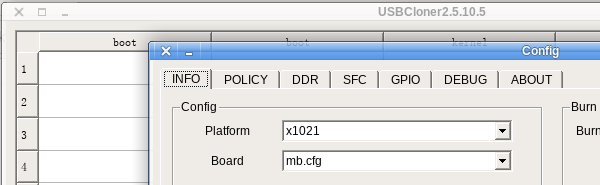
Or select mb.cfg in 2.5.10.5 USBCloner's Config page.