

 dtuma
dtuma
Add CFBundleIdentifier to Info.plist files for Mac
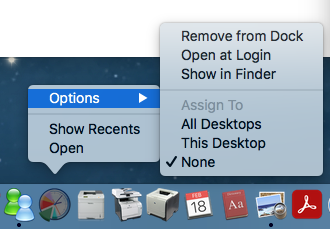
Hi. On Mac, you can make an application "sticky" to all desktops by right-clicking the dock icon and selecting Options -> All Desktops.
The Process Dashboard and the other apps don't currently support enabling this option. See screenshot 1:
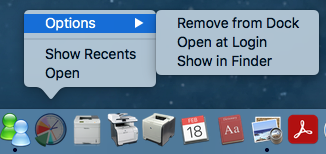
However, it's possible to enable these options by defining a value for CFBundleIdentifier in Info.plist.
Example for Process Dashboard:
diff -U5 Info.plist-o Info.plist
--- Info.plist-o	2021-02-05 10:41:34.000000000 +1100
+++ Info.plist	2021-02-18 15:13:58.000000000 +1100
@@ -1,10 +1,12 @@
 <?xml version="1.0" encoding="UTF-8"?>
 <!DOCTYPE plist PUBLIC "-//Apple Computer//DTD PLIST 1.0//EN"
                        "http://www.apple.com/DTDs/PropertyList-1.0.dtd">
 <plist version="1.0">
   <dict>
+    <key>CFBundleIdentifier</key>
+    <string>com.processdash.processdashboard</string>
     <key>CFBundleName</key>
     <string>Process Dashboard</string>
     <key>CFBundleShortVersionString</key>
     <string>2.6.3</string>
     <key>CFBundleGetInfoString</key>
(Use a different value in each of the four Info.plist files .)
To test after making this change on a current installation, remove the icon from the dock, touch the application folder (e.g., touch /Applications/Process\ Dashboard.app/) and then put the application back in the dock.
Now the options are available, and they work! See screenshot 2:

Thank you very much for this suggestion! I'll make sure to include it in the next build.

I do have a question for you regarding this change.
The application icons for the team and personal dashboard currently include a pointer (in the Contents/Resources subdirectory) to the location where data is stored. When you double-click one of these application icons, it launches a dashboard window showing data for that location. (In fact, the primary difference between the Team and Personal dashboard apps is the data location each icon points to.)
But sometimes, people need to access data in more than one location. For example, an individual might need access to several Team Dashboards, for several teams they belong to. The currently recommended practice is to rename the Team Dashboard application (for example, to "XYZ Team Dashboard"), so you can have multiple icons in the Applications folder, one for each team.
If I add a CFBundleIdentifier to the Info.plist file, will that collide with my current usage guidance? The Apple Developer documentation describes CFBundleIdentifier as a unique ID for a single app. People with more than one Team Dashboard shortcut will suddenly have multiple apps in the Applications folder, all with the same CFBundleIdentifier, which will no longer be unique.
I'm worried whether this could have unexpected side effects - for example:
- Errors during installation if you're trying to create a second Team Dashboard icon
- The OS not allowing you to have two different Team Dashboards open at the same time
- The dock thinking these are all the same app
Can you shed any light on whether these concerns are valid? I tried a simple test on an older version of Mac OS X, and it seemed to work fine. But I don't have any way of testing whether duplicate CFBundleIdentifier values will work without incident on all versions of Mac OS X.
I'm afraid I have almost no insight into this; I only did the minimal diagnosis to find out how to make the "Assign To" functionality work.
I do happen to have some experience running multiple copies of Firefox, and yes, the CFBundleIdentifier value has to be different for the two instances.
Random untested suggestion: the installer could create a new value for the CFBundleIdentifier each time, perhaps by appending a UUID.