

 dteviot
royalroad.com - add demarcation between author's note and chapter content
Describe the bug Currently, there is no demarcation between author's note and chapter content when a epub is generated for a royalroad fiction. Author's note maybe be present before a chapter begins (above chapter content) or after it ends (below chapter content) or both.
To Reproduce Steps to reproduce the behavior:
- Go to https://www.royalroad.com/fiction/34293/dimension-breakers/
- Click on WebToEpub button
- Uncheck "Remove Author Notes"
- Click on "Pack EPUB"
- Scroll down to Chapter II in the generated epub
- See error
Expected behavior There is a clear demarcation between an author's note and the chapter content, at the beginning and/or the end, whenever author's note is present.
Screenshots
Author's note at the top -
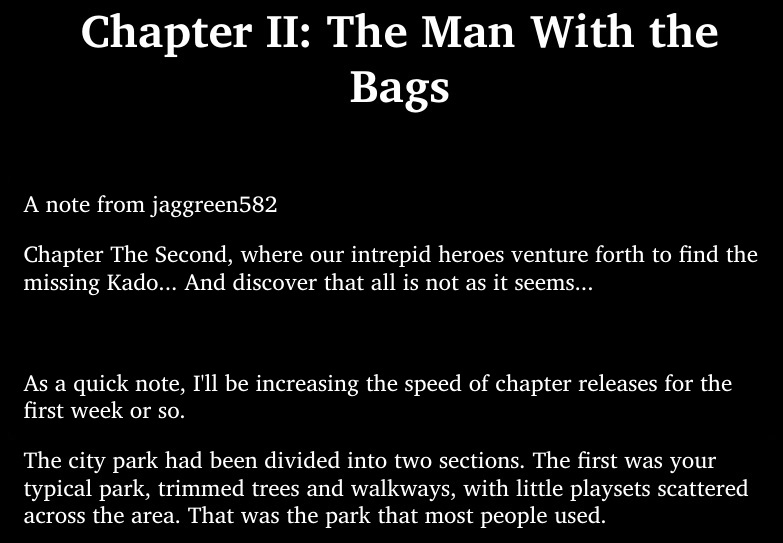 You will see that chapter content (3rd paragram) begins immediately below the end of the author's note.
--
What a possible solution might look like -
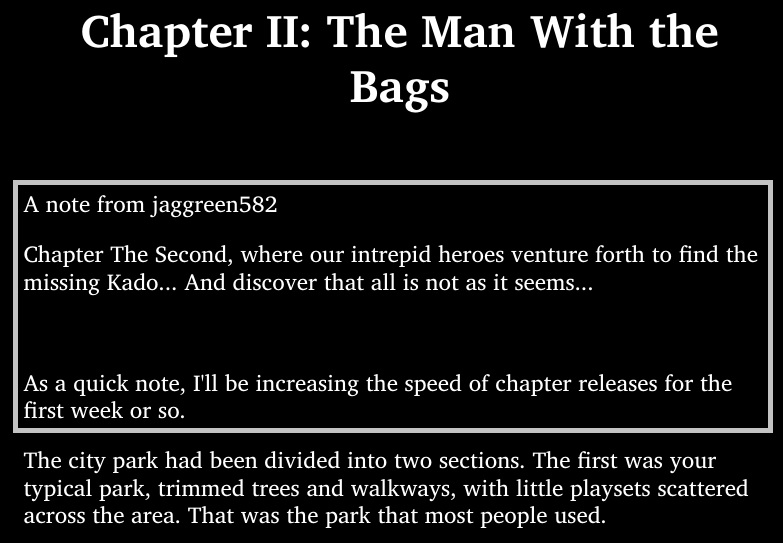 (This is a quick and dirty edit in mspaint)
Putting the author's note in a box, or alternatively, adding a section break or "----" line to show the start and end of author's note will help.
(This is a quick and dirty edit in mspaint)
Putting the author's note in a box, or alternatively, adding a section break or "----" line to show the start and end of author's note will help.
Desktop (please complete the following information):
- Windows 10
- Firefox 106.0 (64-bit)
- WebToEpub 0.0.0.150

@xypha If you open the "Advanced Options" and then add the following to the "Stylesheet" option,
div.author-note-portlet {
   border: 1px solid black;
}
You should get a box drawn around the author's note. Warning, I have not tested this.

@dteviot Thank you! I tweaked your recommendation a bit and tried it on one. It worked well.
div.author-note-portlet { border: 1px solid black; padding: 10px; }
Although this fixed the issue for me, it won't for others. Will you consider adding this to the default stylesheet? (probably after more extensive testing)
Closing the issue for now. Thanks again :)
@xypha
Will you consider adding this to the default stylesheet?
This isn't really the right general solution. It works for Royal Road, but it's a special case, exploiting the class attribute used by Royal Road. It doesn't work for other sites, e.g. (e.g. Webnovel)
This was intended as a quick solution for you. While I work on a better solution, that should work for all sites.
I think the correct solution is to add a border style rule to the default stylesheet, and inject the class attribute into the author note elements.
@xypha
Test versions for Firefox and Chrome have been uploaded to https://drive.google.com/drive/folders/1B_X2WcsaI_eg9yA-5bHJb8VeTZGKExl8?usp=sharing. Pick the one suitable for you, follow the "How to install from Source (for people who are not developers)" instructions at https://github.com/dteviot/WebToEpub/tree/ExperimentalTabMode#user-content-how-to-install-from-source-for-people-who-are-not-developers and let me know how it goes.
You may need to press the "Reset stylesheet to default" button on the "Advanced Options" under the Stylesheet to apply the changes to the stylesheet.
For my notes: 99 minutes work
@xypha
Updated version (0.0.0.151) has been submitted to Firefox and Chrome stores. Firefox version is available now. Chrome might be available in 1 to 3 weeks. If you can't wait, Test versions for Firefox and Chrome have been uploaded to https://drive.google.com/drive/folders/1B_X2WcsaI_eg9yA-5bHJb8VeTZGKExl8?usp=sharing. Pick the one suitable for you, follow the "How to install from Source (for people who are not developers)" instructions at https://github.com/dteviot/WebToEpub/tree/ExperimentalTabMode#user-content-how-to-install-from-source-for-people-who-are-not-developers and let me know how it goes.