
angular2-json-schema-form
 angular2-json-schema-form copied to clipboard
 dschnelldavis
listItems When set to 0, still renders 1 element by default
Issue type
I'm submitting a (check one): [••] Bug report
Prerequisites
Before posting, make sure you do the following (check all): [ ] Confirm you are using the latest versions of all necessary packages (or if not, explain why not) [ ] Search GitHub for a similar issue or PR [ ] If submitting a Support request, also search [Stack Overflow][stack-overflow] for similar issues Note: Please cross-post GitHub support requests to [Stack Overflow][stack-overflow], and include a link in your GitHub issue to your Stack Overflow question. We do currently respond to support requests on GitHub, but we eventually expect to stop, and will then refer all support questions exclusively to Stack Overflow.
Current behavior
When I try to set listItems for array elements to 0 it sill renders 1 element by default. I tried to change globalOptions to 0 but still its not working.
Expected behavior
When I try to set listItems to 0 it should show no element.
IMPORTANT: How can we reproduce your problem?
Navigate to Demo link https://angular2-json-schema-form.firebaseapp.com/ and change the schema to the below: Basically I changed the listItems to 0 and removed the data for phonenumber in the default example
{ "schema": { "type": "object", "properties": { "first_name": { "type": "string" }, "last_name": { "type": "string" }, "address": { "type": "object", "properties": { "street_1": { "type": "string" }, "street_2": { "type": "string" }, "city": { "type": "string" }, "state": { "type": "string", "enum": [ "AL", "AK", "AS", "AZ", "AR", "CA", "CO", "CT", "DE", "DC", "FM", "FL", "GA", "GU", "HI", "ID", "IL", "IN", "IA", "KS", "KY", "LA", "ME", "MH", "MD", "MA", "MI", "MN", "MS", "MO", "MT", "NE", "NV", "NH", "NJ", "NM", "NY", "NC", "ND", "MP", "OH", "OK", "OR", "PW", "PA", "PR", "RI", "SC", "SD", "TN", "TX", "UT", "VT", "VI", "VA", "WA", "WV", "WI", "WY" ] }, "zip_code": { "type": "string" } } }, "birthday": { "type": "string" }, "notes": { "type": "string" }, "phone_numbers": { "type": "array", "items": { "type": "object", "properties": { "type": { "type": "string", "enum": [ "cell", "home", "work" ] }, "number": { "type": "string" } }, "required": [ "type", "number" ] } } }, "required": [ "last_name" ] }, "layout": [ { "type": "flex", "flex-flow": "row wrap", "items": [ "first_name", "last_name" ] }, { "key": "address.street_1", "title": "Address", "placeholder": "Street" }, { "key": "address.street_2", "notitle": true }, { "type": "div", "display": "flex", "flex-direction": "row", "items": [ { "key": "address.city", "flex": "3 3 150px", "notitle": true, "placeholder": "City" }, { "key": "address.state", "flex": "1 1 50px", "notitle": true, "placeholder": "State" }, { "key": "address.zip_code", "flex": "2 2 100px", "notitle": true, "placeholder": "Zip Code" } ] }, { "key": "birthday", "type": "date" }, { "key": "phone_numbers", "type": "array", "listItems": 0, "items": [ { "type": "div", "displayFlex": true, "flex-direction": "row", "items": [ { "key": "phone_numbers[].type", "flex": "1 1 50px", "notitle": true, "placeholder": "Type" }, { "key": "phone_numbers[].number", "flex": "4 4 200px", "notitle": true, "placeholder": "Phone Number" } ] } ] }, { "type": "section", "title": "Notes", "expandable": true, "expanded": false, "items": [ { "key": "notes", "type": "textarea", "notitle": true } ] } ], "data": { "first_name": "Jane", "last_name": "Doe", "address": { "street_1": "123 Main St.", "city": "Las Vegas", "state": "NV", "zip_code": "89123" }, "birthday": "1999-09-09", "notes": "(This is an example of an uninteresting note.)" } }


Can confirm, I need control over this behaviour so I'm tracking the bug down atm.

The code responsible for the bug is this part of layout.functions.ts. In my tests, the second operand was 0 for arrays.
Why does the first operand evaluate to 1 instead of 0 though? Because of this:
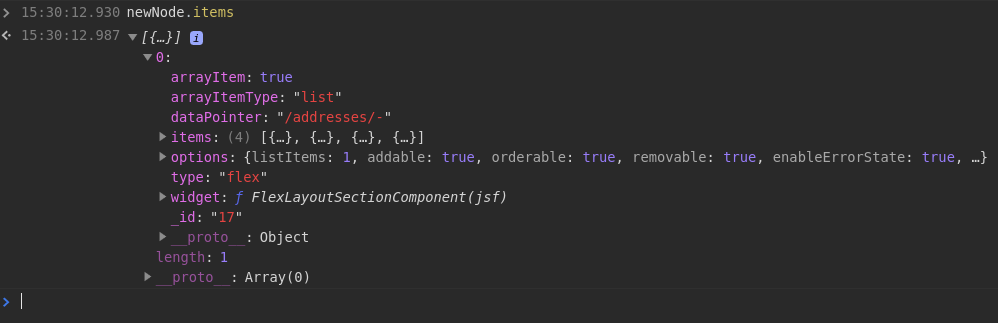 Note the
 type: "flex" field on the newNode.items[0] object. I suspect that the library expects the $ref to still be present at this point in the form building process, while in fact it has already been replaced by a complete item object (I'm using a different example than the one shared by @sharanainapurapu).

No, we moved away from angular2-json-schema-form and rolled our own solution from scratch instead due to numerous issues with the library.