
SqlServerDsc
 SqlServerDsc copied to clipboard
 dsccommunity
SqlServerDscHelper: Connect-SQL: Fails to connect to a named instance if browser service is not started and instance is listening on non-standard port
Details of the scenario you try and problem that is occurring: I have a named instance with named pipes disabled and the port forced to 1433. In this scenario, Connect-SQL does not know how to connect to an instance on a specific port.
The DSC configuration that is using the resource (as detailed as possible): Any configuration will be affected after the port is set.
Version of the Operating System, SQL Server and PowerShell the DSC Target Node is running: Server 2012 R2, SQL Server 2014, PowerShell v5.0
Version of the DSC module you're using, or 'dev' if you're using current dev branch: 4.0.0.0 & dev

The workaround I found is this:
$serverObject = Connect-SQL -SQLServer $SQLServer -SQLInstanceName "$SQLInstanceName:1433"
@randomnote1 This does not sound like an issue with Connect-SQL, but rather a configuration issue with your server. I imagine this translation should be handled either by the SQL Browser service or an alias in the client driver. Do you have the SQL Browser set to automatically start?

Named pipes is disabled by default. But in my lab I only have named instances, so I need to install a default instance to test this.
Browser service should not be necessary when running the default instance. So if this is because of Browser service is stopped, then we need to solve this.

Went back to look at this today and discovered my installations of SQL are completely corrupt, so I have to re-install to continue investigating. I'll update then.
@randomnote1 I actually tested this now, and I can't reproduce. I disabled the Browser service and everything connects just fine. I hope it was the corrupt install so you won't see this again :)
At least testing this got me to find another bug 😉
A working SQL instance makes all the difference :)
Should we consider supporting a connection string (or something similar) for named instances when NamedPipes and the browser service are disabled, there are multiple instances on a box, and a non-standard port is used for each instance?
We should support it if we can - renamed the title and labeled as enhancement and help wanted.
In addition to the workaround by @randomnote1 , we can connect to instances via the IP address and port number using 'ip.address,port#' as the server name. Maybe the resources could be updated to use $serverObject = Connect-SQL -SQLServer "${SQLServer},${InstanceName}" if the InstanceName is numeric, or maybe add a separate PortNumber property and use $serverObject = Connect-SQL -SQLServer "${SQLServer},${PortNumber}".

The format seems to be [protocol:]hostname[\instance][,port], e.g. tcp:192.168.1.1\TEST,50200
If there are named instances then I think a workaround can be used today by setting the configuration to:
ServerName   = 'tcp:192.168.1.1' # Or just '192.168.1.1'
InstanceName = 'TEST,50200'
But this does not work for the default instance since Connect-Sql looks if InstanceName is MSSQLSERVER and then just ignores the InstanceName parameter altogether.
If there are default instance then I think a workaround can be used today by setting the configuration to:
ServerName   = 'tcp:192.168.1.1,1433' # Or just '192.168.1.1,1433'
InstanceName = 'MSSQLSERVER'
I have not tested this and it might not work at all, ~~but looking at the code of Connect-Sql is looks feasible.~~ It will break resources when the named instance is not the actual instance name but have a comma and port number in it.
I think the root cause could be resolved in the function Connect-Sql by parsing instance for the port number.
ServerName   = 'tcp:192.168.1.1' # Or just '192.168.1.1'
InstanceName = 'TEST,50200'

ServerName   = 'tcp:192.168.1.1' # Or just '192.168.1.1'
InstanceName = 'MSSQLSERVER,1433'
But the above will break resources that depend on the actual name of the instance (without portnumber) being in the parameter InstanceName. So all resource need to parse out the instance name as @Rob-S suggested to a PortNumber so then we could just add a new parameter PortNumber to Connect-Sql so we only parse once.
An even cleaner solution is to add a PortNumber parameter to all the resources that can be passed to Connect-Sql. That includes additional separate port number parameters for resource SqlAG* that is used to find the primary replica (I think).
ServerName   = 'tcp:192.168.1.1' # Or just '192.168.1.1'
InstanceName = 'TEST'
PortNumber = 50200

ServerName   = 'tcp:192.168.1.1' # Or just '192.168.1.1'
InstanceName = 'MSSQLSERVER'
PortNumber = 1433
The format seems to be
[protocol:]hostname[\instance][,port], e.g.tcp:192.168.1.1\TEST,50200
To my best understanding, they are mutual exclusive.
e.g. tcp:192.168.1.1\TEST OR tcp:192.168.1.1,50200
Where the \TEST runs to the browser service to find the port to connect to.
PortQry.exe -n 192.168.1.1 -e 1434 -p UDP
Also keep in mind that according to these two sites: https://techcommunity.microsoft.com/t5/sql-server-support/running-sql-server-8216-default-8217-instance-on-a-non-default/ba-p/315987 https://docs.microsoft.com/en-us/openspecs/windows_protocols/mc-sqlr/1ea6e25f-bff9-4364-ba21-5dc449a601b7
When trying to connect to port 1433 drivers ALWAYS assume to be dealing with the default instance. And when connecting to a default instance always port 1433 is assumed.
So if the SQL-Connect resource is to be changed i would suggest these three variations
Connect-SQL -SQLServer "${SQLServer}\${InstanceName}"
Connect-SQL -Server "${SQLServer}" -InstanceName "${InstanceName}"
Connect-SQL -Server "${SQLServer}" -PortNumber $PortNumber
Where the last two are new style, and the first is the current way.

I did not know it was possible to connect to an instance without passing the instance name. Learned something new. 🙂
To my best understanding, they are mutual exclusive.
They seem they are not. I just ran this in my lab on one of the clusters and having the browser service turned off .
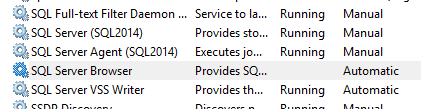
IP address is the cluster group IP address (but could have used the cluster group name) and 'SQL2014' is the instance name. Below uses the same code as Connect-SQL.
PS > $ServerName   = 'tcp:192.168.10.46'
PS > $InstanceName = 'SQL2014,50244'
PS > $databaseEngineInstance = '{0}\{1}' -f $ServerName, $InstanceName
PS > $databaseEngineInstance
tcp:192.168.10.46\SQL2014,50244
PS > import-module sqlserver
PS > $sqlServerObject = New-Object -TypeName 'Microsoft.SqlServer.Management.Smo.Server'
PS > $sqlConnectionContext = $sqlServerObject.ConnectionContext
PS > $sqlConnectionContext.ServerInstance = $databaseEngineInstance
PS > $sqlConnectionContext.Connect()
PS > $sqlServerObject.Status
Online
Running without the instance name does work as well.
PS > import-module sqlserver
PS > $databaseEngineInstance = 'tcp:192.168.10.46,50244'
PS > $sqlServerObject = New-Object -TypeName 'Microsoft.SqlServer.Management.Smo.Server'
PS > $sqlConnectionContext = $sqlServerObject.ConnectionContext
PS > $sqlConnectionContext.ServerInstance = $databaseEngineInstance
PS > $sqlConnectionContext.Connect()
PS > $sqlServerObject.Status
Online
Hi everyone, any news about this ?
I'm able to deploy AG by using InstanceName = SQL2014,50244 but I'm stuck on SqlAGDatabase module, I'm getting Failed to invoke DSC Test method: An internal error occurred.
I tried every possible combination as explained by @johlju but no one is working.
I suppose this is due to the lines equal to: $connectSqlParameters = Split-FullSqlInstanceName -FullSqlInstanceName $availabilityGroupReplica.Name as $availabilityGroupReplica.Name doesn't contain the port.
To sum up on modules I tested:
- SqlLogin -> OK
- SqlPermission -> OK
- SqlEndpoint -> OK
- SqlAlwaysOnService -> OK
- SqlEndpointPermission -> OK
- SqlAG -> OK
- SqlAGListener -> OK
- SqlWaitForAG -> OK
- SqlAGReplica -> OK
- SqlAGDatabase -> KO
Thanks for your help.
Best,
Tim.

Yes, you are correct, it is because it uses $availabilityGroupReplica.Name to get the hostname and instance name, and the port is not part of that Name property.
https://github.com/dsccommunity/SqlServerDsc/blob/7518364e77901c94f627fc52f24d4674c100f07e/source/DSCResources/DSC_SqlAGDatabase/DSC_SqlAGDatabase.psm1#L351
Not sure how to get the availability replicas port number 🤔 There seems not to be a property in the class for that value: https://learn.microsoft.com/en-us/dotnet/api/microsoft.sqlserver.management.smo.availabilityreplica?view=sql-smo-preview
Best would be to somehow be able to get the port number dynamically from the replica, or second best is to add a new property to the resource, e.g PrimaryReplicasPortNumber. But with the later option we must assume the replica that is the current primary always has the same port number (specfied in PrimaryReplicasPortNumber).