
deconz-rest-plugin
 deconz-rest-plugin copied to clipboard
 dresden-elektronik
Tuya Moes ZTS-EUB - 1 gang switch
Device
- Product name: Tuya Moes ZTS-EUB
- Manufacturer: _TZE200_amp6tsvy
- Model identifier: TS0601
- Device type :
- Switch
Seems to be similar to this one : https://github.com/dresden-elektronik/deconz-rest-plugin/issues/2879
Screenshots


Basic

Groups

Scenes

Other clusters that are not mentioned above
Tuya specific cluster


Hello, it s a wired device ? If yes, have you a recent deconz version, with DDF ?

Hello, yes it is. I'm running deCONZ on a RPi4 with Home Assistant integration so I don't have the latest version, only the 2.12.6 so no DDF I think
Hello, same here with a 2 gangs.
 Basic
Basic
 Groups
 Scenes
 Others Clusters

Same version, Deconz add-on on HA 2.12.6
Thanks

I can explain a way to make it working in 5mn for almost all tuya switch (that use already supported tuya command) and without compiling the code, but you need at least a version that support DDF.
And this method will be beta (disabled at every restart for the moment, waiting for next deconz version)
I can explain a way to make it working in 5mn for almost all tuya switch (that use already supported tuya command) and without compiling the code, but you need at least a version that support DDF.
And this method will be beta (disabled at every restart for the moment, waiting for next deconz version)
How can we check if there is DDF support ?
Edit: ok, seems to be in 2.13+
I can explain a way to make it working in 5mn for almost all tuya switch (that use already supported tuya command) and without compiling the code, but you need at least a version that support DDF.
And this method will be beta (disabled at every restart for the moment, waiting for next deconz version)
Hello @Smanar I can wait. When the method you're talking about will be considered as stable ? In the next 2.13 stable version ?
No sure, will take some time to have the DDF core full working. But if the autodisable at sartup is removed (it s for me the more boring) you can already start to use it. But yes on the next stable DDF will be usable, even still beta. It will work for exemple for wired switch (already tested on a dimmer one), but not battery one.
Ok thank you for the detailed information, and fast answers too. Do you have a link or something to some documentation about the way to fix it ? Will surely test that when I'll be able to use 2.13.x
2.13 stable should be release soon I hope:
Current Beta: v2.13.2-beta
Current Stable: v2.12.6

Next Beta: v2.13.3-beta
Next Stable: v2.13.x expected in November.
We also have to wait the HA addon update then.
@chatainsim I shouldn't get my hopes up for november. I think december or perhaps january is a more appropriate timeframe.

For the documentation about DDF (sorry the documentation is WIP too) The hard part > https://dresden-elektronik.github.io/deconz-dev-doc/modules/ddf/ The easy one > https://github.com/dresden-elektronik/deconz-rest-plugin/wiki/DDF-cheat-sheet
You can find some device already done with capture on the forum or the github
@orionevo14 Missing a forum post aswell. Can you please make one?
Of course ! https://forum.phoscon.de/t/tuya-moes-zts-eub-1-gang-wired-switch/946
As there has not been any response in 21 days, this issue has been automatically marked as stale. At OP: Please either close this issue or keep it active It will be closed in 7 days if no further activity occurs.
![github-actions[bot] avatar](https://avatars.githubusercontent.com/in/15368?v=4 "Published by a pub.dev verified publisher")
Hat anyone the ddf Files ready for the 1 and 2 wa Switch? Are they still in Progress?
Great

If it s a wired device, it can be possible if you have a deconz version that support DDF.
Take a look here https://github.com/dresden-elektronik/deconz-rest-plugin/wiki/DDF-cheat-sheet
As device type take on/off light, and you can let all the rest empty, because the device don't use report, don't use bind, don't use classic cluster.
I do it. And add 2 on/off light. But in phoscon it is shown as lightchain and only one light.
Can you show your DDF, and the cluster list of your device ? You need to use fake Endpoint if you have 2 gangs, because I think at the base you have only one.
My DDF looks :
{ "schema": "devcap1.schema.json", "manufacturername": "_TZE200_g1ib5ldv", "modelid": "TS0601", "product": "TS0601", "sleeper": false, "status": "Gold", "path": "/devices/ts0601.json", "subdevices": [ { "type": "$TYPE_ON_OFF_LIGHT", "restapi": "/lights", "uuid": [ "$address.ext", "0x01" ], "items": [ { "name": "attr/id" }, { "name": "attr/lastannounced" }, { "name": "attr/lastseen" }, { "name": "attr/manufacturername" }, { "name": "attr/modelid" }, { "name": "attr/name" }, { "name": "attr/swversion" }, { "name": "attr/type" }, { "name": "attr/uniqueid" }, { "name": "state/on", "refresh.interval": 5 }, { "name": "state/reachable" } ] }, { "type": "$TYPE_ON_OFF_LIGHT", "restapi": "/lights", "uuid": [ "$address.ext", "0x02" ], "items": [ { "name": "attr/id" }, { "name": "attr/lastannounced" }, { "name": "attr/lastseen" }, { "name": "attr/manufacturername" }, { "name": "attr/modelid" }, { "name": "attr/name" }, { "name": "attr/swversion" }, { "name": "attr/type" }, { "name": "attr/uniqueid" }, { "name": "state/on", "refresh.interval": 5 }, { "name": "state/reachable" } ] } ] }
The Cluster are like the 4th Post.
Ha nice DDF, I would have done the same
But in phoscon it is shown as lightchain and only one light.
I m not sure to understand but phoscon can "custom" display. Can you checks the 2 devices json ? You can find them in phoscon / help / api information, the result will be more "raw" without phoscon interpretation.
And BTW nothing is working when trying using phoscon on them ?
I found some info about the state of ON/OFF.
https://www.zigbee2mqtt.io/devices/TS0601_switch_3_gang.html#tuya-ts0601_switch_3_gang
This is for the 3 way switch.
The 2 way switch used Endpint 1 and 3.
If i Turn in Off on phoscon, nothing Happens.
The 2 way switch used Endpint 1 and 3.
But it's virtual endpoint, your device have only one in reality. It s easy to check, enable deconz log with "info", you will see line with "tuya debug", and press the 2 buttons, to mimic the request.
@Der-WU did you manage to make it work ? I've tried to edit the DDF but it's not working. To light appear in Phoscon but nothing in HA. They appear in Phoscon, Help, API information.
To light appear in Phoscon but nothing in HA.
Not normal, HA use the same API than deconz
But BTW you have used the same DDF than him ? How they are working in phoscon ? Can you show the 2 device json as result of this DDF ?
To light appear in Phoscon but nothing in HA.
Not normal, HA use the same API than deconz
But BTW you have used the same DDF than him ? How they are working in phoscon ? Can you show the 2 device json as result of this DDF ?
Yes, i'ved used the same DDF has @Der-WU In Phoson, state is not changing.
json from Phoscon API?
If yes:
{
    "etag": "bda2f966ede11c8e1f2e6978eee55da8",
    "hascolor": false,
    "lastannounced": null,
    "lastseen": "2022-01-04T12:08Z",
    "manufacturername": "_TZE200_g1ib5ldv",
    "modelid": "TS0601",
    "name": "On/Off light 36",
    "state": {
        "on": false,
        "reachable": true
    },
    "swversion": null,
    "type": "On/Off light",
    "uniqueid": "5c:02:72:ff:fe:22:90:fd-02"
}
{
    "etag": "bda2f966ede11c8e1f2e6978eee55da8",
    "hascolor": false,
    "lastannounced": null,
    "lastseen": "2022-01-04T12:08Z",
    "manufacturername": "_TZE200_g1ib5ldv",
    "modelid": "TS0601",
    "name": "On/Off light 37",
    "state": {
        "on": false,
        "reachable": true
    },
    "swversion": null,
    "type": "On/Off light",
    "uniqueid": "5c:02:72:ff:fe:22:90:fd-01"
}
You have the 2 gangs version ? Do you have the deconz application (with the GUI) to check logs when making the request (with flag "info") ?
Yes I have the 2 gangs version. I have the deconz app with the GUI in home assistant. I don't know how can I export logs with this version.
No need to export, a screen capture can be enought (if logs are not too much talkative), take only the flag "info_l2".
Here are the logs.
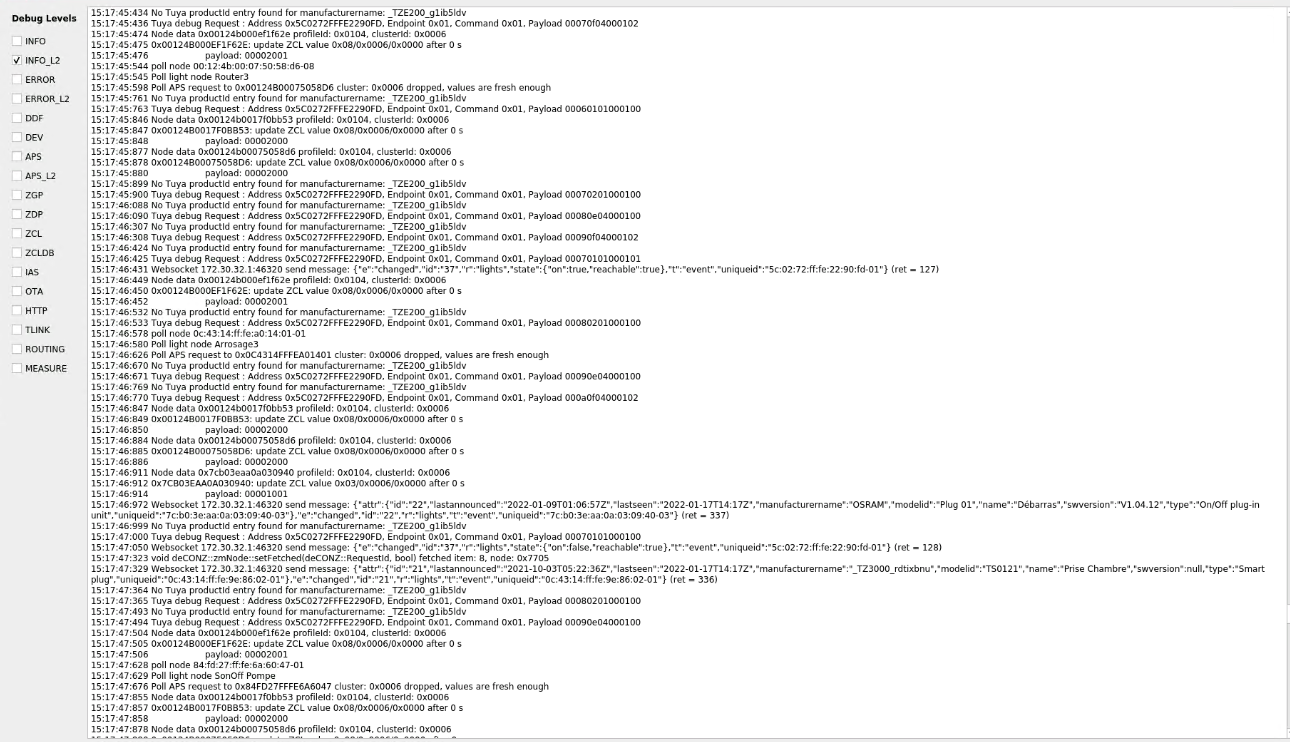 I hope the usefull infos are captured. There is a lot's of logs.
Thanks
I hope the usefull infos are captured. There is a lot's of logs.
Thanks
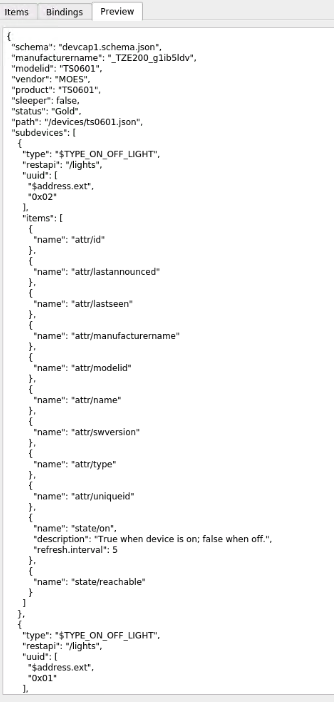
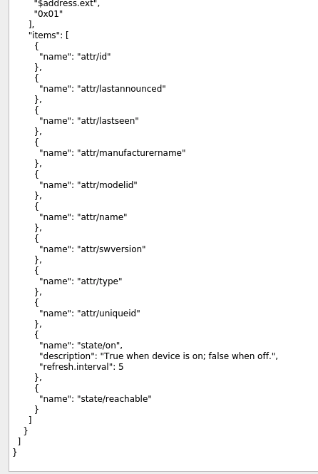 Maybe I made some mistake.