

 drdnar
Filled Charachters 0 , 8 , B , D etc
Executed the script, but some characters have a fill. Can u help me?
This "bug" appears in all wights (light , medium, etc)
Great job by the way! :)
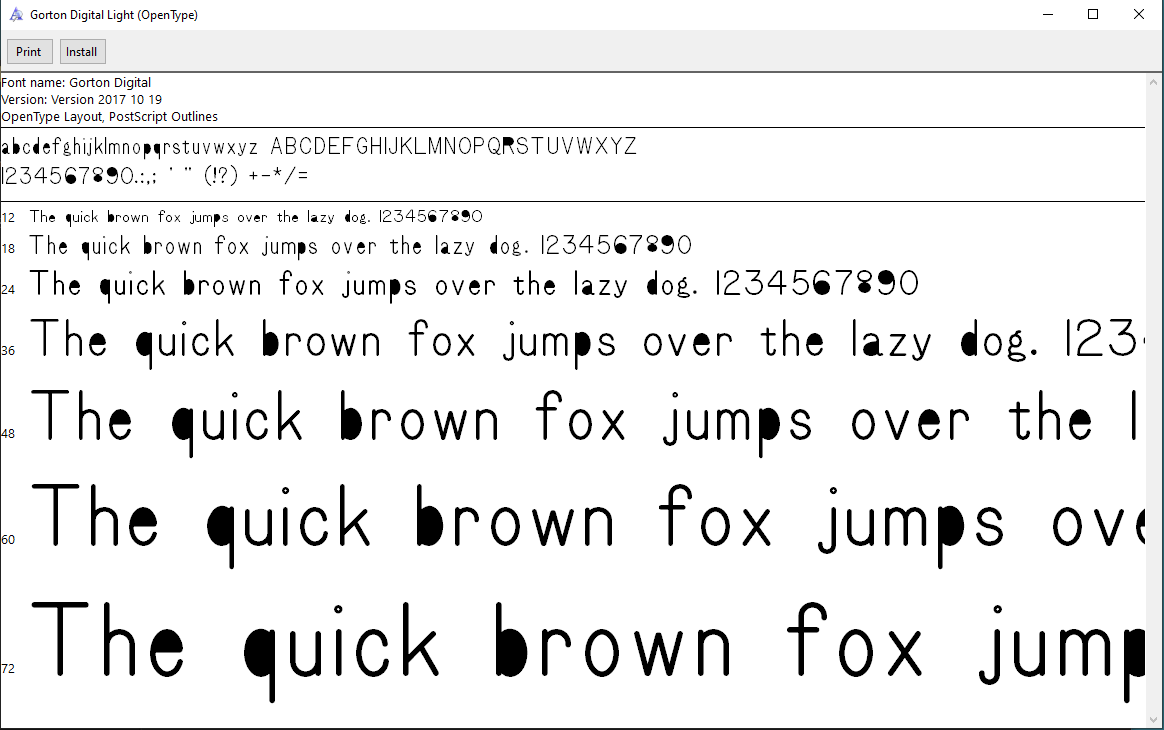

It works for me with this version:
Based on sources from 08:20 UTC 31-Jul-2017-ML-TtfDb-D.
Based on source from git with hash: 8b6e7f07a5511e4de9c8a710db6ca8e770de8f4e
Maybe something has changed with a recent version? Does the problem also occur if you use Element>Expand Stroke on an individual character?

I had the same problem. However, I know why I had it. I used your script on your font on FontForge running on my computer: under Microsoft Windows. No doubt it would have worked perfectly on FontForge running on Linux. In consequence, I'd like to request that you make the font files in .otf format directly available. (One font site claims to have your font on it, but it requires downloading a font downloader program to download it.) Of course, it's hardly reasonable to expect you to fix the Windows version of FontForge.
