
react-native-vertical-alphabet
 react-native-vertical-alphabet copied to clipboard
 draftbit
getItemLayout
Have you looked at this article?
https://medium.com/@jsoendermann/sectionlist-and-getitemlayout-2293b0b916fb)?
The author wrote a function to calculate the appropriate getItemLayout value. Check it out and let me know if it helps your situation.
https://github.com/jsoendermann/rn-section-list-get-item-layout

Check out my implementation of an "address book". I used your alphabet scroller and sectionList.
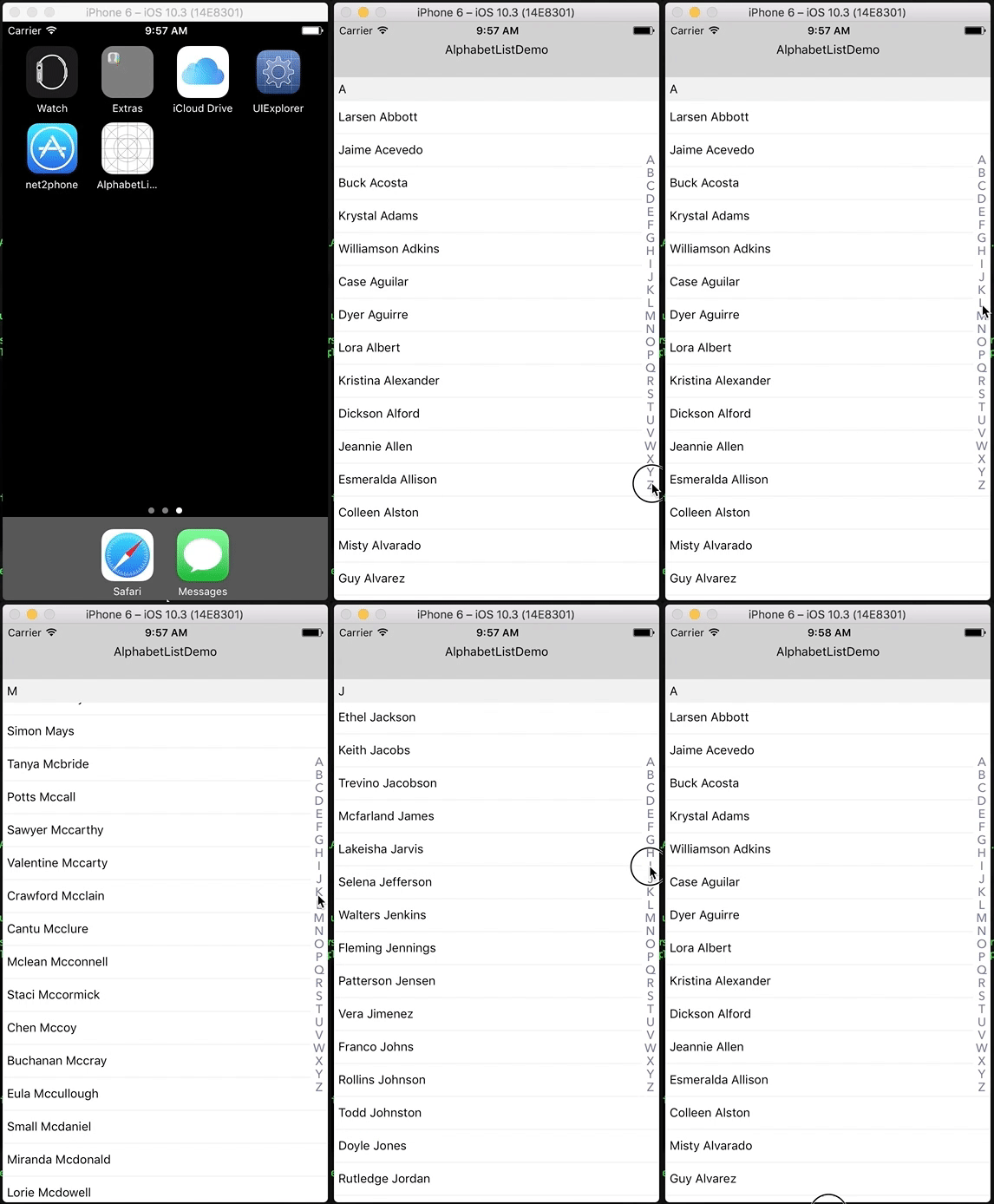
The overall performance is solid but those moments of blank space leave much to be desired. It looks like this is a known issue and it is being addressed by the RN team.
In order to constrain memory and enable smooth scrolling, content is rendered asynchronously offscreen. This means it's possible to scroll faster than the fill rate and momentarily see blank content. This is a tradeoff that can be adjusted to suit the needs of each application, and we are working on improving it behind the scenes.
Hey @rcorrie,
Thanks for reaching out!
Yeah, I was hoping somebody could help me with the getItemLayout. For whatever reason, (maybe I misunderstood how it works) I couldn't get it working so forgot about it for now.
I'm circling back now that we're on our way to public beta status and will try and make this work a little nicer.
If you have any suggestions, just let me know and we can make this thing legit :smile:

@rcorrie Did you manage to come up with a solution for the problem? If so could you please upload your code?

@mierz00 Yes, I ended up using a package called react-native-largelist and implemented my own alphabet scrolling feature.
It would be awfully nice if you helped out and opened a PR with what you've implemented @rcorrie 🤠
@peterpme I managed to get a pretty good working component using both your alphabet and react native largelist which I will upload tomorrow if you are interested in using that as a base?
@peterpme would love to but I'm pretty busy for the next couple of weeks. Although I'll take some time to review whatever code @mierz00 contributes.
:beers:

@jamessawyer Sure, here is a Gist. I apologise I haven't cleaned it up at all, but it works pretty well.
Thanks @mierz00
@jamessawyer if you can open up a PR i'd be happy to get this merged in :smile:
@mierz00 thanks! I was wondering what's the data sources format you supply for the List. BTW, It seems different from your version.
@jamessawyer Here is an example of data I'm passing to the component.
    title: 'a',
    data: [
      {
        company: '',
        familyName: 'Haro',
        thumbnailPath: '',
        recordID: 'F57C8277-585D-4327-88A6-B5689FF69DFE',
        givenName: 'Anna',
        phoneNumbers: [{ label: 'home', number: '5555228243' }]
      }
    ]
  },
  {
    title: 'd',
    data: [
      {
        company: '',
        familyName: 'Higgins',
        thumbnailPath: '',
        recordID: 'AB211C5F-9EC9-429F-9466-B9382FF61035',
        givenName: 'Daniel',
        phoneNumbers: [
          { label: 'home', number: '5554787672' },
          { label: 'mobile', number: '4085555270' },
          { label: 'home fax', number: '4085553514' }
        ]
      },
      {
        company: '',
        familyName: 'Taylor',
        thumbnailPath: '',
        recordID: 'E94CD15C-7964-4A9B-8AC4-10D7CFB791FD',
        givenName: 'David',
        phoneNumbers: [{ label: 'home', number: '5556106679' }]
      }
    ]
  }
]
I'm using this function to organise my already sorted data into the alphabet list.
function alphabetizeList(data) {
  let alphabet = []
  data.forEach((item) => {
    //Get first letter of given name or family name or '#' if no given or family name.
    let firstLetter = item.givenName && item.givenName.charAt(0).toLowerCase()
    if (firstLetter === '')
      firstLetter = item.familyName && item.familyName.charAt(0).toLowerCase()
    if (isNumber(firstLetter) > -1) firstLetter = '#'

    //Check if letter already exists in list
    const alphabetIndex = alphabet.findIndex((i) => i.title === firstLetter)

    //If not add it.
    if (alphabetIndex > -1) {
      alphabet[alphabetIndex].data.push(item)
    } else {
      alphabet.push({
        title: firstLetter,
        data: [item]
      })
    }
  })
@mierz00 does the list perform well for you? Even with react-native-largelist I have noticed poor performance.
@rcorrie It really depends on the phone and contact list size. iPhone 6 and above it works quite well up to 1000 contacts. After that, it starts to get sluggish but I don't think many people have more than 1000 contacts.
Have you tried with a bundled app on real devices? It significantly improves performance.
That being said, it's definitely not native ios contacts app performance.
@rcorrie I'm actually thinking it might be much easier to just create a native module which handles this. At least for IOS, not sure for Android.