

 dracula
Inconsistency in color with others Editor.
Hello team, thank you for maintaining this fantastic color theme. ** I'd like to express my appreciation to Zeno Rocha and the rest of the team who work on maintaining this product.**
I've been using this theme on IntelliJ for a long time, but recently I've been using VSCode due to its ability to connect remotely and programming on cloud instances.
The theme colors and structure on both themes are inconsistent, so, please would there be a way to merge and make both products share the same code color syntax pattern, but since my memory muscle is in habit with the IntelliJ code sometimes I get confused.
This will also allow you to create a standard regular pattern. which will undoubtedly improve the quality of this useful tool.
Thanks in advance.
IntelliJ
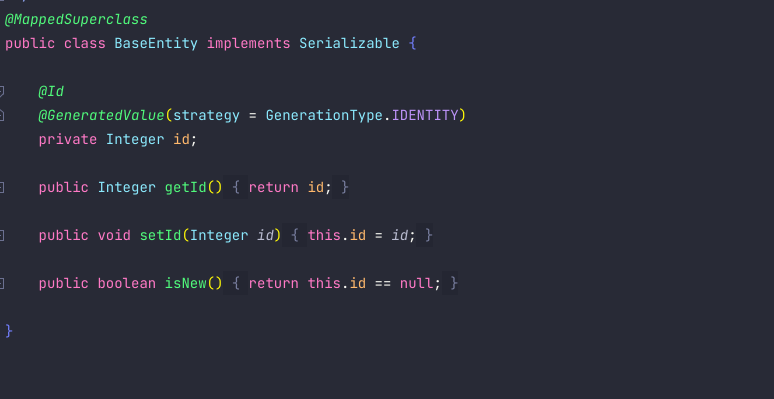
VSCode.


@betancour What language is this? Is this a language that supports semantic highlighting?

Greetings, @dsifford Thank you for your time and consideration; please accept my apologies for the delay in responding.
Java language.
The first image is IntelliJ, whereas the second image is Visual Studio Code. At first sight, the biggest difference is in the Java Annotations colors and type assignation. Other discrepancies exist; my recommendation is to integrate these and utilize the IntelliJ standard, which will make switching from one tool to another much easier.
Thanks once more for your attention.