

 dpgaspar
LDAP authentication silently fails if user attributes are empty
Hello everybody. First of all, thanks for such an awesome project.
I've spent some time trying to figure out why my LDAP authentication wasn't working while setting up our Apache Superset environment, then I ended up looking at the code from FAB (security/manager.py) and found that there is a condition that expects the user_attributes variable to be True, but in our case, as we were using an AD service account, the default attributes wasn't filled:
AUTH_LDAP_FIRSTNAME_FIELD = "givenName" AUTH_LDAP_LASTNAME_FIELD = "sn" AUTH_LDAP_EMAIL_FIELD = "mail"
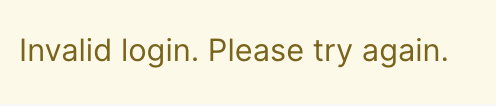
To the point, authentication goes through, but I still receive an error message at the login page:
LDAP search, bind and authorization log:

Login screen error:
Environment
Flask-Appbuilder version: 3.4.3
pip freeze output:
apispec==3.3.2 apsw==3.36.0.post1 async-timeout==3.0.1 attrs==21.2.0 Babel==2.9.1 backoff==1.11.1 billiard==3.6.4.0 bitarray==2.5.0 bleach==3.3.1 boto3==1.18.19 botocore==1.21.19 Brotli==1.0.9 cached-property==1.5.2 cachelib==0.4.1 cachetools==5.0.0 celery==4.4.7 certifi==2021.5.30 cffi==1.14.6 chardet==4.0.0 charset-normalizer==2.0.4 click==7.1.2 clickhouse-driver==0.2.0 clickhouse-sqlalchemy==0.1.6 colorama==0.4.4 convertdate==2.3.2 cron-descriptor==1.2.24 croniter==1.0.15 cryptography==3.4.7 cx-Oracle==8.3.0 defusedxml==0.7.1 deprecation==2.1.0 dnspython==2.1.0 elasticsearch==7.13.4 elasticsearch-dbapi==0.2.9 email-validator==1.1.3 et-xmlfile==1.1.0 Flask==1.1.4 Flask-AppBuilder==3.4.3 Flask-Babel==1.0.0 Flask-Caching==1.10.1 Flask-Compress==1.10.1 Flask-Cors==3.0.10 Flask-JWT-Extended==3.25.1 Flask-Login==0.4.1 Flask-Migrate==3.1.0 Flask-OpenID==1.3.0 Flask-SQLAlchemy==2.5.1 flask-talisman==0.8.1 Flask-WTF==0.14.3 func-timeout==4.3.5 future==0.18.2 geographiclib==1.52 geopy==2.2.0 google-auth==2.6.6 graphlib-backport==1.0.3 gunicorn==20.1.0 holidays==0.10.3 humanize==3.11.0 idna==3.2 ijson==3.1.4 impyla==0.18a2 isodate==0.6.0 itsdangerous==1.1.0 Jinja2==2.11.3 jmespath==0.10.0 JPype1==1.3.0 jsonlines==2.0.0 jsonschema==3.2.0 kerberos==1.3.1 kombu==4.6.11 korean-lunar-calendar==0.2.1 linear-tsv==1.1.0 Mako==1.1.4 Markdown==3.3.4 MarkupSafe==2.0.1 marshmallow==3.13.0 marshmallow-enum==1.5.1 marshmallow-sqlalchemy==0.23.1 msgpack==1.0.2 multidict==5.1.0 mysqlclient==2.1.0 numpy==1.21.1 openpyxl==3.0.7 packaging==21.3 pandas==1.3.4 parsedatetime==2.6 pgsanity==0.2.9 Pillow==9.0.0 ply==3.11 polyline==1.4.0 prison==0.2.1 progress==1.6 psycopg2==2.9.3 psycopg2-binary==2.9.1 pure-sasl==0.6.2 pyarrow==5.0.0 pyasn1==0.4.8 pyasn1-modules==0.2.8 pycparser==2.20 pydruid==0.6.2 PyHive==0.6.4 pyinstrument==4.0.2 PyJWT==1.7.1 PyMeeus==0.5.11 pymssql==2.2.5 pyodbc==4.0.32 pyparsing==3.0.6 pyrsistent==0.16.1 python-dateutil==2.8.2 python-dotenv==0.19.0 python-editor==1.0.4 python-geohash==0.8.5 python-ldap==3.4.0 python3-openid==3.2.0 pytz==2021.1 PyYAML==5.4.1 redis==3.5.3 requests==2.26.0 rfc3986==1.5.0 rsa==4.8 s3transfer==0.5.0 sasl==0.2.1 selenium==3.141.0 shillelagh==1.0.13 simplejson==3.17.3 six==1.16.0 slackclient==2.5.0 SQLAlchemy==1.3.24 sqlalchemy-drill==1.1.2 sqlalchemy-trino==0.5.0 SQLAlchemy-Utils==0.37.8 sqlalchemy-vertica-python==0.5.10 sqlparse==0.3.0 tableschema==1.20.2 tabulate==0.8.9 tabulator==1.53.5 thrift==0.11.0 thrift-sasl==0.4.3 thriftpy2==0.4.14 trino==0.313.0 typing-extensions==3.10.0.0 tzlocal==2.1 unicodecsv==0.14.1 urllib3==1.26.6 vertica-python==1.0.5 vine==1.3.0 webencodings==0.5.1 Werkzeug==1.0.1 wrapt==1.12.1 WTForms==2.3.3 WTForms-JSON==0.3.3 xlrd==2.0.1 yarl==1.6.3 zipp==3.4.1
Describe the expected results
Authentication works successfully and user is redirect to the logged area of the application.
Describe the actual results
User receives an "Invalid login. Please try again." error, even though the authentication receives a success message.
Steps to reproduce
- Create a user on Active Directory without givenName, sn and mail
- Set up LDAP authentication on FAB:
from flask_appbuilder.security.manager import AUTH_LDAP
AUTH_TYPE = AUTH_LDAP
AUTH_ROLE_ADMIN = 'Admin'
AUTH_ROLE_PUBLIC = 'Public'
AUTH_USER_REGISTRATION = True
AUTH_USER_REGISTRATION_ROLE = 'Gamma'
AUTH_LDAP_SERVER = 'ldap://xx.xx.xx.xx'
AUTH_LDAP_USE_TLS = False
AUTH_LDAP_BIND_USER = 'CN=xxxxxx,OU=Accounts,OU=User Accounts,DC=corp,DC=xxxx'
AUTH_LDAP_BIND_PASSWORD = 'xxxx'
AUTH_LDAP_SEARCH = 'DC=corp,DC=xxxxx'
AUTH_LDAP_UID_FIELD = 'sAMAccountName'
#AUTH_LDAP_SEARCH_FILTER = "(&(objectClass=user)(sAMAccountName=%s))"
AUTH_LDAP_SEARCH_FILTER = "(objectClass=user)"
AUTH_LDAP_FIRSTNAME_FIELD = 'givenName'
AUTH_LDAP_LASTNAME_FIELD = 'sn'
AUTH_LDAP_EMAIL_FIELD = 'mail'
AUTH_ROLES_SYNC_AT_LOGIN = False
- Try to log into the application.
How to fix it:
Workaround: Fill at least one of the user attributes field or change one or more attribute fields to be something that is mandatory e.g set AUTH_LDAP_FIRSTNAME_FIELD as 'cn'
Solution:
#Add validation to see check if user_attributes is True before manager.py:1197, something like this. I can provide a proper PR later!

if user_attributes is False:
    log.error("LDAP authentication failed! User {} must have at least one of {} attributes filled".format(username, default_attrs))
    return None
Thanks!
