

 dotnet
System.TypeLoadException: Method 'GetSelection' in type 'MS.Internal.Automation.SelectionProviderWrapper' does not have an implementation
Description
I found the exception System.TypeLoadException: Method 'GetSelection' in type 'MS.Internal.Automation.SelectionProviderWrapper' does not have an implementation has a sudden increase since June 28.
The target framework of my application is .NET Framework 4.7.2. And the .NET Framework on the users' machine who have this exception is 4.8 or 4.8.1.
Is the exception related to the this patch of WPF?
Reproduction Steps
The exception will occure when app starts up. But I can't reprocue this on my machine now althrough I have installed the patch.
Expected behavior
No error
Actual behavior
Error message:
System.TypeInitializationException: The type initializer for 'System.Windows.Automation.Peers.AutomationPeer' threw an exception. ---> System.TypeLoadException: Method 'GetSelection' in type 'MS.Internal.Automation.SelectionProviderWrapper' from assembly 'PresentationCore, Version=4.0.0.0, Culture=neutral, PublicKeyToken=31bf3856ad364e35' does not have an implementation.
   at System.Windows.Automation.Peers.AutomationPeer.Initialize()
   at System.Windows.Automation.Peers.AutomationPeer..cctor()
   --- End of inner exception stack trace ---
   at System.Windows.Automation.Peers.AutomationPeer.RaiseFocusChangedEventHelper(IInputElement newFocus)
   at System.Windows.Input.KeyboardDevice.ChangeFocus(DependencyObject focus, Int32 timestamp)
   at System.Windows.Input.KeyboardDevice.TryChangeFocus(DependencyObject newFocus, IKeyboardInputProvider keyboardInputProvider, Boolean askOld, Boolean askNew, Boolean forceToNullIfFailed)
   at System.Windows.Input.KeyboardDevice.Focus(DependencyObject focus, Boolean askOld, Boolean askNew, Boolean forceToNullIfFailed)
   at System.Windows.Input.KeyboardDevice.Focus(IInputElement element)
   at System.Windows.Interop.HwndKeyboardInputProvider.OnSetFocus(IntPtr hwnd)
   at System.Windows.Interop.HwndKeyboardInputProvider.FilterMessage(IntPtr hwnd, WindowMessage message, IntPtr wParam, IntPtr lParam, Boolean& handled)
   at System.Windows.Interop.HwndSource.InputFilterMessage(IntPtr hwnd, Int32 msg, IntPtr wParam, IntPtr lParam, Boolean& handled)
   at MS.Win32.HwndWrapper.WndProc(IntPtr hwnd, Int32 msg, IntPtr wParam, IntPtr lParam, Boolean& handled)
   at MS.Win32.HwndSubclass.DispatcherCallbackOperation(Object o)
   at System.Windows.Threading.ExceptionWrapper.InternalRealCall(Delegate callback, Object args, Int32 numArgs)
   at System.Windows.Threading.ExceptionWrapper.TryCatchWhen(Object source, Delegate callback, Object args, Int32 numArgs, Delegate catchHandler)
   at System.Windows.Threading.Dispatcher.LegacyInvokeImpl(DispatcherPriority priority, TimeSpan timeout, Delegate method, Object args, Int32 numArgs)
   at MS.Win32.HwndSubclass.SubclassWndProc(IntPtr hwnd, Int32 msg, IntPtr wParam, IntPtr lParam)
Regression?
No response
Known Workarounds
No response
Impact
No response
Configuration
No response
Other information
No response

System.Windows.Automation.Peers namespace. The error is related to the method GetSelection in the MS.Internal.Automation.SelectionProviderWrapper class, which is part of the PresentationCore assembly. you could try the following steps: Check .NET Framework Version: Make sure you are targeting the correct version of the .NET Framework that is compatible with the PresentationCore assembly. If your application requires a specific version, ensure that it is installed on the target machine.
Check for Missing DLLs: Verify that all required DLLs are present and accessible on the target machine. The TypeLoadException can occur if there is a problem with loading the assembly or any of its dependencies.
Check for Any Assembly Redirection: If your application references multiple versions of assemblies, assembly redirection might be needed in the application configuration file (app.config) to ensure the correct version of the assembly is loaded.
Check for Windows Updates: Ensure that the target machine has all necessary Windows updates, as some issues related to the PresentationCore assembly might be resolved through updates.
Check for Third-Party Libraries: If your application uses third-party libraries, make sure they are compatible with the .NET Framework version and do not cause conflicts with the PresentationCore assembly.
Run Dependency Walker: Use a tool like Dependency Walker (depends.exe) to check for any missing or incompatible dependencies.
Check for Application Settings: If the error occurs in a specific part of your application, review that code section and make sure there are no issues related to the AutomationPeer or related classes.
If none of the above steps help, it might be worth looking for any known issues or updates related to the PresentationCore assembly or the .NET Framework version you are using.

@imechZhangLY Is it possible to share a sample repro app for this? Does the app have something to do with XPS? From the provided call stack, it doesn't seem to be a side effect of the patch which is being referred. Could you please share a dump file or sample repro to investigate this further?

@singhashish-wpf Sorry, I can't reproduce this problem now. And according to the dump file, I found the version of UIAutomationProvider.dll and UIAutomationTypes.dll is 4.8.4605.0, but the version of PresentationCore.dll is 4.8.9166.0. Could the version mismatch cuase this exception?
@singhashish-wpf you can find dump files and more details on Watson https://watsonportal.microsoft.com/Failure?FailureSearchText=3d11dd57-8b3e-f6e0-d83a-860ae0f5f7df&DateRange=Last%2014%20Days&DateTimeFormat=UTC&MaxRows=100&DisplayMetric=CabCount&AppScope_AppName=mspcmanager.exe
@imechZhangLY Thank you for the dump details. From the provided dump:
    000000A3B63F7B60 00007FFEECE1A67C PresentationCore!System.Windows.Automation.Peers.AutomationPeer.RaiseFocusChangedEventHelper(System.Windows.IInputElement)+0x1c
    000000A3B63F7B90 00007FFEECE143EB PresentationCore!System.Windows.Input.KeyboardDevice.ChangeFocus(System.Windows.DependencyObject, Int32)+0x81b
    000000A3B63F7C10 00007FFEECE12804 PresentationCore!System.Windows.Input.KeyboardDevice.PostProcessInput(System.Object, System.Windows.Input.ProcessInputEventArgs)+0x534
    000000A3B63F7CA0 00007FFEECE0E416 PresentationCore!System.Windows.Input.InputManager.RaiseProcessInputEventHandlers(System.Windows.Input.ProcessInputEventHandler, System.Windows.Input.ProcessInputEventArgs)+0xb6
  0:000> !PrintException /d 0000022ab3c092d8
Exception object: 0000022ab3c092d8
Exception type:   System.TypeLoadException
Message:          程序集“PresentationCore, Version=4.0.0.0, Culture=neutral, PublicKeyToken=31bf3856ad364e35”中的类型“MS.Internal.Automation.SelectionProviderWrapper”的方法“GetSelection”没有实现。
InnerException:   <none>
StackTrace (generated):
    SP               IP               Function
    000000A3B63FB530 0000000000000000 PresentationCore!System.Windows.Automation.Peers.AutomationPeer.Initialize()+0x1
    000000A3B63FB5E0 00007FFEECE1A735 PresentationCore!System.Windows.Automation.Peers.AutomationPeer..cctor()+0x75

StackTraceString: <none>
HResult: 80131522
The implementation appears missing for the GetSelection method while initializing the AutomationPeer.
This could very much be possible due to version mismatch.
Is the version mismatch due to Windows Update? Is there any workaround to solve this problem? Like reinstalling .NET Framework? @singhashish-wpf
Some of our users also reported this issue, any workaround so far?
Any timeline for when will this issue be fixed?
@singhashish-wpf

This was caused by one windows update, users can uninstall it to fix the problem. Unfortunately, I didn't write down the version of patch :(
update: one of my customer uninstalled the following patch and solved the problem:

Our customers also encountered this error. Unfortunately, many users' operating systems are unable to uninstall related Windows updates.

@lunzima Try ignore this exception in Application.DispatcherUnhandledException event.
@lunzima Try ignore this exception in Application.DispatcherUnhandledException event.
Useless.
I suspect that some popular "PC City" Broadcom Ghost OS images have defective Windows patches integrated into them. Even some Internet cafes’ diskless systems also have this problem. However, there are still many users who use OEM pre-installed Windows encountered this problem although updates are removable.
This was caused by one windows update, users can uninstall it to fix the problem. Unfortunately, I didn't write down the version of patch :(
update: one of my customer uninstalled the following patch and solved the problem:

Thanks a lot, uninstall update KB5011048 solve my problem.

This was caused by one windows update, users can uninstall it to fix the problem. Unfortunately, I didn't write down the version of patch :( update: one of my customer uninstalled the following patch and solved the problem:
Thanks a lot, uninstall update KB5011048 solve my problem.
Not applicable for some of my customers, problem can be "resolved" by reinstalling OS only. There's a spike of increased failure
rate on Patch Tuesday also.
@singhashish-wpf Sorry, I can't reproduce this problem now. And according to the dump file, I found the version of UIAutomationProvider.dll and UIAutomationTypes.dll is 4.8.4605.0, but the version of PresentationCore.dll is 4.8.9166.0. Could the version mismatch cuase this exception?
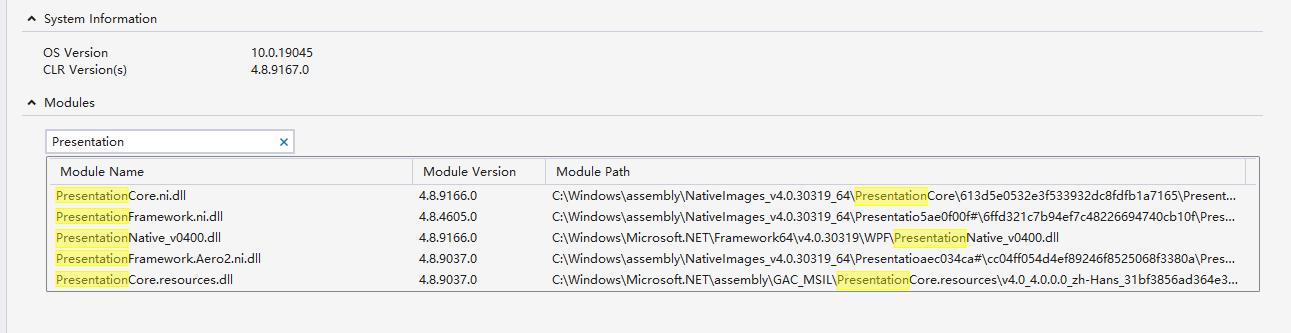

Now, I ensure this crash is due to the version mismatch between UIAutomationTypes.dll and PresentationCore.dll. I have tried to extract UIAutomationTypes.dll, UIAutomationProvider.dll and PresentationCore.dll from the dump file. And I found the definition of IRawElementProviderSimple is in UIAutomationProvider.dll which version is 4.8.4590.0,but PresentationCore.dll which version is 4.8.9200.0 uses IRawElementProviderSimple in UIAutomationTypes.dll. And there is no definition of IRawElementProviderSimple in UIAutomationTypes.dll which version is 4.8.4590.0. And the dll is heredll.zip.
I think users can fix this problem by reinstalling .NET Framework.

