

 dotnet
[dotnet-sdk-8.0.100-preview.1.23107.4] Custom class "Windows" result to its elements cannot be recognized in .NET 8.0
Application Name: mRemoteNG OS: Windows10 21h2 CPU: x64 App or App Source checking at: https://devdiv.visualstudio.com/DevDiv/_workitems/edit/1744505
Verify Scenarios: 1).Windows 10 21H2 AMD64 + dotnet-sdk-8.0.100-preview.1.23107.4 + app (default 6.0): Pass 2). Windows 10 21H2 AMD64 + dotnet-sdk-8.0.100-preview.1.23107.4 + app (retarget 8.0): Fail 3). Windows 10 21H2 AMD64 + dotnet-sdk-7.0.103-win-x64 + app (retarget 7.0):Pass
Repro steps:
- Copy app source from mRemoteNG folder.
- Retarget the app from .NET 6.0 to .NET 8.0 by changing net6.0-windows to net8.0-windows in mRemoteNG.csproj.
<TargetFramework>net8.0-windows</TargetFramework> - Open Developer command prompt for VS2022 and run "MSBuild mRemoteNG.csproj"
Expected Result:
Build successful.
Actual Result:
Build failed with errors:

Minimal Repro sample: Minimal repro sample attached: mRemote demo.zip
- Create a default .net8.0 WinForm app.
- Add a Test folder in the project and add a custom class named "Windows". Windows.cs:
namespace WinFormsApp1.Test
{
    internal class Windows
    {
        public static void Show()
        {
        }
    }
}
- Add the namespace of custom Windows class and call its method in Form1.cs:
using WinFormsApp1.Test;
namespace WinFormsApp1
{
    public partial class Form1 : Form
    {
        public Form1()
        {
            InitializeComponent();
            //This line will show error, if we changed to use "WinFormsApp1.Test.Windows.Show();", the error will go
            Windows.Show();
        }
    }
}
Expected Result: Build successful.
Actual Result:
Build failed with errors:
Error CS0234 The type or namespace name 'Show' does not exist in the namespace 'Windows' (are you missing an assembly reference?)
Findings: Caused by the custom class named "Windows", it seems conflicts with the Windows in .net8.0 sdk. If we change the class name, it works. If we use mRemoteNG.App.Windows directly in code instead of adding "using mRemoteNG.App;" on top of the class then use Windows in code, the errors can be fixed.
@dotnet-actwx-bot @dotnet/compat

@marcpopMSFT This issue was found during the .NET 8 Preview 1 AppCompat Test validation, could you help check and triage it? Please help to move it to the right area if it is not correct. Thank you.
CC @merriemcgaw since it's a winforms app. Could be Roslyn analyzers that are the problem though.

When using is moved inside the namespace, type is resolved as expected.
namespace WinFormsApp1
{
    using WinFormsApp1.Test;
    public partial class Form1 : Form
    {
        public Form1()
        {
            InitializeComponent();
            //This line will show error when the using is outside the namespace, if we use "WinFormsApp1.Test.Windows.Show();", the error will go
            Windows.Show();
        }
    }
}
Otherwise, Windows is being resolved as part of System.Windows namespace name. So the order of namespace resolution had changed in the latest c# version - the language seems to assume that the default namespaces are available inside the interface definition, i.e. "using SYstem.Windows.Forms;" resolves inside the namespace even when it's not explicitly there, to override it we need the explicit usings for the local namespace.
This has nothing to do with winforms, this is controlled by
<LangVersion>latest</LangVersion>
@merriemcgaw - this should be moved to Roslyn


I couldn't figure out the best area label to add to this issue. If you have write-permissions please help me learn by adding exactly one area label.
![dotnet-issue-labeler[bot] avatar](https://avatars.githubusercontent.com/in/90031?v=4 "Published by a pub.dev verified publisher")
So the order of namespace resolution had changed in the latest c# version
I don't think that's the case. We've not made such changes.
the language seems to assume that the default namespaces are available inside the interface definition, i.e. "using SYstem.Windows.Forms;" resolves inside the namespace even when it's not explicitly there
This feels like a global using was injected into the project during the build process. If you inspect a binlog of the build failure, you should be able to see all the inputs that the compiler received, and I would bet that one of them is added by the build process to implicitly bring a number of global usings.
Tagging @jaredpar as FYI

From the Roslyn standpoint, this behavior is "By Design". Based on the info provided it seems one of the global namespaces used here has Windows as either a sub-namespace or a type within that namespace. C# name lookup rules are going to prefer that over the locally defined type.
@merriemcgaw did you all change the set of global namespaces here in net8 or add a new type named Windows? That is likely the source of the delta here. Or possibly it's because we didn't inject global namespaces at all in net6.0.
@Tanya-Solyanik in this comment, the code sample still has this line:
//This line will show error, if we changed to use "WinFormsApp1.Test.Windows.Show();", the error will go
Windows.Show();
I assume that is a copy paste issue. My expectation is that the code in that sample compiles just fine as the using is now inside the namespace.

One thing I notice between two bin logs is the resolution path for System.Windows binary.
on .Net 8.0 :
Primary reference "System.Windows, Version=4.0.0.0, Culture=neutral, PublicKeyToken=b03f5f7f11d50a3a".
    Resolved file path is "C:\Program Files\dotnet\packs\Microsoft.NETCore.App.Ref\8.0.0-preview.2.23106.6\ref\net8.0\System.Windows.dll".
    Reference found at search path location "{RawFileName}".
    This reference is not "CopyLocal" because at least one source item had "Private" set to "false" and no source items had "Private" set to "true".
And on .Net 7.0:
Primary reference "System.Windows, Version=4.0.0.0, Culture=neutral, PublicKeyToken=b03f5f7f11d50a3a".
    Resolved file path is "C:\Users\dreddy\.nuget\packages\microsoft.netcore.app.ref\7.0.2\ref\net7.0\System.Windows.dll".
    Reference found at search path location "{RawFileName}".
    This reference is not "CopyLocal" because at least one source item had "Private" set to "false" and no source items had "Private" set to "true".
@jaredpar - you are right, my comment referred to another potential workaround, I corrected it.
Or possibly it's because we didn't inject global namespaces at all in net6.0.
Makes sense.
@jcouv - what should we look for in the binlog?
what should we look for in the binlog?
Find the step that runs csc. Below is an example of what that looks like (when you search for "csc" in the log via the binary log viewer tool).
Then you copy the value of "CommandLineArguments" and inspect all the source files that are fed to the compiler.
There's likely source file called your-project-name.GlobalUsings.g.cs. From a cursory look, it looks generated by a target called GenerateGlobalUsings. That target can be configured, but I'm not sure how (it should be documented somewhere).

Based on the thread, this is by design as far as the compiler is concerned. Closing as such.
The build system now injects global namespaces. I believe they can be disabled with <ImplicitUsings>disable</ImplicitUsings> in the project file (mitigation).
@jcouv Thanks for looking into this issue.
We tried to set <ImplicitUsings>disable</ImplicitUsings> in the project file, this issue is still repro. And we checked ProjectName.GlobalUsings.g.cs under obj/Debug when set ImplicitUsings to true, it is same content when targetframework is 7.0 and 8.0. Could you please look into this issue again?

This issue doesn't repro when TargetFramework set to.NET 6.0/.NET 7.0, only repro with .NET 8.0. I think we are better investigating what change cause this different from .NET 8.0.
Adding @PriyaPurkayastha @marklio if any additional comments.
@Junjun-zhao Thanks for trying the ImplicitUsings option and for looking at the ProjectName.GlobalUsings.g.cs before/after file. Next, please look at the binary logs to provide evidence of a compiler problem. The greatest likelihood is still that the compiler is being given different inputs.
After comparing the CommandLineArguments between .NET 7 and .NET 8 binary log, we foud following differences:
-
CommondLineArguments contains LangVersion=11.0 in .NET 7 but doesn't in .NET 8. So we tried assign LangVersion = 11.0 in .NET 8 project, but the problem still exists.
-
In .NET 7, the WarningLevel is 7 and in .NET 8, the WarningLevel is 8. If we change the WarningLevel to 7 in .NET 8 project, the issue still exists.
-
The Analyzer and References, in .NET 7, they are using .NET 7 assemblies and in .NET 8 they are using .NET 8 assemblies.
Here is the binary logs for you reference. BinaryLogs.zip
Additional findings from Visual Studio, before we build the project, intellisense in VS will suggest using the namespace in .NET 7 project, but not in .NET 8 project. Also, we tried with Console & WPF, neither reproduced this issue. seems only Winfrom has this issue.
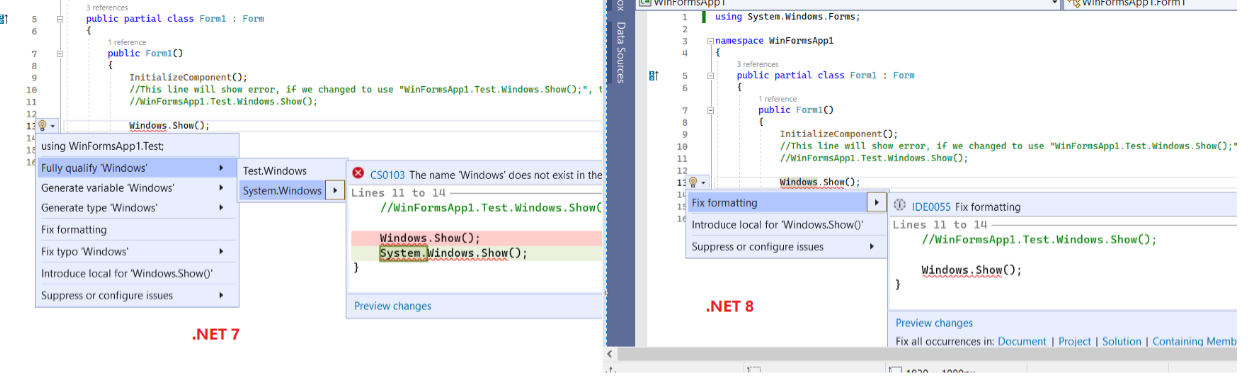
please help check if it is not a Roslyn issue, could you please help assign it to the right team. Thank you.
Took a look at the project and I best I can tell there was a namespace added called "Windows" in .NET 8.
Here's an example to illustrate the before situation (compiles without issue):
using Test;
// namespace Windows { }
namespace Test
{
    class Windows  { public static void M() { } }
}

class C
{
   void Method()
   {
       Windows.M();
   }
}
Then a new namespace is declared and you get an error:
using Test;
namespace Windows { }
namespace Test
{
    class Windows { public static void M() { } }
}

class C
{
   void Method()
   {
       Windows.M(); // error CS0234: The type or namespace name 'M' does not exist in the namespace 'Windows' (are you missing an assembly reference?)
   }
}
I didn't track down exactly when/how the "Windows" namespace was added, but such breaks are to be expected as new namespaces/types/APIs get added. I'll move the issue to the runtime repo in case they can provide additional details.
Tagging subscribers to this area: @dotnet/area-system-runtime See info in area-owners.md if you want to be subscribed.
Issue Details
Application Name: mRemoteNG OS: Windows10 21h2 CPU: x64 App or App Source checking at: https://devdiv.visualstudio.com/DevDiv/_workitems/edit/1744505
Verify Scenarios: 1).Windows 10 21H2 AMD64 + dotnet-sdk-8.0.100-preview.1.23107.4 + app (default 6.0): Pass 2). Windows 10 21H2 AMD64 + dotnet-sdk-8.0.100-preview.1.23107.4 + app (retarget 8.0): Fail 3). Windows 10 21H2 AMD64 + dotnet-sdk-7.0.103-win-x64 + app (retarget 7.0):Pass
Repro steps:
- Copy app source from mRemoteNG folder.
- Retarget the app from .NET 6.0 to .NET 8.0 by changing net6.0-windows to net8.0-windows in mRemoteNG.csproj.
<TargetFramework>net8.0-windows</TargetFramework> - Open Developer command prompt for VS2022 and run "MSBuild mRemoteNG.csproj"
Expected Result:
Build successful.
Actual Result:
Build failed with errors:
Minimal Repro sample: Minimal repro sample attached: mRemote demo.zip
- Create a default .net8.0 WinForm app.
- Add a Test folder in the project and add a custom class named "Windows". Windows.cs:
namespace WinFormsApp1.Test
{
    internal class Windows
    {
        public static void Show()
        {
        }
    }
}
- Add the namespace of custom Windows class and call its method in Form1.cs:
using WinFormsApp1.Test;
namespace WinFormsApp1
{
    public partial class Form1 : Form
    {
        public Form1()
        {
            InitializeComponent();
            //This line will show error, if we changed to use "WinFormsApp1.Test.Windows.Show();", the error will go
            Windows.Show();
        }
    }
}
Expected Result: Build successful.
Actual Result:
Build failed with errors:
Error CS0234 The type or namespace name 'Show' does not exist in the namespace 'Windows' (are you missing an assembly reference?)
Findings: Caused by the custom class named "Windows", it seems conflicts with the Windows in .net8.0 sdk. If we change the class name, it works. If we use mRemoteNG.App.Windows directly in code instead of adding "using mRemoteNG.App;" on top of the class then use Windows in code, the errors can be fixed.
@dotnet-actwx-bot @dotnet/compat
| Author: | Junjun-zhao |
|---|---|
| Assignees: | - |
| Labels: |
|
| Milestone: | - |

@ericstj @dotnet/area-system-runtime-compilerservices Could you help check this bug? Thanks.
As others have mentioned this is normal compiler behavior when new namespaces are added. In this case it looks like compiler is seeing the added internal namespaces in the Windows.Win32 in System.Windows.Forms.Primitives.dll
https://gist.github.com/ericstj/ebcd7b516ab8423143b4dc4d2d7dd342#file-wd-diff-diff-L5756
@JeremyKuhne seems like this is happening because of Winforms use of CS-win32 and also the compiler emitted reference assemblies which preserve internals. I'll transfer this over to winforms.
One thing I experimented with in the past is using the linker to trim out non-public types from reference assemblies emitted by the compiler. That could be a way to strip those internals without going all the way back to using explicit reference assembly projects.

@ericstj I'm quite surprised that the reference assembly generation has internals. So are you suggesting ildasm/ilasm on the output? E.g. ildasm /VISIBILITY=PUB?

Yeah, it has a lot of internals which is one of the reasons why we've been reluctant to adopt it in dotnet/runtime (that and our need to actually have different refs in many cases). I was actually suggesting using illink in the same way we use it on the framework implementation assemblies we ship. https://github.com/dotnet/runtime/blob/42322f5a9df7273509b74057457914da57a88265/eng/illink.targets#L189 This seems a bit safer than ilasm/ildasm or the other assembly rewriters we used in the past (refasmgen) since it's a shipping product and gets pretty good test coverage. When we experimented with it in the past we found that it was able to reduce compiler emitted reference assemblies to a similar size as our hand-authored reference assemblies.
@jaredpar looking at the design docs I understand that having the auto-generated reference assemblies be public only was a future improvement. This is an instance where we would totally be using this feature. :) Is there an existing issue we could reference?
@JeremyKuhne
Is there an existing issue we could reference?
Not that I'm aware of. Believe that @jcouv was looking at it recently but there is no concrete ask that I'm aware of.
The one piece of information that would be interesting here is why do you want to limit to public only? What is the intended consumption case? From a compiler perspective this is hard to understand because our immediate reaction is that this is not useful for compilation. Or rather yes it may work in a number of scenarios but it creates many scenarios where compiling against the ref assembly would produce different results compared to the actual assembly. So what usefulness is the split providing?
The one piece of information that would be interesting here is why do you want to limit to public only?
@jaredpar It's breaking retargeting against .NET 8 (see the description). I'm unclear as to why this causes grief when everything we've added in the Windows namespace is internal. Maybe I'm missing some simpler fixable issue or another solution the compiler could provide. Why does it even consider the internal namespace if the assembly has no access?
Note that the namespaces in question are as defined in the Windows metadata assemblies.
Why does it even consider the internal namespace if the assembly has no access?
Because internal, even in the abscence of IVT, can impact whether a declaration is legal or not. Consider as a simple example:
// assembly1
[IVT: assembly2]
public abstract class C1 {
  internal abstract void M();
}

// assembly2
pubic class C2 : C1 {
  internal override void M() { }
}
If you don't include C2.M then the compiler has to consider that C2 is abstract. There is no member that satisfies the abstract. Therefor the compiler must export and import internal members for C2 even though assembly2 has an empty IVT list.
More generally if you ask
What is the harm if we don't import member with internal / private accessibility?
This is hard to say generally what goes wrong here. It is very easy to construct specific examples as I did above but it's hard to say in general what all will go wrong if a specific member / scenario excluded. This is true even for the compiler team cause C# is a complex language and members can have lots of subtle interactions.
This is why in the end we took a very simple approach to what should / shouldn't be in a ref assembly:
If the compiler imports the member then we must assume it's relevant until proven otherwise so we must also export it.
That we know will produce reference assemblies that provide identical behavior to the implementation one which was the goal of the work.
@jaredpar The runtime libraries don't use the built-in ref generation, partially for this reason as I understand it. In this particular case, we're looking at doing a post build step to remove all of the internals from the ref assembly to solve the problem. The current hope there (as I understand it) is to move from separate ref assembly projects and do a post processing step.
I understand your explanations. I also understand that there isn't a simple fix, particularly as there is occasionally a need to have some internals included. Perhaps a post processing step is the ultimate right answer here. Maybe we should open an issue in any case to at least track this conversation for others to find. Thoughts?
The runtime libraries don't use the built-in ref generation, partially for this reason as I understand it
Correct. This has also resulted in several bugs over the years with how the compiler executes against those assemblies for the reasons I outlined above. Reference assemblies are hard and if you take shortcuts you will find yourself in tricky corners because you are deliberately removing information that impacts compilation output. The runtime team is aware of this trade off and has accepted the implications.
I also understand that there isn't a simple fix, particularly as there is occasionally a need to have some internals included.
The fix is fairly simple in that we can just add a flag to exclude members that aren't public, protected or protected internal. The problem is what documentation do you add for such a flag? The only correct documentation is that "this will produce reference assemblies that you must assume deviate from the implementation assemblies".
The other issue is how do you deal with situations like I outlined above. It only takes a small pattern like I described to create completely unusable ref assemblies. Any bugs filed against the compiler for cases like that will be "won't fix" because you're using unsupported reference assemblies. It's very much a "buyer beware" request.
The other, I think much more palatable option, is to "Won't Fix" this issue. C# has had the issue of namespace part names and type names creating this type of ambiguity since 1.0. It comes up from time to time. Rather than complicate your build using unsupported reference assemblies I would suggest instead don't name types in such a way that they're in conflict with imported namespace parts. If it's due to internal namespaces that you own then consider naming them less common names.
The other, I think much more palatable option, is to "Won't Fix" this issue.
In general, I'm inclined to agree with you. This one is a little more user abusive as using Windows is expected to hit a number of folks.
If it's due to internal namespaces that you own then consider naming them less common names.
It's an option. I'd prefer not to as these namespaces are coming directly from the Windows published metadata assemblies. It also would require a feature add from CSWin32, which complicates things.
@AArnott heads up on this. I'm still investigating trimming our ref assemblies but might be circling around with you about the plausibility of customizing the root namespace.
Thanks for sharing. CsWin32 actually used to support allowing an override of the base namespace, but it complicated the code significantly so I removed it. We could look at putting it back if necessary. I'm not sure if it's feasible.
