

 dotnet
Flaky test DataGridView_OnColumnHeadersHeightChanged_InvokeWithHandle_CallsColumnHeadersHeightChanged
Runfo Tracking Issue: Flay tests: CallsColumnHeadersHeightChanged
Build Result Summary
| Day Hit Count | Week Hit Count | Month Hit Count |
|---|---|---|
| 2 | 6 | 17 |
![runfoapp[bot] avatar](https://avatars.githubusercontent.com/in/73252?v=4 "Published by a pub.dev verified publisher")
In continuation of this question, I did some more research...
Questions:
- Why we have Invalidate call when Cursor is above non-existent
TopLeftHeaderCell??? I mean non-existent because we have no columns and rows here - we have absolutely empty grid! But we will Invalidate in any case if mouse over hypotheticalTopLeftHeaderCell🤷♂️ Side note,TopLeftHeaderCellis somehow visible: 😁 But I think this is other issue...
 - Why (or what) moves the cursor from bottom right corner (we set it there in
ThreadExceptionFixture)? Or may be control appear there? - What we can do?
I can't say anything about point 2, and point 1 is better considered from the third.
My thoughts on point 3 (Hiding cursor unfortunately doesn't help):
a. We can try to investigate point 1, but I really afraid of it 🙄
b. We can explicitly set Cursor out of the TopLeftHeaderCell (whole control?) in each test. This should significantly reduce the number of false positives, or may be solve the problem completely, but without studying point 2, I cannot be 100% sure.
с. Examine invalidate call stack and ignore it if we found OnCellMouseEnter?
d. Remove invalidate count form this tests?
/cc @RussKie

Thank you @kirsan31 for digging deep into this.
The cursor is a system-wide singleton, and we're running many tests, and some of those are concurrent... I think it's plausible that a) some of our tests move the cursor, b) something else on a build agent is active and causes the cursor to move, ~and c) sun spots and aliens~. I don't think we can/should be locking the cursor in a way that may affect other tests.
I had a cursory look at the column header change functionality, and it looks like it's tightly coupled with the mouse interactions: https://github.com/dotnet/winforms/blob/2dce3534848dceec8b0d375f247507d7b759c8fb/src/System.Windows.Forms/src/System/Windows/Forms/DataGridView.Methods.cs#L14516-L14531
One way of resolving this, is perhaps move the test to the UIIntegrationTests projects - those tests are run one at a time, and we can expect to have full control over the mouse (though it's not 100% guaranteed either). Another option - as you mentioned - is to remove the invalidation check. Though it'd be great to understand why it was added in the first place (#3373). Though I suspect this may be lost to time...

@RussKie
As far as I can tell, all DataGridView Flaky tests have the same root... And I decided to go the hard way and fix the cause first, not the consequence... 🙄 And the cause as I mentioned is that TopLeftHeaderCell is not visible if we have no columns at all, but DataGridView still treat it as visible :(
Also we have another non consistent behavior here -DataGridView without columns (left) look different from DataGridView with all invisible columns (right):
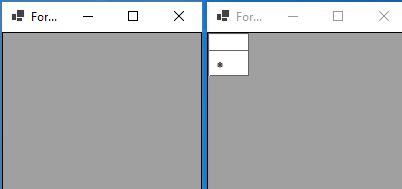
If we have no columns at all TopLeftHeaderCell not visible and if we have columns but they all set as not visible, TopLeftHeaderCell is visible 🤔 Also we have third variant bound DataGridView with all invisible columns 😫
It seems that the option of the absence of columns was not considered in the context of TopLeftHeaderCell. I see 2 ways here:
- Treat
TopLeftHeaderCellinvisible if we have no columns. This will be some how a breaking change... And after that it will be necessary to redo about 60 tests that consider thatTopLeftHeaderCellis always visible whenColumnHeadersVisible&&RowHeadersVisible. By the way, to fix all (I think) Flaky tests we no need to changeDataGridViewHeaderCell.Visible, just add the conditions for invalidate in two places. Because all invalidated test are using empty (no columns)DataGridView. But if some one will add tests with columns - we will get all this mouse problems again :( - Paint
TopLeftHeaderCellin any cases ifColumnHeadersVisible&&RowHeadersVisible. Will it be a visual breaking change? This approach will not fix any of our flaky tests, but at least it will be clear what needs to be changed in them and why...
I need to understand which way you prefer to go and how far.
And I think I need to add tests which will put the mouse above TopLeftHeaderCell... So moving these invalidated tests to UIIntegrationTests is something need to be done any way...
Or what do you think about [CollectionDefinition(DisableParallelization = true)]? I think it should work:
Parallel-capable test collections will be run first (in parallel), followed by parallel-disabled test collections (run sequentially). Also be aware that these values affect only this assembly; if multiple assemblies are running in parallel against one another, they have their own independent values.
?
Also, I found another bunch of bugs related to visibility of TopLeftHeaderCell. In many places it's checked like DataGridView.LayoutInfo.TopLeftHeader != Rectangle.Empty. And DataGridView.LayoutInfo.TopLeftHeader updated only in PerformLayoutPrivate. Which is not always called when necessary. For example if we have DataGridView with AutoSize == true and call ColumnHeadersVisible = false then we will get TopLeftHeaderCell.Visible == false and TopLeftHeaderCell.Displayed == true because PerformLayoutPrivate will not be called if AutoSize == true 😕
/cc @RussKie can you pls. look into this so I understand in which direction to continue?
Just to reiterate my understanding - we have a number of issues that we believe are all caused by the incorrect visibility handling of TopLeftHeaderCell. These issues are as follows (in no specific order):
- multiple intermittent DGV-related test failures,
- inconsistent behaviour depending on whether a DGV has any columns or not,
- inconsistent behaviour depending on whether a DGV has any bound columns,
- https://github.com/dotnet/winforms/issues/3378
- https://github.com/dotnet/winforms/issues/4807
Did I get this correctly? 💭 What may be helpful here is a simple sample app - a form with a DGV and buttons - that show case different behaviours and deficiencies, so that we could observe different scenarios all in one place (like we did in https://github.com/dotnet/winforms/issues/3029#issuecomment-749295542).
All but the first issue (i.e., the test related) will require a hollistic review of the handling, and the fix will likely be breaking change; not to mention an extensive testing will be required. This path is not completely off the table, in fact with the re-introduced support for feature switches in .NET 7, we can consider fixing the behaviour putting it behind an opt-out switch (i.e., allow to return to the old behaviour). I don't think the team would be able to champion this work due to current and the already assigned priorities for the .NET 8 release. And we'd look up to the community to champion this (with the team's support, though limited). /cc: @merriemcgaw
It seems that the option of the absence of columns was not considered in the context of
TopLeftHeaderCell. I see 2 ways here:
- Treat
TopLeftHeaderCellinvisible if we have no columns. This will be some how a breaking change... And after that it will be necessary to redo about 60 tests that consider thatTopLeftHeaderCellis always visible whenColumnHeadersVisible&&RowHeadersVisible. By the way, to fix all (I think) Flaky tests we no need to changeDataGridViewHeaderCell.Visible, just add the conditions for invalidate in two places. Because all invalidated test are using empty (no columns)DataGridView. But if some one will add tests with columns - we will get all this mouse problems again :(- Paint
TopLeftHeaderCellin any cases ifColumnHeadersVisible&&RowHeadersVisible. Will it be a visual breaking change? This approach will not fix any of our flaky tests, but at least it will be clear what needs to be changed in them and why...
Technically, anything that makes an app behave differently is a behavioural breaking change. The question how justified/necessary a change is. In this case, it sounds, the change(s) may be justified.
Fixing of the tests can be seen as a tactical measure.
I don't know if serialising test execution would help here (i.e., [CollectionDefinition(DisableParallelization = true)]), because during the unit tests phase we run tests from multiple assemblies.
In a short-term (though there's nothing more permanent than a temporary fix (c)) would the removal of the invalidation check remove the flackiness?
@RussKie
Did I get this correctly?
Yes, but not sure about https://github.com/dotnet/winforms/issues/3378...
💭 What may be helpful here is a simple sample app - a form with a DGV and buttons - that show case different behaviours and deficiencies, so that we could observe different scenarios all in one place (like we did in https://github.com/dotnet/winforms/issues/3029#issuecomment-749295542).
All but the first issue (i.e., the test related) will require a hollistic review of the handling, and the fix will likely be breaking change; not to mention an extensive testing will be required. This path is not completely off the table, in fact with the re-introduced support for feature switches in .NET 7, we can consider fixing the behaviour putting it behind an opt-out switch (i.e., allow to return to the old behaviour). I don't think the team would be able to champion this work due to current and the already assigned priorities for the .NET 8 release. And we'd look up to the community to champion this (with the team's support, though limited).
If @merriemcgaw doesn't mind in principle, I would try to open a new issue...
In a short-term (though there's nothing more permanent than a temporary fix (c)) would the removal of the invalidation check remove the flackiness?
Yes.

@RussKie with a big problem, everything is clear - I will open a new issue... What we will do with the tests and will we?
with a big problem, everything is clear - I will open a new issue...
👍 thank you
What we will do with the tests and will we?
Fix? 😉
If I may ask you to raise a new issue describing the problem, then comment out the checks in the tests with a comment referencing that issue. This way we'll have a track record. Thank you heaps for doing this.