

 dotnet
WinForms HighDPI PerMonitorV2 RichTextBox looses formatting
.NET Core Version: SDK: 5.0.301 (ef17233f86) Runtime: 5.0.7 (556582d964)
Problem description: Moving a window containing a RichTextBox between two displays makes the RichTextBox drop all formattings when PerMonitorV2 is enabled.
Starting on main display:
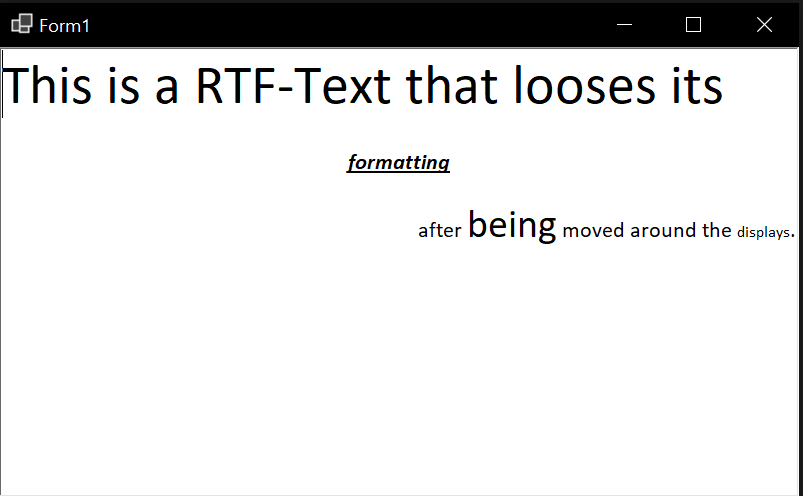
After being moved to second display:
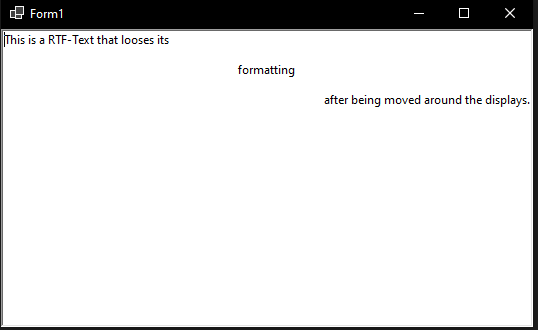
Minimal repro: A sample is attached here: TestDpiRichTextBox.zip


I have not tried this on other versions, but it should be pretty easy to verify with the provided sample.
@John-Qiao could you please check whether this is reproducible in an MFC app?


@RussKie What's the plan with all the included controls for .NET 6. Everytime i try to include a winforms control i discover bugs with dpi scaling. Is there no task in the backlog for .NET 6 to test all the winforms controls if they are production ready for using with PerMonitorV2?
I fear that if i don't report a control now, we will be stuck for another release of .NET with not working high dpi support in winforms. If there ever is put work into winforms after .NET 6...
@RussKie What's the plan with all the included controls for .NET 6. Everytime i try to include a winforms control i discover bugs with dpi scaling. Is there no task in the backlog for .NET 6 to test all the winforms controls if they are production ready for using with PerMonitorV2?
Thanks @Balkoth for your efforts in validating HDPI scenario and opening issues with sample apps. It helps. Our default for winforms applications is still SystemAware. Work on HDPI is being prioritized and expected to speed up in the coming previews of .NET 6.0. HDPI support for winforms PermintorV2 mode is not yet production ready.
I fear that if i don't report a control now, we will be stuck for another release of .NET with not working high dpi support in winforms. If there ever is put work into winforms after .NET 6...
While reporting helps prioritize and identify the common areas, We do plan on validating all winforms controls for HDPI.

@dreddy-work
Our default for winforms applications is still SystemAware. Work on HDPI is being prioritized and expected to speed up in the coming previews of .NET 6.0. HDPI support for winforms PermintorV2 mode is not yet production ready.
Dose this mean that we 100% will not see working PermintorV2 in .NET6? Also, I still see no progress on HDPI project :( Do we at least have a chance on improvements (read fixes) for SystemAware (very few time left for this)?

Dose this mean that we 100% will not see working PermintorV2 in .NET6? Also, I still see no progress on HDPI project :( Do we at least have a chance on improvements (read fixes) for SystemAware (very few time left for this)?
for 100% screens, setting PerMonitorV2 doesn't make any difference. There were some changes in the prioritization between designer performance and runtime work for .NET6. We are resuming the HDPI work now. Can you list the issues that blocking you in SystemAware mode? they will have higher priority and we expect SystemAware is functional in .NET 6.0.
@dreddy-work
Can you list the issues that blocking you in SystemAware mode? they will have higher priority and we expect SystemAware is functional in .NET 6.0.
All of them are in https://github.com/dotnet/winforms/projects/4. I think that fundamental problems are: https://github.com/dotnet/winforms/issues/3202 https://github.com/dotnet/winforms/issues/3168 and all related to Anchor Right. May be https://github.com/dotnet/winforms/issues/4846 but this is font scaling.
Thanks @kirsan31 . #3202 is designer issue and is slated for VS 2022 release and will be tracked out side of .NET release.
Issue related to SetDefaultFont is being investigated and expected to get some fix in .NET 6.0.
could you please check whether this is reproducible in an MFC app?
I've checked mfc CRichEditCtrl:
formatting is not losing, but font is not scaled too. And it seems that this cannot be achieved automatically. That is, most likely the reset occurs after the winforms scale the font...