

 dotnet
Populate the FrameworkId property for each UIA element with running version of .NET
Accessibility Insights for Windows needs to be able to determine which .NET version is running in order to report only actionable errors to the application developer when they are scanning for accessibility errors. Errors where WinForms had not yet implemented a UIA provider for a control is not realistically actionable for a developer to take corrective action.
This may require exposing this property directly if WinForms doesn't already do so. If that's the case we won't be able to backport new API surface area pre .NET 6. But it will be helpful to get this in now for .NET 6.
Note this isn't to make WinForms itself more accessible or usable at runtime, it's to make it such that WinForms developers who are running AI4Win are able to take action on all the errors that are displayed.
/cc: @robgallo; @Tanya-Solyanik; @vladimir-krestov; @SergeySmirnov-Akvelon

@merriemcgaw,
We already have UiaCore.UIA.FrameworkIdPropertyId, so we can use it in GetPropertyValue to return some value.
To get the current used framework version, it's necessary to use System.Runtime.InteropServices.RuntimeInformation.FrameworkDescription. So we can do the following:
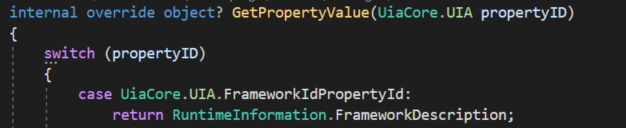
And in AI4Win:
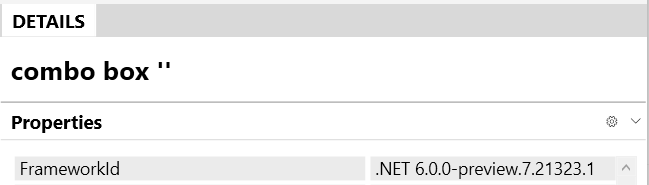
RuntimeInformation.FrameworkDescription returns a real value of used sdk, I checked it for .NET 3.1, 5.0 and 6.0.
At this moment, we don't implement this for any accessible object. But we can just set this property inside AccessibleObject, it will work for all accessible objects.
@RobGallo, if you need to test how it works in AI4Win, you have to do the following steps:
- clone the project
- open it and open
AccessibleObject.csfile - find
GetPropertyValueand addUiaCore.UIA.FrameworkIdPropertyId => RuntimeInformation.FrameworkDescription,there: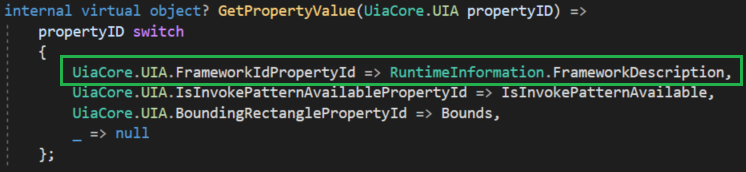
- find "WinformsControlsTest" project in the solution explorer and start it
- open AI4Win and focus on any button on the test form
PS. It's impossible to test it using a common .NET app, even using reflection. FrameworkIdPropertyId should be set from our side.

@vladimir-krestov , Thank you.
Just fyi: There is a discussion happening about what the exact format should be and how the expected values should be documented. The format needs to be stable and predictable.

@vladimir-krestov We need to see something like the platform plus the targeted framework moniker separated by a delimiter, e.g., “WPF|netcoreapp3.1”, “WinForms|net451”, etc.
Here are the pieces of data we need. (* indicates required)
-
- Platform (WPF | XAML | WinForms | etc.)
-
- Version
-
- delimiter (we need to parse the platform and version programmatically)
- A differentiator between .Net Framework and .Net Core. (This is why I suggested the targeted framework moniker)
I think we ran out of runway for .NET 6, but we have plenty of time for discussions in .NET 7 and to design the best approach. UIA properties seem like a very logical place to put this information, but there is concern about breaking existing customers. Let's sync internally again with all the players including @SamBent from WPF and @Tanya-Solyanik on our end.