

 dotnet
Provide access to "IntegralHeight" property in the "DataGridViewComboBoxColumn" and "DataGridViewComboBox"
Is your feature request related to a problem? Please describe.
The DataGridViewComboBoxColumn and DataGridViewComboBox have a MaxDropDownItems to set the maximum number of items visible in the dropdown list. This property works only if the IntegralHeight property is disabled for the ComboBox. Unfortunately, unlike ComboBox or ToolStripComboBox, the user does not have access to this property, which makes the MaxDropDownItems properties useless
Describe the solution you'd like and alternatives you've considered
I suggest adding an API for DataGridViewComboBoxColumn and DataGridViewComboBox based on the logic of MaxDropDownItems property that will allow the user to customize the IntegralHeight property:
DataGridViewComboBoxCell.cs
[DefaultValue(DefaultIntegralHeight)]
public virtual bool IntegralHeight
{
    get
    {
        object integralHeight = Properties.GetObject(s_propComboBoxCellIntegralHeight, out bool found);
        if (found)
        {
            return (bool)integralHeight;
        }
        return DefaultIntegralHeight;
    }
    set
    {
        Properties.SetObject(s_propComboBoxCellIntegralHeight, value);
        if (OwnsEditingComboBox(RowIndex))
        {
            EditingComboBox.IntegralHeight = value;
        }
    }
}
DataGridViewComboBoxColumn.cs
[DefaultValue(DataGridViewComboBoxCell.DefaultIntegralHeight)]
[SRCategory(nameof(SR.CatBehavior))]
public bool IntegralHeight
{
    get
    {
        if (ComboBoxCellTemplate is null)
        {
            throw new InvalidOperationException(SR.DataGridViewColumn_CellTemplateRequired);
        }
        return ComboBoxCellTemplate.IntegralHeight;
    }
    set
    {
        if (IntegralHeight != value)
        {
            ComboBoxCellTemplate.IntegralHeight = value;
            if (DataGridView is not null)
            {
                DataGridViewRowCollection dataGridViewRows = DataGridView.Rows;
                int rowCount = dataGridViewRows.Count;
                for (int rowIndex = 0; rowIndex < rowCount; rowIndex++)
                {
                    DataGridViewRow dataGridViewRow = dataGridViewRows.SharedRow(rowIndex);
                    if (dataGridViewRow.Cells[Index] is DataGridViewComboBoxCell dataGridViewCell)
                    {
                        dataGridViewCell.IntegralHeight = value;
                    }
                }
            }
        }
    }
}
Example:
private void InitializeComponent()
{
    this.dataGridView1 = new System.Windows.Forms.DataGridView();
    this.column1 = new System.Windows.Forms.DataGridViewComboBoxColumn();
    ((System.ComponentModel.ISupportInitialize)(this.dataGridView1)).BeginInit();
    this.SuspendLayout();

    this.dataGridView1.Columns.AddRange(new System.Windows.Forms.DataGridViewColumn[] {
    this.column1});
    this.dataGridView1.Location = new System.Drawing.Point(0, 0);
    this.dataGridView1.Name = "dataGridView1";
    this.dataGridView1.Size = new System.Drawing.Size(492, 150);
    this.dataGridView1.EditingControlShowing += DataGridView1_EditingControlShowing;

    this.column1.HeaderText = "Column1";
    this.column1.Name = "column1";
    this.column1.Items.AddRange(new object[] { 1, 2, 3, 4, 5, 6 });

    this.ClientSize = new System.Drawing.Size(492, 272);
    this.Controls.Add(this.dataGridView1);
    this.Name = "DataGridView";
    this.Text = "DataGridView";
    ((System.ComponentModel.ISupportInitialize)(this.dataGridView1)).EndInit();
    this.ResumeLayout(false);
    this.PerformLayout();
}

private void DataGridView1_EditingControlShowing(object sender, System.Windows.Forms.DataGridViewEditingControlShowingEventArgs e)
{
    this.column1.IntegralHeight = false;
    this.column1.MaxDropDownItems = 3;
}

private System.Windows.Forms.DataGridView dataGridView1;
private System.Windows.Forms.DataGridViewComboBoxColumn column1;
Will this feature affect UI controls?
- No
Will VS Designer need to support the feature?
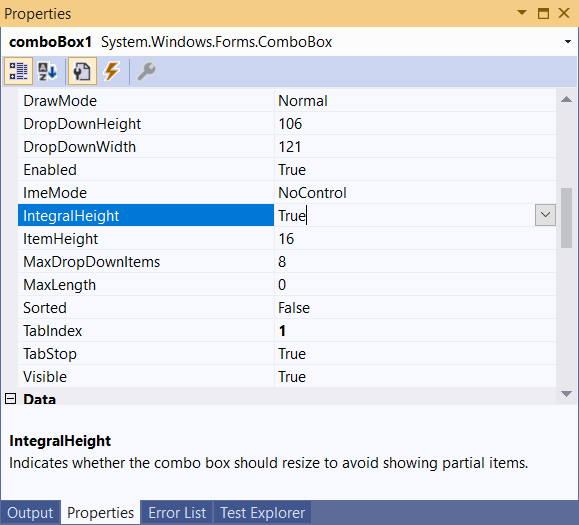
- Yes, ComboBox have the "IntegralHeight" property in PropertyGrid
What impact will it have on accessibility?
- No
Will this feature need to be localized or be localizable?
- It looks like 'DataGridViewComboBoxColumn.MaxDropDownItems' is localizable so I'm assuming yes.
