

 dotnet
Invalid URI: The format of the URI could not be determined. on calling WCF service on .NET 6
Describe the bug We have a code base that is on .NET Core 3.1 and we are upgrading it to .NET 6. The code has a call to WCF service that works fine on .NET Core 3.1, but starts throwing the below error after upgrade to .NET 6:
Exception: System UriFormatException: Invalid URI: The format of the URI could not be determined.

at System.Uri. CreateThis(String uri, Boolean dontEscape. UriKind uriKind, UricreationOptions& creationOptions)

at System. Uri..ctor(String uriString)

at System.Xml.xmlResolver.ResolveUri(Uri baseUri, String relativeUri)

at System.Xml.XmlTextReaderImpl.ConvertAbsoluteUnixPathToAbsoluteUri (Strings url, xmlResolver resolver)

at System.Xml.XmlTextReaderImpl..ctor(Stream stream, Byte[] bytes, Int32 byteCount, XmlReaderSettings settings, Uri baseUri, String baseUriStr, XmlParserContext context, Boolean closeInput)

at System.Xml.xmlReaderSettings. CreateReader (Stream input, Uri baseUri, String baseUriString, XmlParserContext inputContext)

at System.Xml.XmlReader.Create(Stream input, XmlReaderSettings settings, String baseUri)

at System.Security.Cryptography.xml.Utils.PreProcessStreamInput (Stream InputStream, XmlResolver xmlResolver, String baseUri)

at System.Security.Cryptography.Xml.ExcCanonicalxml..ctor(Stream inputStream, Boolean includeComments, String inclusiveNamespacesPrefixList, XmlResolver resolver, String strBaseUri)

at System.Security.Cryptography.Xml.XmlDsigExcC14NTransform.LoadInput(Object obj)

at System.Security.Cryptography.Xml.TransformChain. TransformToOctetStream(Object InputObject, Type inputType, XmlResolver resolver, String baseUri)

at System.Security.Cryptography.Xml.TransformChain. TransformToOctetStream(Stream Input, XmlResolver resolver, String baseUri)

at System.Security.Cryptography.Xml.Reference.CalculateHashValue(XmlDocument document, CanonicalXmlNodeList refList)

at System Security.Cryptography.Xml.Reference.UpdateHashValue(XmlDocument document, CanonicalXmlNodeList refList)

at System.Security.Cryptography.Xml.SignedXml.BuildDigestedReferences()

at System.Security.Cryptography.Xml.SignedXml.ComputeSignature()

at System.ServiceModel.Security.WSSecurityOneDotZeroSendSecurityHeader.CompletePrimarySignatureCore (SendSecurityHeaderElement[] signatureconfirmations, SecurityToken[] signedEndorsingTokens, SecurityToken[] signedTokens, SendSecurityHeaderElement[] basicTokens, Boolean isPrimarySignature)

at System.ServiceModel.Security.WSSecurityOneDotZeroSendSecurityHeader.CreateSupportingSignature(SecurityToken token, SecurityKeyIdentifier identifier)

at System.ServiceModel.Security.SendSecurityHeader.SignwithSupportingToken(SecurityToken token, SecurityKeyIdentifierClause identifierClause)

at System.ServiceModel.Security.SendSecurityHeader.SignwithSupportingTokens()

at System.ServiceModel.Security.SendSecurityHeader.CompleteSecurityApplication()

at System.ServiceModel.Security.SecurityAppliedMessage.OnWriteMessage(XmlDictionaryWriter writer)

at System.ServiceModel.Channels.Message.WriteMessage(XmlDictionaryWriter writer)

at System.ServiceModel.Channels.BufferedMessagewriter.WriteMessage(Message message, BufferManager bufferManager, Int32 initialoffset, Int32 maxSizeQuota)

at System.ServiceModel.Channels.TextMessageEncoderFactory. TextMessageEncoder.WriteMessageAsync(Message message, Int32 maxMessageSize, BufferManager bufferManager, Int32 messageOffset)

at System.ServiceModel.Channels.TextMessageEncoderFactory.TextMessageEncoder.WriteMessage(Message message, Int32 maxMessageSize, BufferManager bufferManager, Int32 messageOffset)

at System.ServiceModel.Channels.MessageEncoder.WriteMessage(Message message, Int32 maxMessageSize, BufferManager bufferManager)

at System.ServiceModel.Channels.BufferedMessageContent.EnsureMessageEncoded()

at System.ServiceModel.Channels.BufferedMessageContent.TryComputeLength (Int64& length)

at System.Net.Http.HttpContent.GetComputedOrBufferLength()

at System.Net.Http.Headers.HttpContentHeaders.get_ContentLength()

at System.Net.Http.SocketsHttpHandler.ValidateAndNormalizeRequest(HttpRequestMessage request)

at System.Net.Http.SocketsHttpHandler.SendAsync(HttpRequestMessage request, CancellationToken cancellationToken)

at System.Net.Http.HttpClientHandler.SendAsync(HttpRequestMessage request, CancellationToken cancellationToken)

at System.Net.Http.HttpClientHandler SendAsync(HttpRequestMessage request, CancellationToken cancellationToken)

at System.Net.Http.HttpMessageInvoker. SendAsync(HttpRequestMessage request, CancellationToken cancellationToken)

at System.Net.Http.HttpClient.<>n__0(HttpRequestMessage request, CancellationToken cancellationToken)

at System.Net.Http.HttpClient.<SendAsync>g__Core|83_0(HttpRequestMessage request, HttpCompletionOption completionOption, CancellationTokenSource cts, Boolean disposeCts, CancellationTokenSource pendingRequestsCts, CancellationToken originalCancellationToken)

at System.ServiceModel.Channels.HttpChannelFactory`1.HttpClientRequestChannel.HttpClientChannelAsyncRequest.SendRequestAsync(Message message, TimeoutHelper timeoutHelper)

at System.ServiceModel.Channels.RequestChannel.RequestAsync(Message message, TimeSpan timeout)

at System.ServiceModel.Channels.RequestChannel.RequestAsyncInternal (Message message, TimeSpan timeout)

at System.Runtime.TaskHelpers.ToApmEnd[TResult](IAsyncResult iar)

at System.ServiceModel.Channels.RequestChannel.EndRequest (IAsyncResult result)

at System.Threading.Tasks.TaskFactory`1.FromAsyncCoreLogic (IAsyncResult iar, Func`2 endfunction, Action`1 endAction, Task` 1 promise, Boolean requiresSynchronization)

--- End of stack trace from previous location ---

at System.ServiceModel.Channels.SecurityChannelFactory`1. SecurityRequestChannel.RequestAsync(Message message, TimeSpan timeout)

at System.ServiceModel.Channels.SecurityChannelFactory`1.SecurityRequestChannel.RequestAsyncInternal(Message message, TimeSpan timeout)

at System.ServiceModel.Channels.SecurityChannelFactory`1.SecurityRequestChannel.Request (Message message, TimeSpan timeout)

at System.ServiceModel.Dispatcher.RequestChannelBinder Request (Message message, TimeSpan timeout)

at System.Servicemodel.Channels.ServiceChannel.call(String action, Boolean oneway, ProxyOperationRuntime operation, Object[] Ins, Object[] outs, TimeSpan timeout)

at System.ServiceModel.Channels.ServiceChannel.call(String action, Boolean oneway, ProxyOperationuntime operation, Object[] ins, Object[] outs)

at System.ServiceModel.Channels.ServiceChannelProxy.InvokeService(MethodCall methodCall, ProxyOperationRuntime operation)

at System.ServiceModel.Channels.ServiceChannelProxy.Invoke(MethodInfo targetMethod, Object[] args)

at generatedProxy_1.GetCustomerInfo(CustomerInfoRequest )

at CustomerService.CustomerServiceClient.GetCustomerInfo(CustomerInfoRequest customerInfoRequest) in D:\apps\jenkins\workspace\Jenkins-build281-902370858199\src\Connected Services\CustomerService\Reference.cs:line 4442
This is the binding we use:
services.AddSingleton<ICustomerServiceClient, CustomerServiceClient>(s =>
{

	TextMessageEncodingBindingElement encoding= new TextMessageEncodingBindingElement();
	encoding.WriteEncoding = System.Text.Encoding.UTF8;

	var binding new BasicHttpBinding(BasicHttpSecurityMode.TransportWithMessageCredential);
	binding.Security.Message.ClientCredentialType = BasicHttpMessageCredentialType.Certificate;

	var customBinding = new CustomBinding(binding);
	var sbe = customBinding.Elements.Find<TransportSecurityBindingElement>();
	var httpsTransport = new HttpsTransportBindingElement();
	httpsTransport.MaxBufferSize = 2000000000;
	httpsTransport.MaxReceivedMessageSize=2000000000;
	httpsTransport.MaxBufferPoolSize=2000000000;

	var dvsBinding = new CustomBinding(sbe, encoding, httpsTransport);
	dvsBinding.OpenTimeout new TimeSpan (0, 10, 0);
	dvsBinding.CloseTimeout = new TimeSpan (0, 10, 0);
	dvsBinding.SendTimeout = new TimeSpan (0, 10, 0);
	dvsBinding.ReceiveTimeout = new TimeSpan (0, 10, 0);

	EndpointAddress endpointAddress = new EndpointAddress(serviceConfig.CustomerServiceUrl);
	X509Certificate2 certificate = new X509Certificate2(serviceConfig.TrustStore, serviceConfig.CertPassword);

	var client = new CustomerServiceClient(dvsBinding, endpointAddress);
	client.ClientCredentials.ClientCertificate.Certificate = certificate;
	return client;
});
The application is deployed on a Kubernetes pod running alpine Linux.
Looking at the call stack, it seems like it's trying to sign an XML, but is running into some problems with the URI. But I cannot make out what URI is expected. Not sure if this error is strictly a WCF issue, but would really like to know what is being signed and what could be the reason for the Invalid URI exception, as nothing in the code is changed except the .NET 6 upgrade.
To Reproduce Steps to reproduce the behavior:
- Create a WCF client in .NET 6 with the above bindings, deploy to Kubernetes running Alpine Linux
Any help on this issue is appreciated.
Thanks!

Use a debugger and set a breakpoint to find out what is the Uri which is not possible to create:
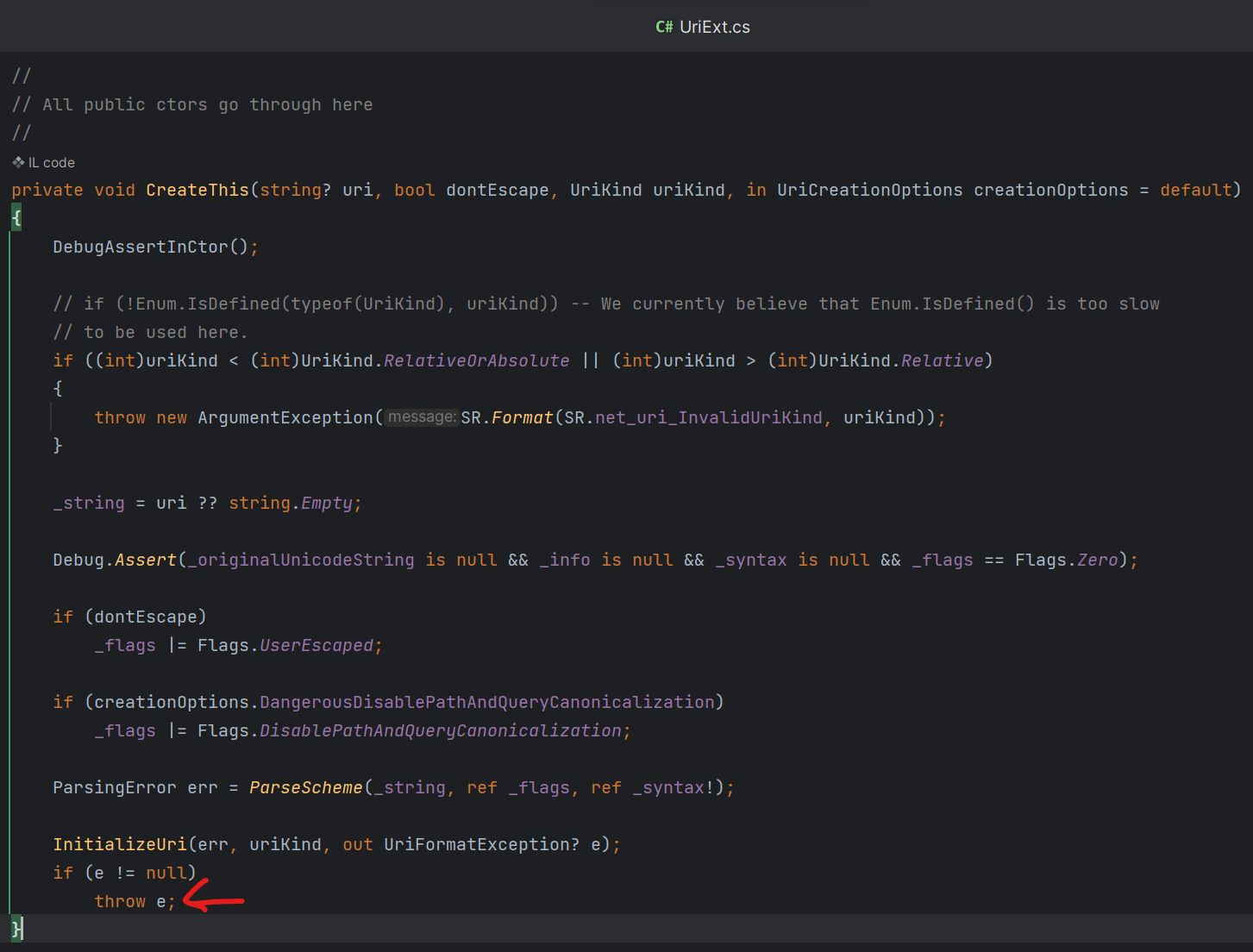 It will maybe tell you who is the author of a string with cannot be parsed.
An issue with Uri is probably not related to WCF, but to your config or to your data. With .Net 6/7 there are different rules for constructing Uri (it requires uriKind)

Hi, We also facing same error while deploying it in Linux function app, where in windows plan it is working fine. I have the similar code but in our case we are using WSHttpBinding to connect WCF service.

I also have an Azure Function targeting .NET 6 that works find under a Windows deployment, but with a Linux deployment gives the same stacktrace as h0tspur.

Find where is such exception produced. Is it your code or a library? Depending on previous answer, add missing 2nd argument of new URI or create ticket/PR in target library with a failing test. Maybe check also that the library produces optional target witch you can consume (like it was happening here).
I have exactly the same issue with the same stacktrace running on Linux, any progress on this topic? I'm using WSL with Docker image, not easy to attach the debuger to the target. Thanks!!

Use URI which is always absolute e.g. https://localhost:5000 instead of localhost:5000.
See: https://sharplab.io/#v2:C4LgTgrgdgNAJiA1AHwAICYAMBYAUBgRjz1QIE4AKKAUwHcACAVTAEsKAiAC2GAAcQA9AIA2AewDGAQ2GdRAZ2DsAlEoDcJclTpNWHMVJnzFK1UA
I’m doing the following tests with my client application (just changing the following 2 lines) using the same target uri: https://targetserviceHostname.com/ServicePath/ServiceName/Service.svc
- OK: HTTPS without Message Security: tempBinding.Security.Mode = SecurityMode.Transport; tempBinding.Security.Message.ClientCredentialType = MessageCredentialType.None; (Disable server side MessageSecurity)
- Failing: HTTPS with Message Certificate Security: tempBinding.Security.Mode = SecurityMode.TransportWithMessageCredential; tempBinding.Security.Message.ClientCredentialType = MessageCredentialType.Certificate; (Enable server side MessageSecurity)
I’m also using .NET 6 getting the same error and stacktrace as above, really look to be related to ExcCanonicalXml which is receive strBaseUri in the contructor. at System.Uri.CreateThis(String uri, Boolean dontEscape, UriKind uriKind, UriCreationOptions& creationOptions) at System.Uri..ctor(String uriString) at System.Xml.XmlResolver.ResolveUri(Uri baseUri, String relativeUri) at System.Xml.XmlTextReaderImpl.ConvertAbsoluteUnixPathToAbsoluteUri(String& url, XmlResolver resolver) at System.Xml.XmlTextReaderImpl..ctor(Stream stream, Byte[] bytes, Int32 byteCount, XmlReaderSettings settings, Uri baseUri, String baseUriStr, XmlParserContext context, Boolean closeInput) at System.Xml.XmlReaderSettings.CreateReader(Stream input, Uri baseUri, String baseUriString, XmlParserContext inputContext) at System.Xml.XmlReader.Create(Stream input, XmlReaderSettings settings, String baseUri) at System.Security.Cryptography.Xml.ExcCanonicalXml..ctor(Stream inputStream, Boolean includeComments, String inclusiveNamespacesPrefixList, XmlResolver resolver, String strBaseUri) at System.Security.Cryptography.Xml.XmlDsigExcC14NTransform.LoadInput(Object obj) at System.Security.Cryptography.Xml.TransformChain.TransformToOctetStream(Object inputObject, Type inputType, XmlResolver resolver, String baseUri) at System.Security.Cryptography.Xml.Reference.CalculateHashValue(XmlDocument document, CanonicalXmlNodeList refList) at System.Security.Cryptography.Xml.SignedXml.BuildDigestedReferences() at System.Security.Cryptography.Xml.SignedXml.ComputeSignature() at System.ServiceModel.Security.WSSecurityOneDotZeroSendSecurityHeader.CompletePrimarySignatureCore(SendSecurityHeaderElement[] signatureConfirmations, SecurityToken[] signedEndorsingTokens, SecurityToken[] signedTokens, SendSecurityHeaderElement[] basicTokens, Boolean isPrimarySignature) at System.ServiceModel.Security.WSSecurityOneDotZeroSendSecurityHeader.CreateSupportingSignature(SecurityToken token, SecurityKeyIdentifier identifier) at System.ServiceModel.Security.SendSecurityHeader.SignWithSupportingToken(SecurityToken token, SecurityKeyIdentifierClause identifierClause) at System.ServiceModel.Security.SendSecurityHeader.SignWithSupportingTokens() at System.ServiceModel.Security.SendSecurityHeader.CompleteSecurityApplication() at System.ServiceModel.Security.SecurityAppliedMessage.OnWriteMessage(XmlDictionaryWriter writer) at System.ServiceModel.Channels.Message.WriteMessage(XmlDictionaryWriter writer) at System.ServiceModel.Channels.BufferedMessageWriter.WriteMessage(Message message, BufferManager bufferManager, Int32 initialOffset, Int32 maxSizeQuota) at System.ServiceModel.Channels.MtomMessageEncoder.WriteMessageInternal(Message message, Int32 maxMessageSize, BufferManager bufferManager, Int32 messageOffset, String startInfo, String boundary, String startUri, Boolean writeMessageHeaders) at System.ServiceModel.Channels.MtomMessageEncoder.WriteMessage(Message message, Int32 maxMessageSize, BufferManager bufferManager, Int32 messageOffset) at System.ServiceModel.Channels.MessageEncoder.WriteMessage(Message message, Int32 maxMessageSize, BufferManager bufferManager) at System.ServiceModel.Channels.BufferedMessageContent.EnsureMessageEncoded() at System.ServiceModel.Channels.BufferedMessageContent.TryComputeLength(Int64& length) at System.Net.Http.HttpContent.GetComputedOrBufferLength() at System.Net.Http.Headers.HttpContentHeaders.get_ContentLength() at System.Net.Http.SocketsHttpHandler.ValidateAndNormalizeRequest(HttpRequestMessage request) at System.Net.Http.SocketsHttpHandler.SendAsync(HttpRequestMessage request, CancellationToken cancellationToken) at System.Net.Http.HttpClientHandler.SendAsync(HttpRequestMessage request, CancellationToken cancellationToken) at System.Net.Http.HttpMessageInvoker.SendAsync(HttpRequestMessage request, CancellationToken cancellationToken) at System.Net.Http.HttpClient.<SendAsync>g__Core|83_0(HttpRequestMessage request, HttpCompletionOption completionOption, CancellationTokenSource cts, Boolean disposeCts, CancellationTokenSource pendingRequestsCts, CancellationToken originalCancellationToken) at System.ServiceModel.Channels.HttpChannelFactory`1.HttpClientRequestChannel.HttpClientChannelAsyncRequest.SendRequestAsync(Message message, TimeoutHelper timeoutHelper) at System.ServiceModel.Channels.RequestChannel.RequestAsync(Message message, TimeSpan timeout) at System.ServiceModel.Channels.RequestChannel.RequestAsyncInternal(Message message, TimeSpan timeout) at System.Runtime.TaskHelpers.ToApmEnd[TResult](IAsyncResult iar) at System.ServiceModel.Channels.RequestChannel.EndRequest(IAsyncResult result)
Thanks!!!!
Finally found the issue: When running my linux Docker image using WSL by default the call to System.Environment.CurrentDirectory return: “/”.
Then when I am configuring the WebService to use HTTPS with Message Certificate Security, the following Cryptography code additional are executed: at System.Security.Cryptography.Xml.Reference.CalculateHashValue(XmlDocument document, CanonicalXmlNodeList refList) at System.Security.Cryptography.Xml.SignedXml.BuildDigestedReferences() at System.Security.Cryptography.Xml.SignedXml.ComputeSignature() at ....
The method System.Security.Cryptography.Xml.Reference.CalculateHashValue perform the following: internal byte[] CalculateHashValue(XmlDocument document, CanonicalXmlNodeList refList) { .... string baseUri = (document == null ? System.Environment.CurrentDirectory + "\" : document.BaseURI); ... } The CurrentDirectory return “/”, then the baseUri is “/\” which generating the error. Just changing the current directory solve the issue: System.Environment.CurrentDirectory = "/home";
Thanks @Steven-Als this work: : System.Environment.CurrentDirectory = "/home";
