
vscode-csharp
 vscode-csharp copied to clipboard
 dotnet
VCS Debugger Breakpoints' paths are changed to the wrong value
Im attempting to connect my debugger to a dotnet3.1 service running inside an alpine container, im attempting to use these docs https://github.com/OmniSharp/omnisharp-vscode/wiki/Attaching-to-remote-processes#installing-vsdbg-on-the-server
Environment data
dotnet --info output:
VS Code version: 1.71.1
C# Extension version: 0.7.7
The dll's for my application are stored in /app inside the docker image. My service is published in the Dockerfile using Debug configuration with <DebugType>portable</DebugType>
my launch.json task
        {
            "name": ".NET Core Docker Attach",
            "type": "coreclr",
            "request": "attach",
            "processId": "1",
            "pipeTransport": {
                "pipeProgram": "docker",
                "pipeArgs": [ "exec", "-i", "2862e1254f00" ],
                "debuggerPath": "/root/vsdbg/vsdbg",
                "pipeCwd": "${workspaceFolder}/src/DB.API",
                "quoteArgs": false
            },
            "logging": {
                "moduleLoad": false,
                "engineLogging": true,
                "trace": true
            },
            "sourceFileMap": {
                "/app": "${workspaceFolder}/src/DB.API" //the csproj file of my api is here
            },
        }
OmniSharp log
-> (C) {"command":"setBreakpoints","arguments":{"source":{"name":"HealthCheckController.cs","path":"/Users/isaac.patterson/dev/dbx/document-branding-service/src/DB.API/Controllers/HealthCheckController.cs","checksums":[{"algorithm":"SHA1","checksum":"fcc6f4f0342c29bf4e22856510c2018cccd51a34"},{"algorithm":"SHA256","checksum":"55eb2d1c3a09808508a447561c3529d082c76a3695be60a3f978bd72dc3d0bdc"},{"algorithm":"SHA1","checksum":"b51b4e9c6015bc25cd7a2ee70185c5eebe4abf6f"},{"algorithm":"SHA256","checksum":"2fee18185ea8c7e7ba35c61b7781ef18c556f930781bfc68307e5f50ffb1a922"}]},"lines":[48],"breakpoints":[{"line":48}],"sourceModified":false},"type":"request","seq":9}

<- (R) {"seq":263,"type":"response","request_seq":9,"success":true,"command":"setBreakpoints","body":{"breakpoints":[{"id":1,"verified":true,"source":{"name":"HealthCheckController.cs","path":"/src/Controllers/HealthCheckController.cs","sourceReference":0,"checksums":[{"algorithm":"SHA256","checksum":"55eb2d1c3a09808508a447561c3529d082c76a3695be60a3f978bd72dc3d0bdc"}]},"line":48,"endLine":48,"offset":0}]}}
Expected behavior
/Users/isaac.patterson/dev/dbx/document-branding-service/src/DB.API/Controllers/HealthCheckController.csshould map to /src/DB.API/Controllers/HealthCheckController.cs but DB.API/ is missing
Actual behavior
Maps to /src/Controllers/HealthCheckController.cs which is not a file
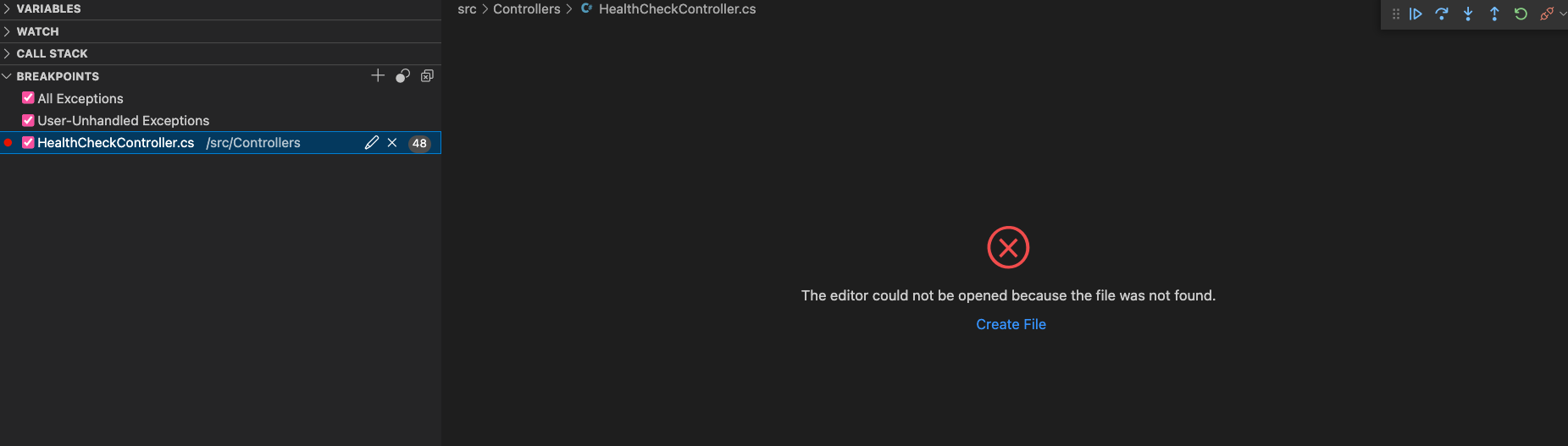
When I hit the endpoint with the breakpoint, the request does not go all the way through as if the breakpoint is working - however on my vcs nothing shows
Additional context
Add any other context about the problem here.

The debugger is just reporting the source info in your PDBs. So the problem lies in how your code is being compiled. Are you building in a different container? Using the compiler option to change file paths?

Hey, thanks for the reply im using a multistage build which is probably part of the problem. My DB.API.pdb is in /app after the image is built
Any thoughts on this?
FROM <SENSITIVEURL>/dotnet/core/aspnet:3.1-bionic AS base
LABEL maintainer="[email protected]"
WORKDIR /app
EXPOSE 80
EXPOSE 443

# Install enteraws: <SENSITIVEURL>
ADD <SENSITIVEURL>/enteraws/v0.0.25/linux/enteraws /usr/bin/enteraws
RUN chmod +x /usr/bin/enteraws

FROM <SENSITIVEURL>/dotnet/core/sdk:3.1-bionic AS build
WORKDIR /src
COPY ["nuget.config", "."]
COPY ["DB.API.csproj", "./"]

RUN dotnet restore "DB.API.csproj"
COPY . .
RUN dotnet publish "DB.API.csproj" -c Debug -o /app/publish

FROM base AS final
WORKDIR /app
COPY --from=build /app/publish .

# Install New Relic APM
ARG NewRelicKey
ARG NewRelicHome=/usr/local/newrelic-netcore20-agent
ARG NewRelicUrl=https://download.newrelic.com/dot_net_agent/previous_releases/8.36.0/newrelic-netcore20-agent_8.36.0.0_amd64.tar.gz
ARG git_sha="0000000000000000000000000000000000000000"

ENV CORECLR_ENABLE_PROFILING="1" \
  CORECLR_PROFILER="{36032161-FFC0-4B61-B559-F6C5D41BAE5A}" \
  CORECLR_NEWRELIC_HOME=$NewRelicHome \
  CORECLR_PROFILER_PATH=$NewRelicHome/libNewRelicProfiler.so \
  NEW_RELIC_LICENSE_KEY=${NewRelicKey} \
  NEW_RELIC_DISTRIBUTED_TRACING_ENABLED=true \
  GIT_SHA=$git_sha

RUN mkdir -p "${NewRelicHome}" && \
  cd /usr/local && apt update -y && apt install wget -y && wget -O - "${NewRelicUrl}" | gzip -dc | tar xf -

RUN curl -sSL https://aka.ms/getvsdbgsh | /bin/sh /dev/stdin -v latest -l ~/vsdbg

ARG build_version=0.0.0.0
ENV BUILD_VERSION=$build_version

ENTRYPOINT ["enteraws", "dotnet", "DB.API.dll"]
EDIT: other things ive tried
adding /p:DebugType=embedded /p:DebugSymbols=true to the dotnet publish command
PDB files contain, by default, the full path to the source files used to compile. So the problem is that your build container has the source files of your project in a directory called 'src', but your sourceFileMap isn't mapping '/src'. What you probably want to do is map your project's source files to a more distinct directory, since '/src' is really generic, and set your sourceFileMap up accordingly.
Note that the location of your .pdb doesn't matter (or only matters that you stick it in a spot that the debugger can find). Source file records are not relative to the path of the pdb.
Ahhhh ok I misunderstood. So you have to have the unbuilt src files in the container aswell. I got this working by adding in all those files and src mapping them to my local. Is there no way to do it without src files in the container? trying to make my images as small as possible