

 dotnet
Different colors for namespaces, interfaces, classes, etc.?
Currently, almost all C# types (and also namespaces), including interfaces, enums, structs, and classes, appear in the same color in VS Code + OmniSharp. By default this is a light greenish kind of color:

Whereas in Visual Studio, for example, the colors are different for each of these entities which enables you to better distinguish them visually:
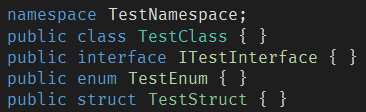
I've been using C# with VS Code for a long time now, and I'm still not sure why this hasn't been implemented? Is it somehow not possible? I would say at the very least namespaces should have a different color (preferably white, to be consistent with Visual Studio) than the rest of these because namespaces are an entirely different construct. They're not even a type.
I also have semantic highlighting enabled in VS Code, if that matters.
Thanks.

Hi, @aradalvand.
The C# extension provides the Visual Studio 2019 theme that solves this problem, I've been using it and it has greatly improved my experience.
Just set in:
Manage Icon > Color Theme > Visual Studio 2019 Dark
Or go to settings.json and add or edit this line:
"workbench.colorTheme": "Visual Studio 2019 Dark"

Hi @victormikael. Thank you, that works, I didn't know that! But it's weird that I have to change the theme in order to get this syntax highlighting, isn't it? What if I want to use a custom theme with these same syntax colors? Wouldn't it be better if this syntax highlighting was the default for C#?!
Is this repo not actively maintained anymore?! I would like a response from the maintainers if possible, regarding why this isn't the default?!

@aradalvand - you mentioned enabling semantic highlighting. As you may know two things are required for this to work: A language extension to provide semantic information, and a theme capable of mapping the provided semantic information to colors. I guess what you're getting at boils down to is, the C# extension would theoretically / automatically override VS Code's theme with one of its own upon install. Seems like a bad idea IMO, but i do agree that the discoverability of these bundled themes could be much improved (as well as "omnisharp.enableEditorConfigSupport": true, "omnisharp.enableImportCompletion": true, "omnisharp.enableRoslynAnalyzers": true but i digress). An alternative being that the VS Code team (and other theme makers) keep their themes up-to-date with C# and countless other languages' semantics, so that when/if a language extension is installed, it "just works".

Just dropping by to say to whoever reading this thread, you can just override the token colours manually. I did it this way instead of changing the whole theme because the theme that comes with the C# extension doesn't really look good on any other language compared to the one that comes with vscode by default.
