

 dotnet
VS 17.4.0 Error "pack Microsoft.Android is not installed"
Description
After installing VS 17.4.0, the existing MAUI project does not build.
error NETSDK1127: The targeting pack Microsoft.Android is not installed. Please restore and try again.
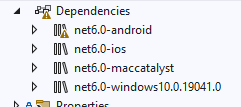
Project file
<PropertyGroup>
		<TargetFrameworks>net6.0-android;net6.0-ios;net6.0-maccatalyst</TargetFrameworks>
		<TargetFrameworks Condition="$([MSBuild]::IsOSPlatform('windows'))">$(TargetFrameworks);net6.0-windows10.0.19041.0</TargetFrameworks>
		<!-- Uncomment to also build the tizen app. You will need to install tizen by following this: https://github.com/Samsung/Tizen.NET -->
		<!-- <TargetFrameworks>$(TargetFrameworks);net6.0-tizen</TargetFrameworks> -->
		<OutputType>Exe</OutputType>
		<RootNamespace>MauiApp1</RootNamespace>
		<UseMaui>true</UseMaui>
		<SingleProject>true</SingleProject>
		<ImplicitUsings>enable</ImplicitUsings>

		<!-- Display name -->
		<ApplicationTitle>MauiApp1</ApplicationTitle>

		<!-- App Identifier -->
		<ApplicationId>com.companyname.mauiapp1</ApplicationId>
		<ApplicationIdGuid>B5605B34-6ACD-431A-B548-AA49D7E3BF34</ApplicationIdGuid>

		<!-- Versions -->
		<ApplicationDisplayVersion>1.0</ApplicationDisplayVersion>
		<ApplicationVersion>1</ApplicationVersion>

		<SupportedOSPlatformVersion Condition="$([MSBuild]::GetTargetPlatformIdentifier('$(TargetFramework)')) == 'ios'">14.2</SupportedOSPlatformVersion>
		<SupportedOSPlatformVersion Condition="$([MSBuild]::GetTargetPlatformIdentifier('$(TargetFramework)')) == 'maccatalyst'">14.0</SupportedOSPlatformVersion>
		<SupportedOSPlatformVersion Condition="$([MSBuild]::GetTargetPlatformIdentifier('$(TargetFramework)')) == 'android'">21.0</SupportedOSPlatformVersion>
		<SupportedOSPlatformVersion Condition="$([MSBuild]::GetTargetPlatformIdentifier('$(TargetFramework)')) == 'windows'">10.0.17763.0</SupportedOSPlatformVersion>
		<TargetPlatformMinVersion Condition="$([MSBuild]::GetTargetPlatformIdentifier('$(TargetFramework)')) == 'windows'">10.0.17763.0</TargetPlatformMinVersion>
		<SupportedOSPlatformVersion Condition="$([MSBuild]::GetTargetPlatformIdentifier('$(TargetFramework)')) == 'tizen'">6.5</SupportedOSPlatformVersion>
	</PropertyGroup>
Steps to Reproduce
Instal VS 17.4.0 and try to build the project
Link to public reproduction project repository
Version with bug
6.0.486 (current)
Last version that worked well
Unknown/Other
Affected platforms
Android
Affected platform versions
All
Did you find any workaround?
No response
Relevant log output
C:\Program Files\dotnet\sdk\7.0.100\Sdks\Microsoft.NET.Sdk\targets\Microsoft.NET.Sdk.FrameworkReferenceResolution.targets(376,5): error NETSDK1127: The targeting pack Microsoft.Android is not installed. Please restore and try again.
1>C:\Program Files\dotnet\sdk\7.0.100\Sdks\Microsoft.NET.Sdk\targets\Microsoft.NET.Sdk.FrameworkReferenceResolution.targets(376,5): error NETSDK1127: The targeting pack Microsoft.Maui.Core is not installed. Please restore and try again.
1>C:\Program Files\dotnet\sdk\7.0.100\Sdks\Microsoft.NET.Sdk\targets\Microsoft.NET.Sdk.FrameworkReferenceResolution.targets(376,5): error NETSDK1127: The targeting pack Microsoft.Maui.Controls is not installed. Please restore and try again.
1>C:\Program Files\dotnet\sdk\7.0.100\Sdks\Microsoft.NET.Sdk\targets\Microsoft.NET.Sdk.FrameworkReferenceResolution.targets(376,5): error NETSDK1127: The targeting pack Microsoft.Maui.Essentials is not installed. Please restore and try again.

Same here. Running dotnet workload restore did not help. Running dotnet workload install maui installed a bunch of stuff, but didn´t help either.

For me after VS 2022 update and migrate the project to .net 7 it worked . 😥

Besides these problems, what does 17.4 fix? What I have done a few times anytime the 1.2GB 12,000 files in my project became corrupted and I get a random error, I newed-up a new cute bot app, and copy/pasted my old project code into the new project. I have that process down to less than an hour now.

The issue can be worked around if all platforms are upgraded to v7.
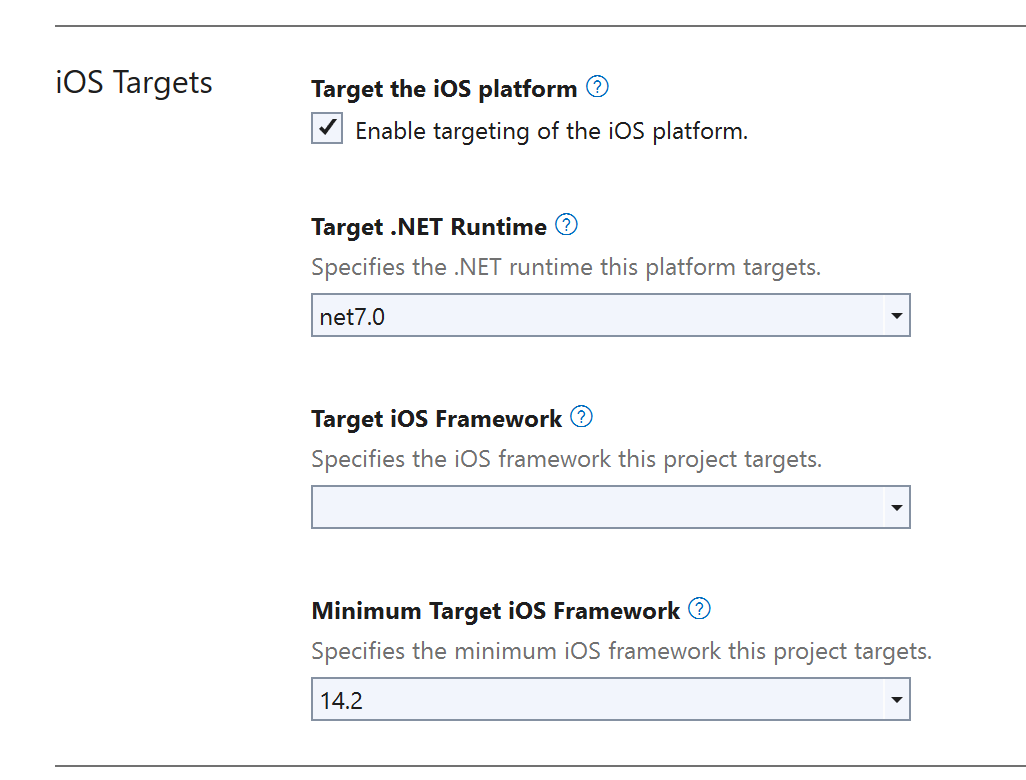
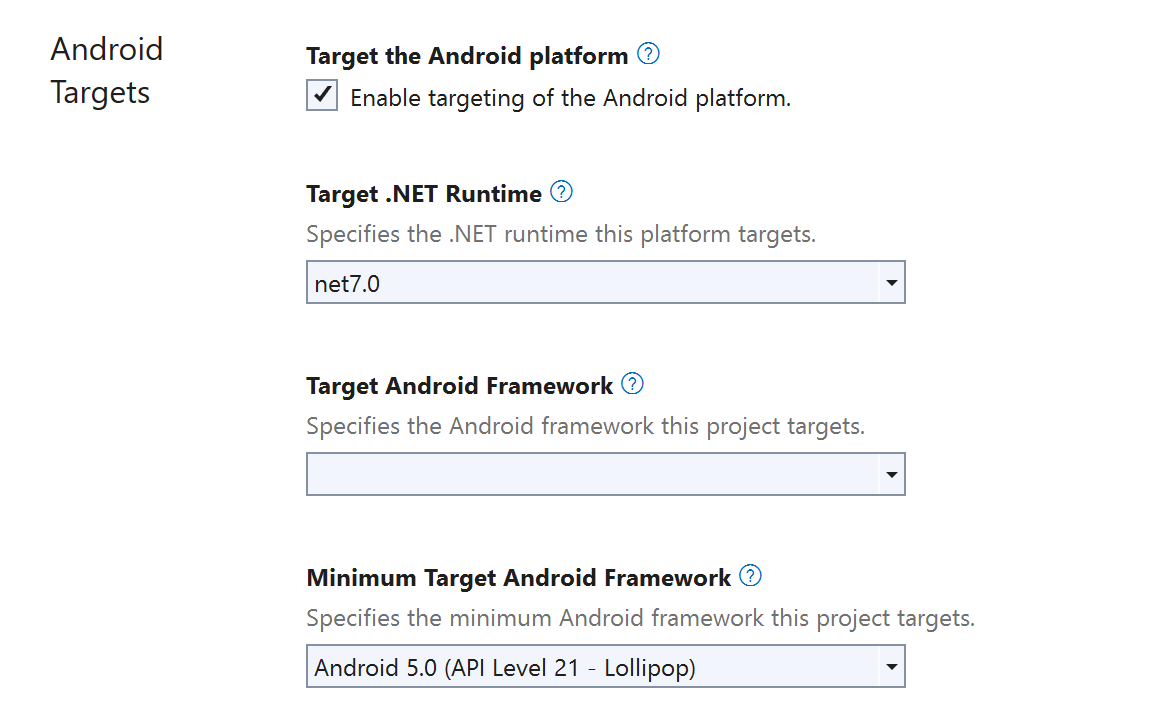
Or even better, change values directly in the project file:
<TargetFrameworks>net7.0-maccatalyst;net7.0-ios;net7.0-android</TargetFrameworks>
However, the issue should still be fixed. Installing the .NET 7 SDK with or without VS upgrade should not change the behaviour of the project.
Doesn't Microsoft use Azure DevOps to ensure the basic quality of products? Building MAUI official .net 6 samples using the latest official release of VS.net 2022 can easily reproduce this error!

The install of 17.4 should include everything needed to target both 7.0 and 6.0 for .NET MAUI applications. Can you provide the output of dotnet workload list and dotnet workload --info so we can see what workloads your machine believes are installed after the upgrade.
CC @Redth and @jonathanpeppers in case this is some upgrade issue with the VS workload packs.

net6.0-android projects are building for me on a machine with a freshly installed VS 2022, so this must be an issue with upgrading.
Is it possible you only hit this when upgrading from VS 17.3 to 17.4?

Doesn't Microsoft use Azure DevOps to ensure the basic quality of products? Building MAUI official .net 6 samples using the latest official release of VS.net 2022 can easily reproduce this error!
@flywhc I guess, yes they use it. I work every day and night with MS products. Many bugs frustrate me. But, every time I try to use something else I say to myself: "Ok, MS might not be so bad".
Same Error when upgrading VS2022 to 17.12.0 and then compiling a net8.0-android target of a MAUI App.
Tried the same things as @FM1973 with the same result
Same here. Running dotnet workload restore did not help. Running dotnet workload install maui installed a bunch of stuff, but didn´t help either.

I just had this error. I ran a dotnet restore on the solution after running a dotnet workload restore and it removed the error.
