

 dotnet
[Blazor] Scopable attribute for isolated components views
When we introduced CSS isolation one of the consequences is that all components/taghelpers are isolated and it's not possible in general to affect their styles from the point of consumption unless you rely on a wrapper element and the ::deep pseudo-selector.
In some cases, it's desirable to be able to apply the CSS scope from the consuming component/page to a given component/taghelper. In all cases, it is the component and not the consumer the one that should be in power to whether or not to allow this to happen, since otherwise isolation is easily broken.
To that effect, I propose we add a new attribute(s) to the framework [Scopable], [AllowCallerScope], [FlowConsumerScope("parent-scope")] or a different name that component authors can apply to their components to signal the compiler that they are willing to accept the CSS scope from their parent.
When the compiler sees a component with this attribute applied, it adds the attribute to the list of attributes passed to the component. At that point, it is the responsibility of the component to do whatever it sees fit with the attribute.
The attribute is passed in as a regular string value, and is indistinguishable from other attributes the component receives. The runtime doesn't know about this attribute nor special cases it in any way. The component author is then free to decide what to do with the attribute.
It can choose to ignore it completely or apply it to certain elements on its rendered output that wants to be affected by styles from the consuming parent.
On the framework we can apply these attributes to our Input****, navlink, etc components to ensure that they can be easily styled from the consuming points.

It's a good idea, I like it. Some things we'll have to figure out:
- How do we go about changing the default style inheritance rule for
Input*without it being a breaking change? - Is it really enough to have a single level of scope flow? That is, you can flow the scope from
Parent.razortoChild.razor, but can't flow it all the way fromGrandparent.razortoChild.razor. If we wanted to flow across more than a single hop, then we'd either need:- ... to reimagine this as a runtime feature, not a compile-time one
- ... or, to require
Parent.razorto explicitly flow all its unknown attributes toChild.razor, which could be pretty intrusive and interfere with other goals the developer may have
Another approach would be the magic @scope thing you mentioned before, whereby you can explicitly push your own styles down to a single immediate child:
<InputText @scope @bind-Value="MyProperty" />
That's more work for the developer, and only solves the "multiple hops" problem if @scope has runtime behavior whereby it accumulates scope identifiers from any continuous chain that pass @scope through themselves. So it's probably not a better design :) Just trying to think through the challenges.

Thanks for contacting us.
We're moving this issue to the Next sprint planning milestone for future evaluation / consideration. We will evaluate the request when we are planning the work for the next milestone. To learn more about what to expect next and how this issue will be handled you can read more about our triage process here.

We've moved this issue to the Backlog milestone. This means that it is not going to be worked on for the coming release. We will reassess the backlog following the current release and consider this item at that time. To learn more about our issue management process and to have better expectation regarding different types of issues you can read our Triage Process.
This issue is still a major issue we are experiencing. Can we get this added to another sprint planning for reconsideration?

@brianlagunas Could you give a few concrete illustrations of how this would work in your case? That is, a few examples of:
- Code that developers have to write today, and why it's problematic
- Corresponding improved code that you want developers to write if a new feature was implemented to support that
This should be based on your actual components, not artificial ones invented for illustration purposes.
This will help us clarify the relevance of this feature proposal and give us an indication of whether any particular design would work in your cases. Thanks!
@SteveSandersonMS This has major impacts for all component vendors. Most have to implement undesirable work arounds.
Telerik has documented their work around here: https://docs.telerik.com/blazor-ui/knowledge-base/common-css-isolation Syncfusion does this: https://blazor.syncfusion.com/documentation/datagrid/how-to/css-isolation-for-grid
We (Infragistics) have a different approach of applying a custom attribute to the component, but this will have to be added to every single component which as you can imagine is not a desirable experience.
I think we can better explain and demonstrate the issue in a meeting, if you or someone from your team would be up for that.
Maybe @danroth27 can help set that up?
@brianlagunas I'm not denying the validity of the request! It would just help to see a few examples. Hopefully they are only a few lines of code each. Could we start with that before we incur the cost of a meeting? Thanks!
@damyanpetev or @gmurray81, can either one of you please provide a few concrete examples? Thanks!
The way that I envisioned this is something like this:
@scope CallerScope
You put that on your component/th and we transform it into a [Parameter] public string CallerScope { get; set; } and you can do with it whatever you want. (Not sure if we support adding the property with @CallerScope in an attribute, but we would hopefully add that).
The compiler just does a pass when it detects its dealing with compiling a scoped component and when it sees a component with the @scope directive being used, it passes the scope from the caller as a parameter in the generated code (which is typically "the parent").
This allows you to apply the scope from the file the component is being used.
I'm very keen on this mechanism being build-time only, as otherwise we have to pay the cost at runtime. I think there are fancier things that could be done, but this likely covers the vast majority of scenarios and more advanced things can be built on top of this at runtime.
It is also noticeable that many Scoped CSS techniques might become "obsolete" in the future due to new incoming CSS features like @layers and @scope (@layers is already supported across all major browsers for example).
@SteveSandersonMS @brianlagunas Sure, I can provide an example for one way we work around this issue in our App Builder when we do design-to-code and we can afford automating. Take for example this snippet:
<IgbNavbar class="navbar" view-scope>
    <IgbButton class="button" view-scope>
        Button
    </IgbButton>
    <IgbButton class="button" view-scope>
        Button
    </IgbButton>
</IgbNavbar>
The styles behind these classes look something like:
.navbar {
    flex-grow: 1;
}
.button::part(base) {
    color: hsla(var(--igc-gray-100));
}
And this is tied with overriding the scope for the view on a project level with config like:
<None Update="Pages/View.razor.css" CssScope="view-scope" />
Note: I've picked an example with not so simple styles that can't just be inherited from a parent container and I've also seen cases where the selector targets a hierarchy under the component.
As you can see, we're setting the scope attribute to a pre-determined value, which we're stuck adding to components so that can be transferred after the DOM transforms just so in the end the class applied to that can work with CSS Isolation. As we've automated this process it mostly flies by customers but we still have to occasionally explain the why/how just as other vendors do and it's not exactly intuitive unless you go digging how isolation works.
This only works when we have control over the project config of course, the alternative being using ::deep which requires a native element above the custom component and, since structure is not guaranteed, the safest choice is to go for always wrapping custom components in a <div> (as in other vendor's guidance linked above). That still creates unnecessary DOM and can in some cases mess with layout or make it harder, so not ideal either.
As they are now, Blazor components behave more like placeholders for a partial render (which might not be a coincidence) since they don't leave a host element behind and that's fine - I'm sure there are plenty of use cases for just that too. But in the case of a component wanting to behave as a singular thing someone built for reuse or like what we offer - e.g. MyButton or IgbCard and the component's markup replace it with a single root element - that element is the equivalent of the razor markup and in theory is defined in the parent view and should belong to its isolation scope. Exposing the scope to components as @javiercn suggested should solve that - leaving the default behavior and giving us the option to render a single component with a root element that integrates where it's defined.

@damyanpetev Thanks very much for the example. That does make it pretty clear what you're currently doing to avoid making component consumers use ::deep within their scoped CSS (and so they don't necessarily have to have a container element around child components like IgbNavbar). If I understand correctly, your technique only works because IgbNavbar (and similar components) use the @attributes(unmatchedattributes) mechanism to pass through arbitrary HTML attributes.
You could imagine two different approaches to solve this:
- A push system: each component could have a way of finding out its own scope ID, and could then choose to pass that to children. That's basically what you're doing, except you have it hard-coded as the value
view-scopein your sample. - A pull system: each component could have a way of finding out its parent's scope ID, and can then choose to render that into its own output.
@javiercn's suggestion is the "pull" mechanism, whereas @damyanpetev's example is closer to the "push" system. My guess is that @damyanpetev would likely also be satisfied by the "pull" mechanism as it also achieves the desired goal. I also think @javiercn's "pull" mechanism is simpler to use, as it doesn't involve the host component writing any code to pass its scope down explicitly - it moves the burden of doing work onto the child component author (e.g., the component vendor) which is better.
Bear in mind that with all of these solutions, the child component author is still responsible for explicitly emitting the scope from the parent into its output. So if you planned to write a really complex child component that emits many elements, and you wanted the parent to be able to target any of those elements from its scoped CSS rule, you'd need explicit code in a lot of places, e.g.:
@scope CallerScope

<div class="outer" @CallerScope>
    <table @CallerScope>
         <tbody @CallerScope>
            <tr @CallerScope>
                <td @CallerScope>Hello</td>
                <td @CallerScope><button @CallerScope>Click me</button></td>
            </tr>
        </tbody>
    </table>
</div>
I suspect this is OK because it would be strange to want the parent to be able to target any of your elements. You'd probably only do this on a small subset of your output. But I want to make sure people are aware of this.
The other part is that the responsibility with the pull model is in the component "pulling" the scope, since it's the one that needs to decide it is ok to receive a parent scope and apply it appropriately where it mattered.
Even in the case of a complex component, the compiler could also add the CallerScope as an attribute to each element automagically if we wanted to (but I don't think we need/want).
@damyanpetev it would probably be ok for us as long as the scope reached the root of the wrapped web component right? I'm guessing?

Presumably so, since that's all we are achieving by having the unmatched attribute get copied down to the root element in the rendered markup, unless there was another scenario that wasn't solved by that workaround.
it would probably be ok for us as long as the scope reached the root of the wrapped web component right? I'm guessing?
@gmurray81 Yes I think so
Even in the case of a complex component, the compiler could also add the CallerScope as an attribute to each element automagically if we wanted to (but I don't think we need/want).
I agree that we could but shouldn't :) Doing that would kill the MarkupBlock optimization in the child component completely, forcing every element of its output to be constructed dynamically in JS instead of being treated as a block.
[...] If I understand correctly, your technique only works because
IgbNavbar(and similar components) use the@attributes(unmatchedattributes)mechanism to pass through arbitrary HTML attributes. [...]
Correct.
And I also agree with everyone else the pull approach fits the bill and that's it's the components responsibility to use the parent's scope if and where appropriate. I also believe the nested scenario use won't be as common as the internals of the component should still be in a separate scope in general, right? The main thing we can alleviate with this is similar to what Fluent UI have linked - i.e to have:
<FluentButton class="awesome-margin">
behave as if the user wrote:
<fluent-button class="awesome-margin">
Pulling the parent scope ID down to the component's root element will allow us to achieve that.
PS: As for accessing the internal structure I think ::deep can still come into play as it's supposed to be intended for that, right? Unless I'm doing something wrong, a selector like this:
.navbar ::deep selector {}
produces
.navbar[scope-id] selector {}
Which achieves the access inside the component and seems like semantically more correct to me or at least explicit in its purpose. Would be nice if .navbar::deep worked without the extra space but that's about it.
any news on this?
I find this quite needed.
Actually I'm using a wrapper div with display:contents; style applied to not let it ruin the layout
see https://developer.mozilla.org/en-US/docs/Web/CSS/display-box
but it's a dirty solution that apply an unneeded dom element and I'm not even sure about the compatibility level css wise

@MithrilMan Perhaps I'm misunderstanding, but I don't think display:contents has any relationship to the feature proposed in this issue. If your goal is to have some behavior like display:contents then you wouldn't benefit from the feature proposed in this issue.
@SteveSandersonMS it's related as per my understanding but correct me if I'm wrong. As @brianlagunas linked on his comment above, one of the solution proposed was this https://blazor.syncfusion.com/documentation/datagrid/how-to/css-isolation-for-grid that said this
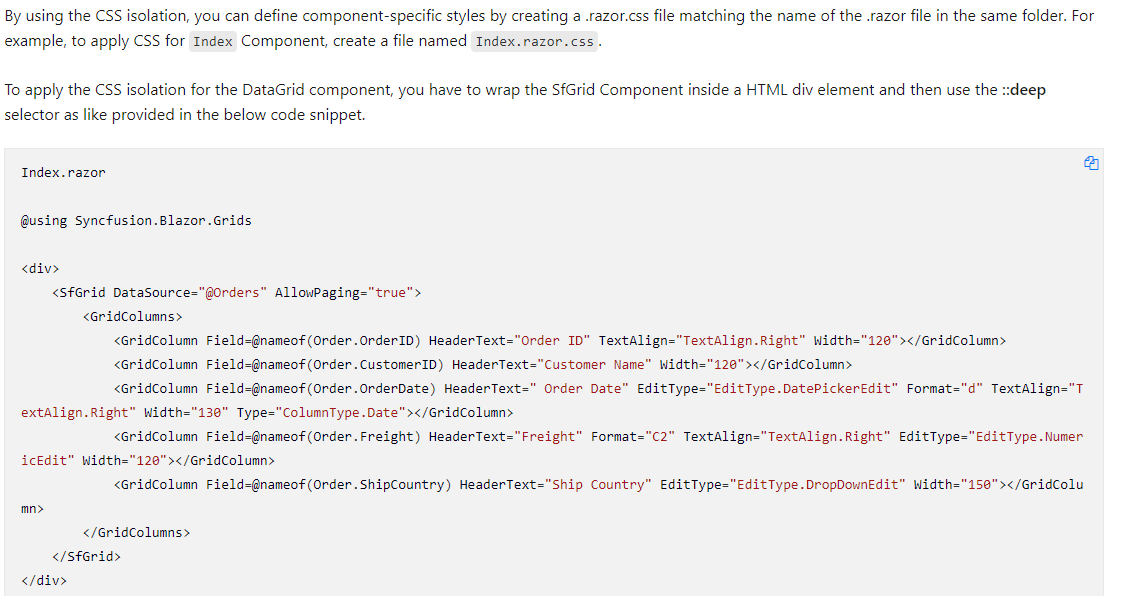
That's because without that div, since the root child element of the component is another component and not an html element, the component doesn't render anyway its component ID and so you can't use ::deep. The problem of that approach tho is that it requires you to add an HTML element explicitly with the sole purpose of generating an ID and even worse, adding a div force you to rethink your layout css.
So I went further and used display:contents to prevent to adjust my css (in my scenario I was for example splitting up a complex page in subcomponents hence the need to not have an additional div to mess with my working css)
The issue is maybe about having a "child" to allow the parent to pass its component Id, but I'm thinking that we may have a way to query any component ID
e.g. take for example this code of a custom component whose content is another component and not an html element
<MyWrapper>
        <AnotherComponent>
            <MyInnerItem Class="my-customization-class"/>
        </AnotherComponent>
</MyWrapper>
Now if I want to customize MyInnerItem in an isolated way, I can't use ::deep because this component root doesn't render any
html element by itself hence it doesn't render the component id.
A possible solution here would be to let the parent inject it's component it on its child so for example if I pass to my wrapper
<MyWrapper @apply-component-id> or whatever syntax fits well, I could then use ::deep in my componente because the parent attribute is supposed to be rendered on the root MyWrapper html element (I don't see a problem about having a component rendering multiple attributes each one for injected parent id)
Of course MyWrapper should itself have a root html element or pass its id to its root element the same way if it doesn't, but that's up to component vendors to implement that
I hope I explained what I meant, if you see other way to solve this problem please let me know.
You might also be able to use a parent selector to achieve this *:has(<<parent-attribute-selector>>) ...
@javiercn the problem I see with future css rules is that it's still a draft and will lack of browser support for a while in any case and it's an issue depending on your app target
*:has(<
My vote goes for "push" mechanism for several reasons:
- the design should cover as many cases if possible, even if we can imagine currently half of them. In other words it should be as future-proof as possible (bear in mind we don't realize "advanced" scenarios partially because currently even basic ones are not supported). Let's say we have
@scoped()function in Razor which takes CSS entity name as input, and results with the one id-suffixed. So I could safely write in root page/component:
<MyChild CssClass='@scoped("my-class")'...
"MyChild" could get it, add its own part and pass it further down:
<MyGrandChild CssClass='@CssClass @scoped("my-addditional-stuff")'...
If I am not mistaken, with "pull" approach it would not be possible, because "MyGrandChild" would have no way to distinguish which CSS class is coming from where.
- it would be beneficial if this mechanism will be uniform. For example for animation currently I had to resolve to global styling, but having "push" mechanism it would be possible to use CSS isolation:
@keyframes pulse {
    0% { transform: scale(1); }
    50% { transform: scale(2.5); }
    100% { transform: scale(1); }
}
.pulse {
    animation-name: @scoped(pulse); /* IMAGINARY */
}
CSS animation cannot work with "pull" mechanism, because in keyframes you do not refer to class, it is the class which refers to keyframes. Of course rolling out two mechanisms, pull for Blazor, push for CSS itself, is technically possible, but I don't see any benefits of such approach.


Surprised that this has not been fixed after many years
I hate wrapping components in a div and using ::deep. It feels unnecessary and wrong...
Not sure how hard it would be to implement in the build system, but surely it isn't too difficult considering it works for standard HTML elements. I do understand that other things are probably on the forefront, but why implement this partially and have a hacky workaround for custom components

I think @scope is already a good solution for most developers
Currently the only issue I see is that we need a top level element to start the scope of the .razor
::deep .my-scoped-variable {
 -- some styling
}
<div> <!-- will start the scope -->
<SomeExternalComponent css="my-scoped-variable">
</div>
and then the css class will work with ::deep
but the main issue is that people want to directly include the Component without inlcuding a placeholder element for starting the scope
//my-scoped-variable does not work because the scope  is not "started"
 <SomeExternalComponent css="my-scoped-variable">
thats because we might want to start building a menu and have many child components that start with <li/>
[Scopable], [AllowCallerScope], [FlowConsumerScope("parent-scope") might give the developer more choice but I don't think that is really required and might take too much work to implement
Any updates on this one? Or some directions / hints on (if any) design-work is currently being worked on?
