
razor
 razor copied to clipboard
 dotnet
Support more user option settings in Razor
We should consider adding more options to Razor to turn on/off certain settings such as onAutoInsert and attribute quotes. HTML supports these settings in their LSP editor today, however these settings won't apply in Razor files. We've also received requests for turning on/off formatting.

Assigning to @mikadumont to look into whether we have telemetry for options today and potentially adding some if not.
Additional report: https://developercommunity.visualstudio.com/t/VS2022-Preview-41:Insert-attribute-val/1629956
Additional report: https://developercommunity.visualstudio.com/t/HTML-auto-closing-tag-is-disabled-but-it/1638219
We're moving this to Candidates until we hear additional feedback that users want settings turned off. Adding a Razor settings page adds overhead that we aren't sure we want to take on currently.
Razor LSP currently does not follow the doctype, despite setting it to html5 doctype, the Razor LSP autocompletes tags with XHTML style. For example, <br> is changed to <br /> and <input> to <input />.
There is to my knowledge, no way to disable this currently.
Are there currently any Razor LSP options that can be configured? Where are these configured?

@ToddGrun / @jimmylewis is this something we'd expect the HTML LSP to respect?

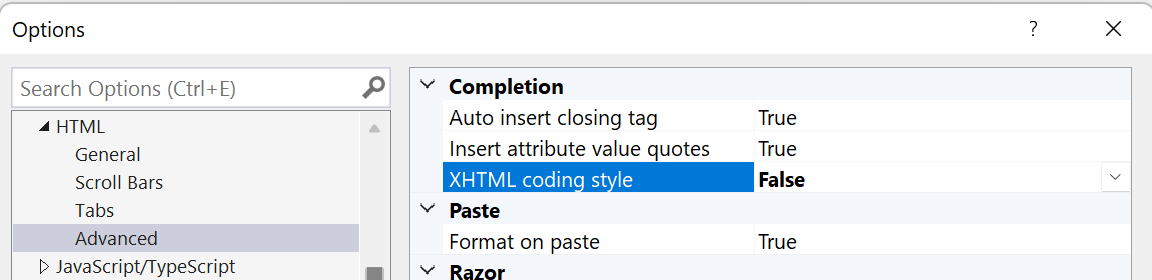

FWIW, HTML LSP does respect this. It's the Razor OnAutoInsert handler that doesn't. ;)
@NTaylorMullen I'll go ahead and reassign this to myself and add it to the current milestone
@NTaylorMullen I'll go ahead and reassign this to myself and add it to the current milestone
You're awesome @allisonchou !!! Sounds good!
Another issue: https://devdiv.visualstudio.com/DevDiv/_workitems/edit/1613726
Another issue: https://developercommunity.visualstudio.com/t/Option-to-disable-automatic-formatting-i/10164936

@michaelcsikos Could you clarify which garbage specifically you're talking about? This issue is tracking the general request for an options page for Razor features, rather than any one particular feature. If you have an issue with the Razor editor we would love to hear about it, and hopefully help you solve the issue. If you can open a new issue with the details of the issue you're having, we'd be very grateful!

@davidwengier VS2022 automatic formatting in razor files is absolutely horrible and I can’t see a way to disable it. I have to hit Ctrl+Z to undo the formatting hundreds of times per day. It formats on paste and at other random times.
I have all of the Text Editor > C# > Code Style > Formatting options switched off and razor formatting still happens all the time.
I usually have the @code block at the bottom of the razor file to minimise switching back and forth, but the editor experience is woeful compared to editing regular cs files.
When I want help with formatting, I make a selection and hit Ctrl+E, F. At all other times the razor automatic formats are extremely intrusive. It's worse when you're halfway through an idea so you may have some missing ) or }. When this happens it seems to do some really crazy automatic formatting, sometimes affecting lines in a different part of the file. If you don't hit Ctrl+Z as soon as it happens you run into code later that VS has made an absolute mess of and have to fix it.
Thanks for the info @michaelcsikos. We have an existing issue for turning off auto-formatting on type in https://github.com/dotnet/razor-tooling/issues/4336 and I've just logged https://github.com/dotnet/razor-tooling/issues/7025 for turning off formatting on paste.
If you have any further issues please do feel free to log them as new issues. I would also encourage you to file issues for specific formatting changes you think are incorrect. Rather than just wholesale turning off the formatting feature, we'd much rather you be happy with the results of formatting, if possible.
@davidwengier Even for regular cs files I have had all of the automatic formatting options switched off for years. (The General, Indentation, New Lines, Spacing and Wrapping options work fine.)
I use the Code alignment extension to format my code to improve readability. Visual Studio's automatic formatting just gets in the way.

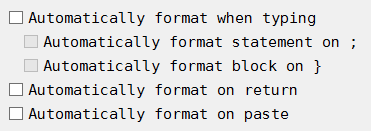
Putting my vote to give us options to turn off things like auto format, auto insert close tag, auto insert quotes etc. you let us turn it off for normal HTML so WHY CANT WE DO THIS IN CSHTML files!? It is beyond frustrating that I have to constantly undo VS auto-insert and formatting and takes time away from my ability to code. I am now looking into other editors besides VS just to fix this stupid problem, which was not a problem just a few version ago.

Another report for being able to turn off attribute quotes: https://developercommunity.visualstudio.com/t/Razor-editor-doesnt-respect-HTML-settin/10261823
Another request for being able to turn off auto inserting closing tags: https://developercommunity.visualstudio.com/t/Auto-Insert-Closing-tag-not-honored-in-/10138663
Let's split this into a few separate issues as they can be implemented separately.

The "Auto Insert Closing Tags" setting was added in https://github.com/dotnet/razor/pull/8500 so I think this issue is actually only for auto inserting attribute quotes now.
#7025 tracks format on paste, which is now the last remaining option we are currently considering.