

 dotnet
Add option to turn off On Type formatting
Some users want to be in full control of their formatting, and currently achieve this by simply never using the Format Document command. Unfortunately for them, on type formatting still gets in the way.
In the below screenshot the user wants HTML to be at the same level of indentation of any C# block it is in, and manually adjusts as such, but every time they type a close brace on type formatting "fixes" the braces, which ends up breaking formatting for them.
From a video recording: https://msit.microsoftstream.com/video/30b40840-98dc-869c-0048-f1ebd05eceaa?st=65 (should start at 1:05)

The position of the braces in the screenshot is actually correct based on the document as a whole, but the indentation of the <div class="form-group col mb-0"> is one too few, so in context they are incorrect. In the video you can see the braces get indented along with the </ul>.
Note that the user is happy with smart indenting, and wants that to remain active.

Updated description and putting this back for triage as I'm not sure this is something we even want to do, let alone with any priority.
Can I tell Visual Studio 2022 that a .cshtml file is not handled by the Razor editor? The situation was bad but bearable in VS 2019. But it has gotten much worse in VS 2022. The new editor is not just slower, it also messes around with my code, indents with spaces instead of tabs where it wants, indents to the first column or other wrong levels as I type, it even deletes parts of the line when I paste in text. Matching bracket highlighting is also a chance game, sometimes it hits, sometimes it misses (preferable backwards when it hits forwards), sometimes it gives up. It's a horrible experience! This makes me wish to open the file with Notepad++ and continue working there. There are so many bugs in the editor that I hardly find the time to report all of them. How could such a pain be released at all? Microsoft is really losing the rest of its reputation in solid UIs and productive development tools here.

Thanks for the comment @ygoe. Would it be possible for you to file separate issues for the problems you're seeing, with more information about the before and after state, and exactly what you're doing that causes the problem?
I know there is a "put everything at column 0" issue with TypeScript formatting at the moment, but the team are aware and working on it.
I'm sorry if you think the experience has gotten worse, but if you can provide specifics we are more than willing to investigate and fix issues.
@ygoe perhaps get a screen recording that captures the various issues you're seeing? I know it can be difficult to isolate to specific feedback items when in situations where it feels like the whole editor is fighting against you.

Screen recording is a bit complicated for each issue. And I don't have the time to throughly describe each of these bugs. I have already reported some through VS feedback, maybe they'll be processed somewhere. Lots of VS feedback is long deferred and eventually discarded anyway. Also some bugs that keep annoying me.
For me, the editor experience definitely got much worse. It wasn't good in VS2019 but VS2022 is another step down. I've already investigated migrating ASP.NET Core projects to VSCode (which has its own set of editor bugs, the delete-on-paste bug is even the same there). But the C# extension isn't ready yet, completely failing in medium-sized solutions.
Here's a short list of bugs that I experienced only today:
All editing causes 100% CPU core load of devenv.exe, as long as typing The editor often freezes for less than a second while typing
Within <script> tag
Type quickly: console.log("");
Then immediately press ArrowLeft 3x
Expected: Cursor is inside the string
Actual: Cursor jumps back to the end of the line
Also happens without typing the "" part, in fact in many situations the cursor jumps back after typing and then moving it
Other bugs: Sometimes, randomly, the opening parenthesis or the empty string is deleted along the way
Within <script> tag
Set the cursor on any opening parenthesis, now the matching closing parenthesis is highlighted
Then set the cursor on the closing parenthesis
Expected: The matching opening parenthesis is highlighted
Actual: Either a different opening parenthesis is highlighted or nothing at all
Automatically formatted text (on typing or pasting) is often indented with spaces instead of tabs
Another one: Auto-completion often gets in my way. It thinks it's smart and knows what I wanted to type but it's actually very dumb and just suggests words it has seen somewhere but that are unrelated. So when I type action(arg and want to continue with ); but the editor has seen an argName somewhere, it'll silently change my input to the wrong action(argName);. Happens with all areas of code, function names etc.
You have to be very careful and highly attentive to what happens with this biest of an editor. It has its own evil will and can easily introduce bugs in your code that you would have typed just right.
Most of the trouble is within script elements. Editing HTML parts isn't problematic so far.
I can't remember nearly the frustration in .js files but I'll test it tomorrow.
CPU usage of devenv.exe on an 8-core machine:
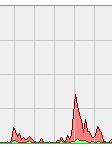
First half: editing in .js file Second half: editing in script in .cshtml file
The jumping cursor doesn't happen in .js files.
Matching parentheses highlighting works reliably in .js files. It also shows a different colour there. It's the colour I've configured. In .cshtml files, the normal symbol highlighting colour is used.
I never had space-indented formatted code in .js files.
Auto-completion doesn't insert anything unless I select it. When I type console.l(, I won't get log inserted. In .cshtml files, exactly that happens.
So, no, none of these nuisances happens in .js files. It's the Razor editor alone that's to blame.
@ygoe thanks for the extra details.
@NTaylorMullen seems this might be an issue with projections of <script> blocks in .cshtml files?
New problem: I have disabled the option to use XHTML-style self-closing tags, and it was regarded so far. But now, for no apparent reason, when I type <hr>, it automatically get changed to <hr />. I've checked my setting and it's still there. No VS upgrade recently. Another reason to shut down this formatting stuff completely. We'll meet again in VS 2025.
Could you log an issue for that @ygoe? Ideally with a screenshot of the option you're using.
In general, for new problems, its best to log new issues. Worst case we might close them as duplicates, but its better to let us do that work, than potentially lose an issue report in a long thread of discussion in some other issue. Whatever might be happening to make tags self closing is not formatting - Razor formatting will never insert or delete any non-whitespace characters, and we have hard checks in place to ensure that.
I also think the razor editing experience has gotten worse with 17.4.0, if that was even possible. Some automatic formats that trigger on a single key stroke now require hitting Ctrl + Z 3 times to undo! I have to hit Ctrl + Z hundreds of times per day. Just let me turn this awful "feature" off already.

@michaelcsikos Could you expand a little on what you're seeing in 17.4, compared to previous versions? We don't actually control the undo stack at all in this repo, but there could be an editor bug that you're coming across, which they might like to know about. Or do you mean there is auto-formatting happening when it didn't used? If so, which keystroke(s) are you seeing that with? I'm not aware of any big changes to on type formatting for 17.4 (though my memory is pretty bad), but I do know that the editor has enabled Format on Paste, which might be what you're seeing?
If you can let us know the details of the issues you're seeing, we're more than happy to fix bugs. We'd rather do that, and give you a good editing experience, than just have you turn off a system as a whole, and not get any benefit from the editor.
@davidwengier When I see it next I'll try to record a GIF. I've been wrestling with this experience all year. I just want a way to switch it off. If I want the editor to format something for me, I select the text and hit Ctrl + E, F.
Here's an example of a very unhelpful automatic format. As you can see it happens on the Enter keystroke, requiring a Ctrl + Z to fix.
 I often close the
 } immediately, and then notice the mess. In this scenario, it actually takes 4x Ctrl + Z to undo.
Thanks for the detail @michaelcsikos. I'm going to move that comment to a new issue, and see if we can do anything about it. Will be interesting to see how many scenarios break if we just ignore any on-type formatting edits that appear after the cursor.
@michaelcsikos Could you try what happens if the line with the attribute were below your editing? Just to quickly check if @davidwengier 's suggestion could work. This whole editor now probably has more bugs than features. Way too many to report, I'd be busy all day. But I already have work to do, it's enough to undo the mess, can't also report it. I feel like it should be re-written from scratch.
@ygoe The worst case seems to be when you have a brace mismatch at the end of your file. This just happens to be where we do a lot of coding, though, working from top to bottom. Pasting can produce some wild results, too:
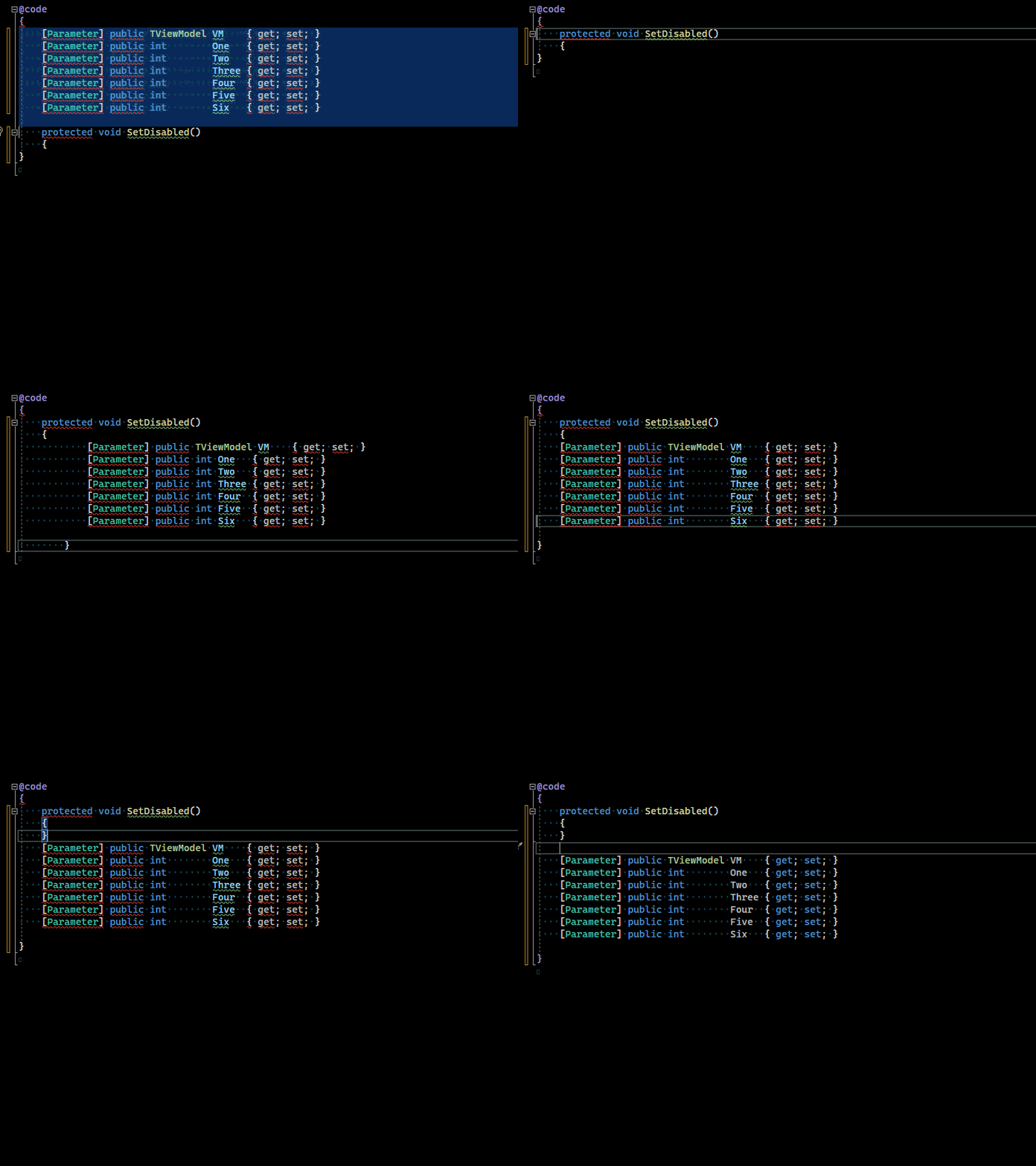
Here's another thing that drives me nuts. Declaring a simple auto property with literally nothing else in the razor file. It makes no difference if the [Parameter] attribute is in-line or on the line above. I type get; and on the ; keystroke VS changes it to GetHashCode; so I hit Ctrl + Z 3 times then type set; and again on the ; keystroke VS changes it to SetParamatersAsync; requiring another Ctrl + Z.

Pressing escape before typing ; closes the Intellisense menu which prevents the change to GetHashCode or SetParamatersAsync but it doesn't stop VS from moving the get; to the next line.
This is not complicated code — it's about as simple as it gets. And Visual Studio royally stuffs it up. This is the entire file:
@code
{
    [Parameter] public string ToolTip { get; set; }

}
VS needs to get out of our way. Let us turn these garbage formatting options off! I feel like VS has gotten worse with every new release since 2013, or maybe even 2010.
Thanks @michaelcsikos for the bug report, I appreciate it. I've moved it to a new issue in https://github.com/dotnet/razor/issues/8047 since it is unrelated to auto-format on type, and have hidden the comment here to keep things on topic.
This has been completed, and will be in 17.6 in an upcoming preview release, and in GA when that happens of course.