

 dotnet
Project with PackageId containing parameter does not import nested dependencies when referenced by another project.
Visual Studio Version: 16.8.6
Summary:
When a project references another project that has a PackageId that contains a parameter (e.g. <PackageId>MyPackage.$(SomeParameter)</PackageId>), any dependencies of the referenced project are not imported into the referencing project.
Steps to Reproduce:
- Create 2 projects, of which one has a
PackageIdcontaining a parameter and at least oneProject/PackageReference. - Reference this project in the other project.
Expected Behavior:
The project reference tree contains both the referenced project and the references of that project (see green arrow in image below)
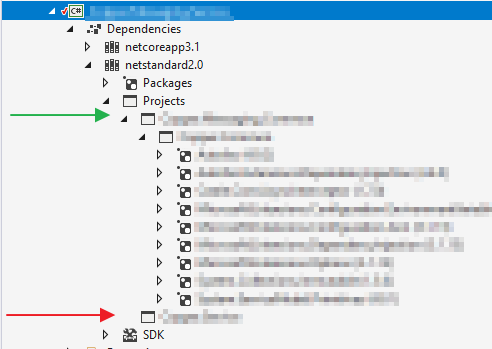
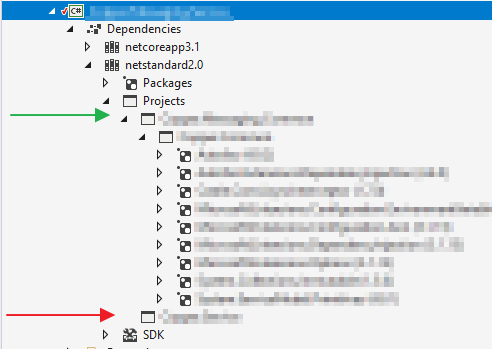
Actual Behavior:
The project reference tree doesn't contain any reference of the referenced project (see red arrow in image below)
User Impact: Due to this issue, we need to include a lot of additional package/project references required by the projects references whereas this usually is taken care of by the project system.

@wouterroos thanks for the report.
Unfortunately I'm unable to repro this locally, despite trying quite a few permutations of your scenario.
To investigate further: In the project that you think is not receiving transitive references, enable "Show All Files" in Solution Explorer, then open the obj/project-assets.json file. Look in that file for references to the dependency you're not seeing in the tree. If it exists there, but not under the Dependencies node, then we have a display issue.
Do any of your project or package references specify PrivateAssets values?
Can you copy your solution, delete all the code and anything else that is redundant to the problem, then share it with me? If you don't want to share it publicly, then please file an issue using the Report a Problem feature in VS and attach a ZIP of your solution to that, then link it here so I can see it.

@drewnoakes Thanks for your quick response!
To investigate further: In the project that you think is not receiving transitive references, enable "Show All Files" in Solution Explorer, then open the obj/project-assets.json file. Look in that file for references to the dependency you're not seeing in the tree. If it exists there, but not under the Dependencies node, then we have a display issue.
I checked the obj/project-assets.json file (its actually in a subfolder of obj in our solution (using OutputPath and IntermediateOutputPath) since we're building for multiple platforms, which can have different (versions of) dependencies) and it does seem to contain the correct entry (MyPackage.SomeParameterValue) with all underlying dependencies. As far as I can tell it has an identical structure to a project reference that does show up correctly, so that might point towards the display issue you mentioned. However, both ResSharper and Visual Studio also don't seem to 'see' these dependencies as they don't show up in the intellisense.
Do any of your project or package references specify PrivateAssets values?
We don't use PrivateAssets.
Can you copy your solution, delete all the code and anything else that is redundant to the problem, then share it with me? If you don't want to share it publicly, then please file an issue using the Report a Problem feature in VS and attach a ZIP of your solution to that, then link it here so I can see it.
Unfortunately, it is quite a large and complicated solution which I cannot share in its entirety. If the answers to your questions I provided aren't enough to solve the issue, please let me know, I will then invest some time into creating a repro-case.
@wouterroos thanks for the extra detail.
both ResSharper and Visual Studio also don't seem to 'see' these dependencies as they don't show up in the intellisense.
That points at a larger issue than just the display of the dependencies tree.
Unfortunately, it is quite a large and complicated solution which I cannot share in its entirety.
Totally understand that you cannot share it in its entirety. Thankfully it should be straightforward to trim it down. I'd suggest:
- Copying the entire repo to somewhere else
- Removing any unrelated projects from disk and the solution
- Removing all source code from remaining projects
- Removing or obfuscating any identifying information you do not wish to share
It'd be good to verify that the issue persists between each step.
I understand that's a fair bit of work, but without a repro it'll be hard to diagnose what's going on. It doesn't sound like your design-time builds are failing, and I can't think of any diagnostics or logs that'd be useful here. As you say, your project setup is moderately complex, so the problem may only exist at the intersection of several features.
@drewnoakes Thanks. I might be able to make some time later today to create a repro. Will post it here when done.

@jjmew I haven't had time to work on a repro yet but I still want to do this. Could you leave the issue open for a while longer?
Thanks
@wouterroos once you find a repro, post it here and we will reopen the issue.
@drewnoakes Please see the repro case attached to https://developercommunity.visualstudio.com/t/project-with-packageid-containing-parameter-does-n/1390991?from=email
Thanks @wouterroos, I think I know what this issue is, and that it's related to the fact your projects are mutli-targeting. I am away from work for the rest of the week so will pick this up once I'm back.
@wouterroos our focus is elsewhere than the dependencies tree at the moment. I don't have a timeline for this.
I'm experiencing the same issue: I am setting up PackageId using MSBuild properties, and I can't see the nested dependencies in Visual Studio. My solution builds and debugs fine and if I use the NuGet packages with the custom naming scheme, they have the correct dependencies.
I have confirmed that if I remove my logic changing PackageId, Visual Studio works correctly.
Has anyone found a workaround if this cannot be fixed?
