

 dotnet
Visual Studio should show the same information as the command-line when an SDK isn't found
From the command-line when I attempt to build a project where the SDK isn't found, I see:
Build started 06/20/17 10:24:22 AM.
The specified SDK version [2.0.0-preview1-005977] from global.json [C:\Temp\aspnetcore-app-workshop\global.json] not found; install specified SDK version
C:\Temp\aspnetcore-app-workshop\src\BackEnd\BackEnd.csproj : error : Unable to locate the .NET Core SDK. Check that it is installed and that the version specified in global.json (if any) matches the installed version.
Project "C:\Temp\aspnetcore-app-workshop\src\BackEnd\BackEnd.csproj" on node 1 (default targets).
C:\Temp\aspnetcore-app-workshop\src\BackEnd\BackEnd.csproj : error MSB4236: The SDK 'Microsoft.NET.Sdk.Web' specified could not be found.
Done Building Project "C:\Temp\aspnetcore-app-workshop\src\BackEnd\BackEnd.csproj" (default targets) -- FAILED.


Build FAILED.

  C:\Temp\aspnetcore-app-workshop\src\BackEnd\BackEnd.csproj : error : Unable to locate the .NET Core SDK. Check that it is installed and that the version specified in global.json (if any) matches the installed version.


"C:\Temp\aspnetcore-app-workshop\src\BackEnd\BackEnd.csproj" (default target) (1) ->
  C:\Temp\aspnetcore-app-workshop\src\BackEnd\BackEnd.csproj : error MSB4236: The SDK 'Microsoft.NET.Sdk.Web' specified
 could not be found.

    0 Warning(s)
    2 Error(s)

Time Elapsed 00:00:00.04
Inside VS, the project is unloaded and if I attempt to load it, I see:
C:\Temp\aspnetcore-app-workshop\src\BackEnd\BackEnd.csproj : error : The SDK 'Microsoft.NET.Sdk.Web' specified could not be found. C:\Temp\aspnetcore-app-workshop\src\BackEnd\BackEnd.csproj
It's missing all the other information about global.json being involved here - I thought my install was busted, but turns out my global.json was specifying a version that wasn't installed.

I assume the CLI resolver is issuing the error about global.json and the msbuild error simply says couldn't find the SDK. CPS is showing the msbuild error. Should msbuild include errors from the resolver as part of it's message? @rainersigwald

We log that error, but it doesn't get a project context assigned. That's why it's in a separate section in the console output. This seems reasonable since we'll only attempt to resolve an SDK once per invocation, to avoid emitting the error many times. But maybe we should only emit this error once, but associate it with the first project that fails?
I have a vague recollection that only log events associated with known projects get surfaced in the UI. Is that correct?

@rainersigwald Yes we only log errors against the project. This needs to be revisited, we did that to avoid duplicate errors coming out of p-to-p references but instead we should de-dup them.
Please see: https://github.com/dotnet/project-system/issues/3621 when fixing this.
Just noting here (it has been discussed elsewhere) that the symptoms in VS have changed (quite a while ago) to what is described in #3621
If the missing SDK is what would import common targets, you will no longer see: "The SDK '_' specified could not be found", but instead "Project file is incomplete. Expected imports are missing."
This is because CPS tries to skip missing imports, which is fatal in the case of missing common targets.
The old message was missing details returned from the SDK resolver. The new message is missing any hint that it is related to SDK resolution.

Another note: if you edit the project while it's loaded to something that can't be found (e.g. Right click, edit project, change Microsoft.NET.Sdk to Microsoft.NET.Sdk) then the project unloads and error is "One or more errors occured" instead of "Project file is incomplete". If you close VS and reopen, then you get back to "Project file is incomplete."
@nguerrera Has the situation changed again? When I try to open a project with global.json that specifies a version of the SDK that I don't have installed, I get the following error in VS 16.5.4:
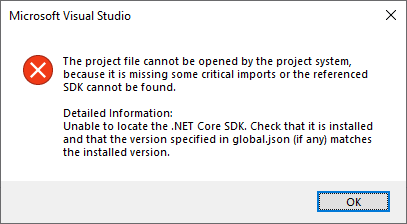
So I got all the information I needed here.
Though I think the experience could still be improved: I would like to fix the error by editing (or deleting) the global.json from VS, but I can't, since the project doesn't open. Could VS open the project regardless of the error? Maybe in the "open folder" mode, which doesn't require successful location of the SDK?

@svick We plan on addressing this experience as part of .NET 5. //cc @davidwengier
Could VS open the project regardless of the error? Maybe in the "open folder" mode, which doesn't require successful location of the SDK?
This is a good idea! This is still not done yet as of VS2022 and .NET 9 afaict
