dotnet
AddAppAction icons don't work with MauiImages in the Resources/Images folder on Android
Description
When declaring AppActions, it appears I can't use images defined in Maui workflows (and have to declare android resources instead). on iOS I can use Maui images.
Steps to Reproduce
- Create a File -> new Maui App
- Add App Actions in the MauiProgram.cs
           .ConfigureEssentials(essentials =>
            {
                //TODO: it's unclear whether icons must be in the Resources/Images folder or in the Platforms/{platform} folder
                essentials
                    .AddAppAction("calendar", "Calendar", "IFPA Tournament Calendar", "calendar.png")
                    .AddAppAction("my-stats", "My Stats", "Your IFPA player data", "mystats.png")
                    .AddAppAction("rankings/player-search", "Player Search", "Search for other players in the IFPA database", "search.png")
                    .OnAppAction(App.HandleAppActions);
            })
- Add images to the project with the same names defined in step 2, but from svg files. (so, in the above example, add calendar.svg)
- On Android, a long press to bring up actions from the home screen or app list screen will not show the icons. This works in iOS.

It appears the only way to get AppAction images to work is the images must be declared as Android native resources. This means you need to maintain separate asset / asset references per platform as opposed to using unified maui images.
Version with bug
6.0 Release Candidate 3
Last version that worked well
Unknown/Other
Affected platforms
Android
Affected platform versions
All Android
Did you find any workaround?
No
Relevant log output
No response

Hi @edgiardina. We have added the "s/try-latest-version" label to this issue, which indicates that we'd like you to try and reproduce this issue on the latest available public version. This can happen because we think that this issue was fixed in a version that has just been released, or the information provided by you indicates that you might be working with an older version.
You can install the latest version by installing the latest Visual Studio (Preview) with the .NET MAUI workload installed. If the issue still persists, please let us know with any additional details and ideally a reproduction project provided through a GitHub repository.
This issue will be closed automatically in 7 days if we do not hear back from you by then - please feel free to re-open it if you come back to this issue after that time.

I installed the latest visual studio Preview (17.5.0 Preview 1.0) and my MAUI project targets 7.0 but I'm not seeing the fix. My project can be found at this repo (.net 7 changes branch) https://github.com/edgiardina/IfpaMaui/tree/net7-changes
@mattleibow Is there a trick to this? On android using Visual Studio 17.5.0 Preview 1.0 and projects targeting .net 7 (and dotnet sdk 7.0.100), I still don't see my svgs appear as icons in my project.
@edgiardina can you try without an extension?
I am looking at the code and I am not sure it works with extensions... And I am adding this to the backlog as I think we need to properly handle these things. I believe all the platforms add the extensions if it is needed. Android never uses extensions, iOS is optional, and Windows always uses PNG.
This is more of an inconsistency than a bug, but if it was not intuitive, then it is a bug nevertheless.

For future me...
We can fix this by always removing the extension. For Windows which requires an extension, the only transparent format is a .png so we might as well just use that.
Technically all the platforms are different and may support .jpg, but that is nasty. Also, Android supports passing the actual bitmap pixels, but that is not so great. So going for a .png-only way is probably best. And to be consistent we just remove the extension the developer provided.
We could even throw an exception if the image is not in the correct format... Not sure if just ignoring the extension is very helpful.
We've moved this issue to the Backlog milestone. This means that it is not going to be worked on for the coming release. We will reassess the backlog following the current release and consider this item at that time. To learn more about our issue management process and to have better expectation regarding different types of issues you can read our Triage Process.
My thoughts are, we should follow the same convention we use the XAML. In the XAML we use .png assuming the svgs are converted to pngs. So everywhere in a MAUI app you know that you want to reference a MauiImage the same way.
@mattleibow I confirmed the icons are present in Android when the .svg / .png file extension is removed. I don't have a Mac at this time to test iOS but previously iOS worked with .png extensions. Do I have to branch on device here until a broader strategy is in place?
FYI thank you for the attention this is getting. I know its a small piece of the puzzle.
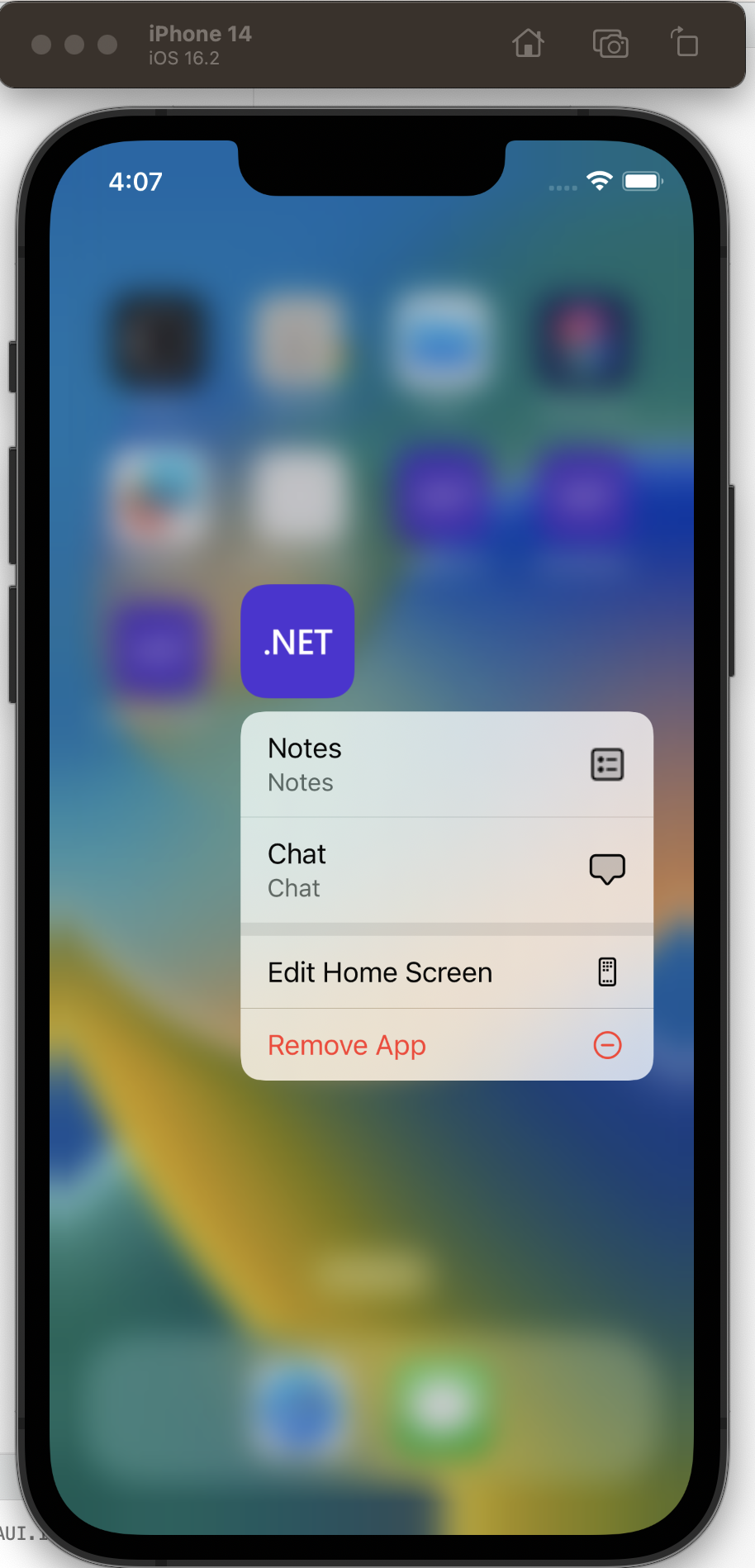
Confirming Android behavior and adding iOS analysis
.ConfigureEssentials
    (
        essentials =>
        {
            essentials
                .AddAppAction
                    (
                        "notes",
                        "Notes",
                        "Notes",
                        "si_ballot.png"	// will not be rendered
                    )
                .AddAppAction
                    (
                        "chat",
                        "Chat",
                        "Chat",
                        "si_chat"		// rendered
                    )
                .OnAppAction(App.HandleAppActions);
        }
    );
On Android icons with extension will NOT be rendered:

On iOS icons with extension will be rendered: