

 dotnet
App Icon for iOS is not created when app icon is not a multiplier by 8
Description
Submitting my IPA file to App Store Connect failed with "Missing App Icon" error. See https://github.com/dotnet/maui/discussions/9035 for more details. I figured it the reason was that my app icon size was not a multiplier by 8. Note: I am NOT speaking about the app icon on the iOS homescreen, I am speaking about the 1024x1024 px PNG app icon that Apple's App Store requires.
SVG size was:
<svg width="437" height="437" ...</svg>
changing it to:
<svg width="440" height="440" ...</svg>
Fixed the problem. I'm reporting this because there should be a build error when publishing for iOS letting the developer know. It took me a few days to find and fix the issue.
Steps to Reproduce
- Create MAUI project
- Add an app icon with the size of 437x437
- Publish to IPA
- Add IPA file to Transporter app and click on "Validate"
Version with bug
6.0.408 (current)
Last version that worked well
Unknown/Other
Affected platforms
iOS
Affected platform versions
iOS
Did you find any workaround?
Making sure that the app icon is a multiplier of 8.
Relevant log output
No response

Thanks. That worked for me as well. Made height and width match on the App icon svg file and divisible by 8.

We've moved this issue to the Backlog milestone. This means that it is not going to be worked on for the coming release. We will reassess the backlog following the current release and consider this item at that time. To learn more about our issue management process and to have better expectation regarding different types of issues you can read our Triage Process.

Very interesting. I did not know that.
Resizetizer (our image generation magic) does this and uses a 1024x1024 image: https://github.com/dotnet/maui/blob/main/src/SingleProject/Resizetizer/src/DpiPath.cs#L110
I wonder if this is still an image and was a result of the errors in the calculations of the physical image size and used the input image size.

Hi @Symbai. We have added the "s/try-latest-version" label to this issue, which indicates that we'd like you to try and reproduce this issue on the latest available public version. This can happen because we think that this issue was fixed in a version that has just been released, or the information provided by you indicates that you might be working with an older version.
You can install the latest version by installing the latest Visual Studio (Preview) with the .NET MAUI workload installed. If the issue still persists, please let us know with any additional details and ideally a reproduction project provided through a GitHub repository.
This issue will be closed automatically in 7 days if we do not hear back from you by then - please feel free to re-open it if you come back to this issue after that time.
@Symbai mostly because I didn't get a chance to re-review this issue on Friday :)
What version of .NET and MAUI did you test on? .NET 7.0.100?
@rsbepvb @Symbai can you also test with setting the BaseSize to a multiple of 8? So you won't need to touch the SVG contents, just the csproj.
Does anyone have any documentation on this magical number? @jamesmontemagno I know you might have some Apple apps, did you ever hit a not-a-multiple-of-8 error in the Apple tools?
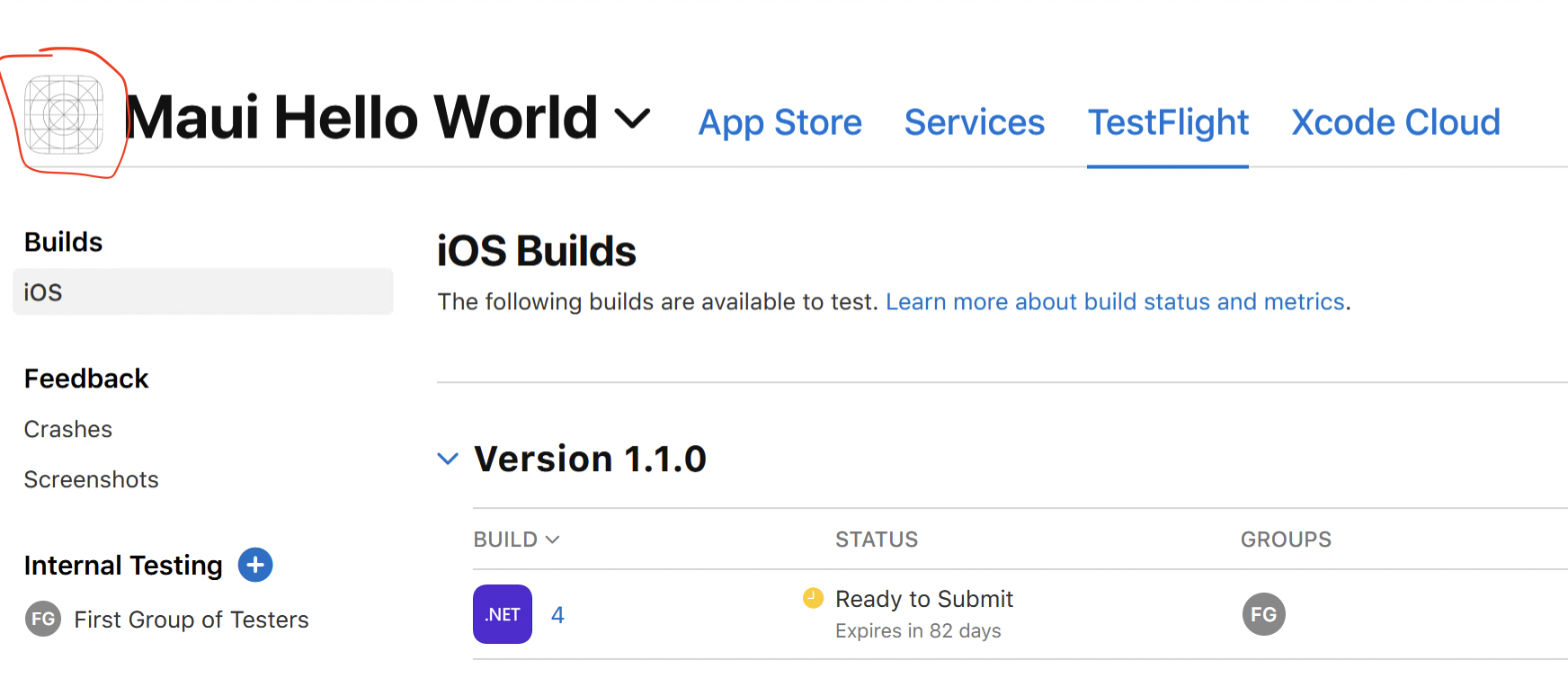
I've uploaded the maui template app into AppStore. It's missing the icon even though it's 456x456... Can someone advise if this is the same problem or I should do it another way?

App icon is missing is one of the symptoms, yes but it can also be caused by something else. You shouldn't be able to submit it to the app store at all if you have THIS issue. Im using Transporter app from Apple on MacOS which check your IPA file before you can submit it. With an invalid icon, the app icon in Transporter is blank just like on your screen but Transporter check also fails with "Missing App Icon".
I am not able to reproduce this at all with .NET 7.0 GA. Can you attach a binlog of this project?
And then can you zip up the "obj\Debug\net7.0-ios\iossimulator-x64\resizetizer" folder and reply here.
As far as I can tell, no matter the image size (I have an explicit 437x437 SVG image), it always generates a 1024x1024 itunes artwork.
I have the same behavior, in the simulator there is a file 'appiconItunesArtwork.png', size 1024x1024, but in the appstore there is only an white icon. Is there any workaround for this? We have to deploy to the appstore at the end of January 2023, and time is running ...

App icon is missing is one of the symptoms, yes but it can also be caused by something else. You shouldn't be able to submit it to the app store at all if you have THIS issue. Im using Transporter app from Apple on MacOS which check your IPA file before you can submit it. With an invalid icon, the app icon in Transporter is blank just like on your screen but Transporter check also fails with "
Missing App Icon".
@hattmann can you try this?
I am not able to reproduce this at all with .NET 7.0 GA. Can you attach a binlog of this project?
And then can you zip up the "obj\Debug\net7.0-ios\iossimulator-x64\resizetizer" folder and reply here.
As far as I can tell, no matter the image size (I have an explicit 437x437 SVG image), it always generates a 1024x1024 itunes artwork.
@hattmann can you try with my sample app and see if the system finds my icons? Or at least zip up the resizetizer folder so I can check things.
If the image is there but not on apple's side then I am not sure. The images are all set exactly.
May be related to https://github.com/dotnet/maui/issues/11124
Do you have a transparent icon maybe?
@mattleibow Has this been fixed? I am trying to release a new (blank slate) maui project and set the base size from <MauiImage Update="Resources\Images\dotnet_bot.svg" BaseSize="168,208" /> to 440,440 before I did this, I had my svg icon set to 440 as well, tried doing both on different submissions and they still do not work.
<MauiIcon Include="Resources\AppIcon\appicon.svg" ForegroundFile="Resources\AppIcon\appiconfg.svg" Color="#512BD4" />.
So this happens whenever I try to delete bin,obj folders and do a clean, rebuild, before doing a dotnet publish.
However, submission does work whenever I just delete bin,obj folders and do a clean before doing dotnet publish straightahead without doing a rebuild, but this causes a crash.
Asset validation failed (90023)
Missing required icon file. The bundle does not contain an app icon for iPad of exactly '167x167' pixels, in .png format for iOS versions supporting iPad Pro. To support older operating systems, the icon may be required in the bundle outside of an asset catalog. Make sure the Info.plist file includes appropriate entries referencing the file. See https://developer.apple.com/documentation/bundleresources/information_property_list/user_interface (ID: cc0e9e1c-15a2-446d-b713-ece343737773)

Asset validation failed (90022)
Missing required icon file. The bundle does not contain an app icon for iPhone / iPod Touch of exactly '120x120' pixels, in .png format for iOS versions >= 10.0. To support older versions of iOS, the icon may be required in the bundle outside of an asset catalog. Make sure the Info.plist file includes appropriate entries referencing the file. See https://developer.apple.com/documentation/bundleresources/information_property_list/user_interface (ID: 84d2fe54-f093-4d5f-b59f-db08307db13a)

Asset validation failed (90713)
Missing Info.plist value. A value for the Info.plist key 'CFBundleIconName' is missing in the bundle 'com.companyname.companyname'. Apps built with iOS 11 or later SDK must supply app icons in an asset catalog and must also provide a value for this Info.plist key. For more information see http://help.apple.com/xcode/mac/current/#/dev10510b1f7. (ID: 53003ab5-242a-4321-be04-c4d40beda519)

Asset validation failed (90023)
Missing required icon file. The bundle does not contain an app icon for iPad of exactly '152x152' pixels, in .png format for iOS versions >= 10.0. To support older operating systems, the icon may be required in the bundle outside of an asset catalog. Make sure the Info.plist file includes appropriate entries referencing the file. See https://developer.apple.com/documentation/bundleresources/information_property_list/user_interface (ID: f8ce4312-3093-44ab-909f-527f3c7b86e3)
Checked resizetizer and icons are all in there.. Not sure what's wrong..
All was done in VS Mac Preview 6 with 7.0.100 workload. Just an update created another release using the app https://github.com/dotnet/maui/issues/9067#issuecomment-1314265069 and it did not worked

First, Please try install lastest version of Svg.Skia
dotnet add package Svg.Skia --version 1.0.0.3
And, try build ipa from command line. https://learn.microsoft.com/en-us/dotnet/maui/ios/deployment/publish-cli#publish-an-ios-app-from-windows

Hi @Symbai. We have added the "s/try-latest-version" label to this issue, which indicates that we'd like you to try and reproduce this issue on the latest available public version. This can happen because we think that this issue was fixed in a version that has just been released, or the information provided by you indicates that you might be working with an older version.
You can install the latest version by installing the latest Visual Studio (Preview) with the .NET MAUI workload installed. If the issue still persists, please let us know with any additional details and ideally a reproduction project provided through a GitHub repository.
This issue will be closed automatically in 7 days if we do not hear back from you by then - please feel free to re-open it if you come back to this issue after that time.
Verified this issue with Visual Studio Enterprise 17.9.0 Preview 1.1. Not repro this issue.

Verified this issue with Visual Studio Enterprise 17.9.0 Preview 1.1. Not repro this issue.
Is this also the case with Version 17.8.3 of Enterprise? because i am having similar issue's where i am missing icons files of sizes 167, 150, 120 pixels

Hello, same here with building and deploying to the app store. When pushing a debug to an iPhone 15 Pro running iOS 17.2 we don't see any app icon. Whereas when checking the obj\Debug\net7.0-ios\ios-arm64\resizetizer\r folder we see the icon's just fine.
in this case we use a PNG instead of an SVG with a size of 640x640
<ItemGroup>
	<!-- App Icon -->
	<MauiIcon Include="Resources\AppIcon\appicondsv.png"
			  ForegroundFile="Resources\AppIcon\appicondsv.png"
			  BaseSize="640,640"
			  Color="#B41D43"/>

	<!-- Splash Screen -->
	<MauiSplashScreen Include="Resources\Splash\splash.png" />

	<!-- Images -->
	<MauiImage Include="Resources\Images\*" />
	<MauiImage Update="Resources\Images\dotnet_bot.svg" BaseSize="168,208" />

	<!-- Custom Fonts -->
	<MauiFont Include="Resources\Fonts\*" />

	<!-- Raw Assets (also remove the "Resources\Raw" prefix) -->
	<MauiAsset Include="Resources\Raw\**" LogicalName="%(RecursiveDir)%(Filename)%(Extension)" />
</ItemGroup>
After cleaning the solution, project and building +deployig it still doesn't show.
Uploader messages:
Asset validation failed Missing Info.plist value. A value for the Info.plist key 'CFBundleIconName' is missing in the bundle 'eu.cande.dsvbasisadministratie'. Apps built with iOS 11 or later SDK must supply app icons in an asset catalog and must also provide a value for this Info.plist key. For more information see http://help.apple.com/xcode/mac/current/#/dev10510b1f7. (ID: 1f282593-8063-44d9-ac05-f7684053a104)
Asset validation failed Missing required icon file. The bundle does not contain an app icon f or iPhone / iPod Touch of exactly '120x120' pixels, in .png format for i OS versions >= 10.0. To support older versions of iOS, the icon may be required in the bundle outside of an asset catalog. Make sure the Info.plist file includes appropriate entries referencing the file. See https://developer.apple.com/documentation/bundleresources/information_property_list/user_interface (ID: 02eb7159-c738-4bb7-b75f-b88761e5530b)
VS version: Microsoft Visual Studio Community 2022 (64-bit) - Current Version 17.8.2 Microsoft Visual Studio Community 2022 Version 17.8.2 VisualStudio.17.Release/17.8.2+34322.80 Microsoft .NET Framework Version 4.8.09037
Installed Version: Community
Visual C++ 2022 00482-90000-00000-AA065 Microsoft Visual C++ 2022
Arduino IDE for Visual Studio by Visual Micro 22.0 Visual Micro is an Arduino Compatible IDE for Visual Studio 2022. For more information and forum please visit www.visualmicro.com.
ASP.NET and Web Tools 17.8.358.6298 ASP.NET and Web Tools
Azure App Service Tools v3.0.0 17.8.358.6298 Azure App Service Tools v3.0.0
Azure Functions and Web Jobs Tools 17.8.358.6298 Azure Functions and Web Jobs Tools
C# Tools 4.8.0-7.23572.1+7b75981cf3bd520b86ec4ed00ec156c8bc48e4eb C# components used in the IDE. Depending on your project type and settings, a different version of the compiler may be used.
Common Azure Tools 1.10 Provides common services for use by Azure Mobile Services and Microsoft Azure Tools.
DevExpress Reporting Extension 1.4 A Visual Studio extension that invokes the Report Designer editor for report definition VSREPX files.
DevExpress Reporting Tools Extension 1.0 Extends Visual Studio with tools required for the Report Designer editor.
DevExpress VSDesigner NETFramework Package 1.0 A Visual Studio extension that invokes the Report and Dashboard designer editors.
DevExpress.DeploymentTool 1.0 A useful tool for deploying DevExpress assemblies.
Extensibility Message Bus 1.4.39 (main@e8108eb) Provides common messaging-based MEF services for loosely coupled Visual Studio extension components communication and integration.
Linux Core Dump Debugging 1.0.9.34309 Enables debugging of Linux core dumps.
Microsoft JVM Debugger 1.0 Provides support for connecting the Visual Studio debugger to JDWP compatible Java Virtual Machines
Mono Debugging for Visual Studio 17.8.17 (957fbed) Support for debugging Mono processes with Visual Studio.
NuGet Package Manager 6.8.0 NuGet Package Manager in Visual Studio. For more information about NuGet, visit https://docs.nuget.org/
Razor (ASP.NET Core) 17.8.3.2353105+f0a326f3e15b2370371693a76fd379635387c74d Provides languages services for ASP.NET Core Razor.
SQL Server Data Tools 17.8.119.0 Microsoft SQL Server Data Tools
Syncfusion .NET MAUI Template Studio 23.2.4 Provides project templates for creating an .NET MAUI Application using Syncfusion Maui components.
Syncfusion .NET MAUI Toolbox 23.2.4 Syncfusion Essential Studio for .NET MAUI Toolbox Visual Studio extension.
Syncfusion ASP.NET Core Project Templates 23.2.4 Provides project templates for creating an ASP.NET Core Web Application using Syncfusion ASP.NET Core components.
Syncfusion ASP.NET MVC Project Templates 23.2.4 Provides project templates for creating ASP.NET MVC Web Applications using Syncfusion components.
Syncfusion Blazor Code Generator 23.2.4 Insert Syncfusion components code snippet in the existing razor file of Blazor application
Syncfusion Blazor Template Studio 23.2.4 Provides project templates for creating an Blazor Application using Syncfusion Blazor components.
Syncfusion Essential JS1 Web Conversion and Migration 20.4.0.38 Converts and migrates a web project into a Syncfusion Essential JS1 web project.
Syncfusion Reference Manager 23.2.4 A useful add-in for adding and migrating Syncfusion Assembly References for Windows Forms, WPF, and Silverlight projects.
Syncfusion UWP Project Templates 23.2.4 Project to create an Universal Windows Application using Syncfusion Products.
Syncfusion.VSExtension.Troubleshooter 23.2.4 Add-in for Troubleshooting the Syncfusion projects.
Syncfusion.WindowsForms.Package 23.2.4 Provides Item/Project Templates to add Syncfusion Windows Forms Item/Project along with corresponding configurations.
SyncfusionMenu Extension 23.2.4 SyncfusionMenu Visual Studio Extension Detailed Info
Test Adapter for Boost.Test 1.0 Enables Visual Studio's testing tools with unit tests written for Boost.Test. The use terms and Third Party Notices are available in the extension installation directory.
Test Adapter for Google Test 1.0 Enables Visual Studio's testing tools with unit tests written for Google Test. The use terms and Third Party Notices are available in the extension installation directory.
TypeScript Tools 17.0.20920.2001 TypeScript Tools for Microsoft Visual Studio
Visual Basic Tools 4.8.0-7.23572.1+7b75981cf3bd520b86ec4ed00ec156c8bc48e4eb Visual Basic components used in the IDE. Depending on your project type and settings, a different version of the compiler may be used.
Visual C++ for Linux Development 1.0.9.34309 Visual C++ for Linux Development
Visual F# Tools 17.8.0-beta.23475.2+10f956e631a1efc0f7f5e49c626c494cd32b1f50 Microsoft Visual F# Tools
Visual Studio IntelliCode 2.2 AI-assisted development for Visual Studio.
VisualStudio.DeviceLog 1.0 Information about my package
VisualStudio.Mac 1.0 Mac Extension for Visual Studio
VSPackage Extension 1.0 VSPackage Visual Studio Extension Detailed Info
Xamarin 17.8.0.155 (d17-8@7042beb) Visual Studio extension to enable development for Xamarin.iOS and Xamarin.Android.
Xamarin Designer 17.8.3.6 (remotes/origin/d17-8@eccf46a291) Visual Studio extension to enable Xamarin Designer tools in Visual Studio.
Xamarin Templates 17.8.16 (830b56a) Templates for building iOS, Android, and Windows apps with Xamarin and Xamarin.Forms.
Xamarin.Android SDK 13.2.2.0 (d17-5/45b0e14) Xamarin.Android Reference Assemblies and MSBuild support. Mono: d9a6e87 Java.Interop: xamarin/java.interop/d17-5@149d70fe SQLite: xamarin/sqlite/3.40.1@68c69d8 Xamarin.Android Tools: xamarin/xamarin-android-tools/d17-5@ca1552d
Xamarin.iOS and Xamarin.Mac SDK 16.4.0.23 (9defd91b3) Xamarin.iOS and Xamarin.Mac Reference Assemblies and MSBuild support.
