

 dotnet
Can't set the app name in MacCatalyst project for macOS
Description
I would like to set my app name that macOS uses in the About/Hide/Quit Menu and in the dock.
I can set CFBundleDisplayName and CFBundleName in Platforms\MacCatalyst\Info.plist and that name is used in the About/Hide/Quit Menu.
But it is not used in the tooltip that appears on mouse over the app icon in the bottom dock in macOS. The project name is displayed there.
Steps to Reproduce
- Create a MAUI project, name it
MyApp, for example - Set the application title to: "My app"
- Run it on macOS
- The value of
<ApplicationTitle>My app</ApplicationTitle>should be used in macOS About/Hide/Quit Menu and in the tooltip over the app icon in macOS bottom dock, but it is not.MyAppis used instead.
Optional - add this to Platforms\MacCatalyst\Info.plist:
	<key>CFBundleDisplayName</key>
	<string>My app</string>
	<key>CFBundleName</key>
	<string>My app</string>
My app is now used in About/Hide/Quit Menu, but not in the tooltip over the app icon in macOS bottom dock.
Link to public reproduction project repository
https://github.com/Jinjinov/MauiBug
Version with bug
7.0 (current)
Last version that worked well
Unknown/Other
Affected platforms
macOS
Affected platform versions
macOS Ventura 13.0, macOS Ventura 13.1
Did you find any workaround?
No response
Relevant log output
No response


We've moved this issue to the Backlog milestone. This means that it is not going to be worked on for the coming release. We will reassess the backlog following the current release and consider this item at that time. To learn more about our issue management process and to have better expectation regarding different types of issues you can read our Triage Process.

We're facing this too! with the workaround(modify info.plist) we just can change the application name inside the app like the window title!
The tooltip you're saying is the name of execute file of the application! and in out most projects we name the maui project PROJECTNAME.Client.App and the result in macOS will be PROJECTNAME.Client.App.app and because of this App.app at the end of it, it will not show up in the launchpad!
and because of all that we did a very dangerous thing to fix it and that's changing the csproject's AssemblyName!
I hope this issue will be fixed soon it's just one the basic and high priority stuffs!!!

@PureWeen Does your PR fixes the application file name? (the .app file)
we did a very dangerous thing to fix it and that's changing the csproject's AssemblyName!
I do not believe that is a dangerous thing. It is a feature of .NET to have a csproj and assembly name different. We use it all over the place in the maui repo.
@rolfbjarne is there a way to control the output app name? Or is rename the output file enough (either via the AssemblyName or like in Finder)?
With regards to changing the app name:
I've taken a look at this, and in short, and I believe the issue with the app name in MacCatalyst lays with Apple. The expected behavior from iOS is when you change the Bundle Display Name, or the CFBundleDisplayName, in the Info.Plist, it will alter the name of the app in the HomeScreen. This is supposed to occur with MacCatalyst as well.
If you create a new XCode project, and change the Display Name (CFBundleDisplayName) in the build settings, only the names in the Title bar and Menu bar will change. Using PListBuddy, I can see that the CFDisplayName is being set in the generated info.plist:

When I look at the info.plist of a new maui app, I see that the CFBundleDisplayName is being correctly output after changing the Application Title in the Project Properties in Visual Studio.
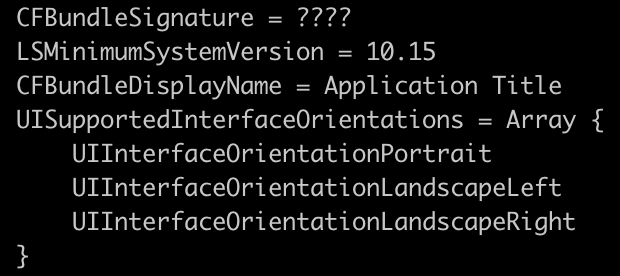
The workaround for XCode is to change the Program Name in the Packaging settings, which would be similar to just renaming the assembly in Visual Studio.
I plan to file a Feedback ticket with Apple to address this issue with MacCatalyst.
