

 dotnet
CollectionView slow/jittering scroll
Description
When there is a complex layout Scroll does not work efficiently.
Steps to Reproduce
I have this layout, as you can see I have used the recommended bindings OneTime and CompressedLayout.IsHeadless="True".
ItemSizingStrategy has to be in mode: MeasureAllItems. Each element can have a different height.
There are like 30-40 elements, the Scroll is unacceptable, both in debug/release mode. Thus, the application cannot be released to production.
I don't know if I can improve my design, but i can't get it. Any help is welcome.
Link to public reproduction project repository
https://github.com/angelru/CvSlowJittering
Version with bug
7.0 (current)
Last version that worked well
Unknown/Other
Affected platforms
Android
Affected platform versions
Android 12
Did you find any workaround?
No response
Relevant log output
No response

have you tried compiling using AOT?
<RunAOTCompilation>true</RunAOTCompilation>
<AndroidEnableProfiledAot>false</AndroidEnableProfiledAot>
you app size will be larger but AOT should fix performance issues

have you tried compiling using AOT?
<RunAOTCompilation>true</RunAOTCompilation>
<AndroidEnableProfiledAot>false</AndroidEnableProfiledAot>
you app size will be larger but AOT should fix performance issues
the improvement in Scroll is very small, it's still very, very inefficient. Also, often when I'm scrolling all the time, there comes a time when the application becomes slower and more unstable.

@angelru Can you try with the same item height if the scroll is smooth
the same issue

Hi @angelru. We have added the "s/needs-repro" label to this issue, which indicates that we require steps and sample code to reproduce the issue before we can take further action. Please try to create a minimal sample project/solution or code samples which reproduce the issue, ideally as a GitHub repo that we can clone. See more details about creating repros here: https://github.com/dotnet/maui/blob/main/.github/repro.md
This issue will be closed automatically in 7 days if we do not hear back from you by then - please feel free to re-open it if you come back to this issue after that time.

@jsuarezruiz I already put the repository in the problem description https://github.com/angelru/CvSlowJittering
We've moved this issue to the Backlog milestone. This means that it is not going to be worked on for the coming release. We will reassess the backlog following the current release and consider this item at that time. To learn more about our issue management process and to have better expectation regarding different types of issues you can read our Triage Process.
@angelru Yes, I tested on Samsung Galaxy Tab Active 2 - Android 9. The collection View scroll is laggy, very very slow @jsuarezruiz
I had the same problem with a "jittery" collection view.
A simple list page structure with a custom "toolbar" control at the top and a vertical collection view below. The toolbar buttons are represented by a custom button control, which i use all over the place. The button control itself is based on a grid with some nested grids for background, overlays and text.
Nothing very complex, 5 buttons and a collection view. But scrolling through the collection view felt very strange, especially when reaching the top or bottom of the view.
I spent HOURS, to try every possible settings combination on the collection view and bindings, with no success. Then i switched to my custom toolbar and button controls, replacing inner controls (i.e. based on SkiaSharp) with simpler representations. Also with no success.
At the end of the day, i added one line to the outer container grid of my custom button control. HeightRequest="40". Now the scrolling behaviour of the collection view is as smooth as expected.
It's interesting, that the reason was not the collection view, but a simple button control somewhere on the same page.
I tried, to extract the issue to a simpler demo project, but unfortunately i ran out of time.

I had the same problem with a "jittery" collection view.
A simple list page structure with a custom "toolbar" control at the top and a vertical collection view below. The toolbar buttons are represented by a custom button control, which i use all over the place. The button control itself is based on a grid with some nested grids for background, overlays and text.
Nothing very complex, 5 buttons and a collection view. But scrolling through the collection view felt very strange, especially when reaching the top or bottom of the view.
I spent HOURS, to try every possible settings combination on the collection view and bindings, with no success. Then i switched to my custom toolbar and button controls, replacing inner controls (i.e. based on SkiaSharp) with simpler representations. Also with no success.
At the end of the day, i added one line to the outer container grid of my custom button control. HeightRequest="40". Now the scrolling behaviour of the collection view is as smooth as expected.
It's interesting, that the reason was not the collection view, but a simple button control somewhere on the same page.
I tried, to extract the issue to a simpler demo project, but unfortunately i ran out of time.
thanks for this information, if you run my provided sample you can see what happens, I haven't found a way to fix it yet.
I increased my MONO_GC_PARAMS=nursery-size=128m and place that in a file compiled it as AndroidEnvironment, and my speed issues seem to have resolved itself.
I increased my MONO_GC_PARAMS=nursery-size=128m and place that in a file compiled it as AndroidEnvironment, and my speed issues seem to have resolved itself.
did you try my sample?
@angelru I agree that CollectionView and StackLayout performance can leave much to be desired, especially on iOS and Catalyst. However, debugging your application, I think your primary issue may be how you laid out your CollectionView.

Your CollectionView includes a Bounded VerticalStackLayout, which itself includes its own CollectionView. If you look at how this runs on iOS, these nested views are multiple UICollectionViews embedded inside each other. It "works" (in that, yes, it compiles and runs) but it would never be performant. Nested UICollectionViews are a bad idea.

Looking a breakdown of the UI in Reveal, every time you scroll down the page, the CollectionViews alone are causing each cell to cause the previous one to eject from memory. Removing that nested CollectionView and the scrolling is much improved. While still not great, it's at least usable. Removing the BindableLayout for VerticalStackLayout and replacing it with a grid further improves the performance.
(I know I'm talking about iOS when I think everyone else here is talking about Android, but my guess if you look at the underlying views under it would similar with whatever controls are being used to render it.)
TL;DR I agree those views have performance issues, but IMO, even if it were working well, your code would be problematic.

@angelru I agree that CollectionView and StackLayout performance can leave much to be desired, especially on iOS and Catalyst. However, debugging your application, I think your primary issue may be how you laid out your CollectionView.
Your CollectionView includes a Bounded VerticalStackLayout, which itself includes its own CollectionView. If you look at how this runs on iOS, these nested views are multiple UICollectionViews embedded inside each other. It "works" (in that, yes, it compiles and runs) but it would never be performant. Nested UICollectionViews are a bad idea.
Looking a breakdown of the UI in Reveal, every time you scroll down the page, the CollectionViews alone are causing each cell to cause the previous one to eject from memory. Removing that nested CollectionView and the scrolling is much improved. While still not great, it's at least usable. Removing the BindableLayout for VerticalStackLayout and replacing it with a grid further improves the performance.
(I know I'm talking about iOS when I think everyone else here is talking about Android, but my guess if you look at the underlying views under it would similar with whatever controls are being used to render it.)
TL;DR I agree those views have performance issues, but IMO, even if it were working well, your code would be problematic.
but I need the bindable layouts, do you suggest that I change them to Grid BindableLayout ?
@angelru "BindableLayout" in it of itself is not bad, it's how you're using it.
You have a VerticalStackLayout with a BindableLayout of CollectionViews, which itself is inside a CollectionView. That is causing your CollectionView items to unload and reload from memory every time you scroll. In general, AFAIK (@hartez may know more) it's preferred to have one CollectionView, max, per page.
You could refactor out that nested CollectionView with another BindableLayout (StackView, Grid, etc) and try with that and see what it does? It probably will still not be great (You can see the other issues filed for CollectionView performance, it does have issues) but it should be at least usable enough to keep working on your app.
@angelru "BindableLayout" in it of itself is not bad, it's how you're using it.
You have a VerticalStackLayout with a BindableLayout of CollectionViews, which itself is inside a CollectionView. That is causing your CollectionView items to unload and reload from memory every time you scroll. In general, AFAIK (@hartez may know more) it's preferred to have one CollectionView, max, per page.
You could refactor out that nested CollectionView with another BindableLayout (StackView, Grid, etc) and try with that and see what it does? It probably will still not be great (You can see the other issues filed for CollectionView performance, it does have issues) but it should be at least usable enough to keep working on your app.
I can test it if, I needed that horizontal scrolling CollectionView. Although the problem is with the vertical scrolling of the first CollectionView.
The reason the vertical scrolling is bad is because of the horizontal scrolling collectionview(s) nested inside it. Your test app is unloading and reloading entire cells every time you scroll down because it needs to generate those views, which are expensive to make. As I wrote, and someone on the MAUI Team can correct me, you should limit yourself to one collectionview per page, and if you find yourself generating multiple then you should look into alternative layouts.
The reason the vertical scrolling is bad is because of the horizontal scrolling collectionview(s) nested inside it. Your test app is unloading and reloading entire cells every time you scroll down because it needs to generate those views, which are expensive to make. As I wrote, and someone on the MAUI Team can correct me, you should limit yourself to one collectionview per page, and if you find yourself generating multiple then you should look into alternative layouts.
It improves if I remove the horizontal CollectionView, but when I add it BindableLayout whitout ScrollView it already starts to go very slow to the point of crashing at some point, this on Android. I haven't tried it on iOS.
@angelru I tried your sample on Windows, and it does seem like memory just grows as you scroll:

Initial issue might be related to the usage of <DataTrigger> inside a <DataTemplate>?
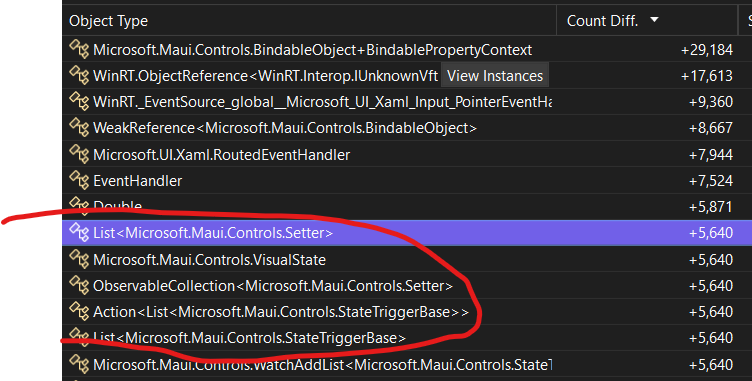
Let me investigate some more next week, these usually take a while to track down but this one seems interesting/impactful to fix.

@jonathanpeppers On Android and iOS, the app almost becomes unusable. Glad to hear of that discovery, although the Horizontal BindableLayout should be covered by a ScrollView.
I still think we should be able to use nested CollectionViews, as long as one is vertical and the other is horizontal.
@angelru The memory leak and the general performance issues you are having are not, strictly speaking, the same. As in, you can cause that memory leak outside of your sample.
In particular, on iOS, the way MAUI currently implements CollectionView with UICollectionView will likely always produce poor performance until it implements UICollectionViewCompositionalLayout or some kind of compositional layout system for these types of complex controls.
Having said that, this is an excellent question for @hartez if what you're trying to do is a supported usecase.
@angelru The memory leak and the general performance issues you are having are not, strictly speaking, the same. As in, you can cause that memory leak outside of your sample.
In particular, on iOS, the way MAUI currently implements CollectionView with
UICollectionViewwill likely always produce poor performance until it implements UICollectionViewCompositionalLayout or some kind of compositional layout system for these types of complex controls.Having said that, this is an excellent question for @hartez if what you're trying to do is a supported usecase.
I understand, I understood that you could use nested CollectionView as long as it doesn't "interfere with scrolling". That is, have a vertical CollectionView and another Horizontal within it, or several horizontal ones. But never more than one vertical. To make a layout like Play Store, there is a vertical scroll and several horizontal (Popular Apps, recommended for you..)
In the context of this issue, i have a question about the available tools for analyzing memory leaks on a Mac for iOS devices.
I got dotnet-trace working, but to be honest, with a quite big application, the amount of data produced is a little bit overwhelming.
dotnet-counters should maybe the better tool, but a could not get it working.
At least, i could log data from System.GC inside the application. Are these data reliable and comparable with the results from dotnet-counters?
Many thanks.
Generally speaking, I don't recommend using nested CollectionViews. The implementation of CollectionView in Forms was limited by the supported platforms at the time (e.g., iOS 9); the current implementation in MAUI.Controls is a direct port of that and isn't using all the most modern options (compositional layout, etc.).
That said, nesting CollectionViews is specifically a feature that we allowed and touted in Forms (with the same disclaimers of "you can do this, but beware the performance implications"). So I think it's reasonable that we keep the performance of it at least close to par with Forms.
So, has anyone tried this same layout/structure on Forms?
Also, is anyone trying this against the latest bits in main? We've merged some layout performance changes for iOS in the past couple of months.

@hartez the latest sample above is reworked to use BindableLayout inside a CollectionView.
Is that the current suggested alternative? It also appears to be quite sluggish.
It depends on the number of items in the BindableLayouts. If there's 10,000 items in each one, then BindableLayout is not a good option. If it's like a dozen items, then I'd expect BindableLayout to be a better alternative.
If it's sluggish both ways, then there may be room for improvement.