

 dotnet
Cannot use Japanese text in window title if ExtendsContentIntoTitleBar is false (possibly Windows only)
Description
If ExtendsContentIntoTitleBar is false, Japanese text does not work in a window title.
I am also trying to set the title bar icon via a Windows SendMessage. This, not surprisingly, only works if ExtendsContentIntoTitleBar is false.
Steps to Reproduce
On windows, build and run the solution from the repro repository located at window-title-issue\MauiTest.sln
The value of the variable experiment in the WindowCreated function can be changed to show the behavior of different attempts to get the desired behavior
Link to public reproduction project repository
https://github.com/greemi01/maui-repro
Version with bug
7.0 (current)
Last version that worked well
Unknown/Other
Affected platforms
Windows, I was not able test on other platforms
Affected platform versions
Windows 10
Did you find any workaround?
No response
Relevant log output
No response

I think this is a bug in the Windows App SDK... The fact that ??? gets there and you are using the Title property makes me worry...
Can you open an issue https://github.com/microsoft/WindowsAppSDK and then add all the info they need.
Might be worth creating a File | New | WinUI3 app and seeing if it happens there too.
One you create the issue I will add the maui tags to get some nice priority on it.

Hi @greemi01. We have added the "s/needs-info" label to this issue, which indicates that we have an open question for you before we can take further action. This issue will be closed automatically in 7 days if we do not hear back from you by then - please feel free to re-open it if you come back to this issue after that time.

I made a simple WinUI3 app (added to the repro repository) The problem does not manifest.
       private void MainWindow_Activated(object sender, WindowActivatedEventArgs args)
        {
            Title = "hello world こんにちは";
        }
sets the title as expected
The WinUI3 example above is incorrect. The corrected example
        public MainWindow()
        {
            this.InitializeComponent();

            Title = "hello world こんにちは";
            ExtendsContentIntoTitleBar = false;
        }
does work as expected.
I also tried a simplified version of the original Maui example that does not use a WebView (added to the repro repository) and the problem still manifests.
I don't see how I can create a WindowsAppSDK at this time since I can only replicate it with Maui.
We've moved this issue to the Backlog milestone. This means that it is not going to be worked on for the coming release. We will reassess the backlog following the current release and consider this item at that time. To learn more about our issue management process and to have better expectation regarding different types of issues you can read our Triage Process.
@greemi01 I ran your example and it does work correctly for me
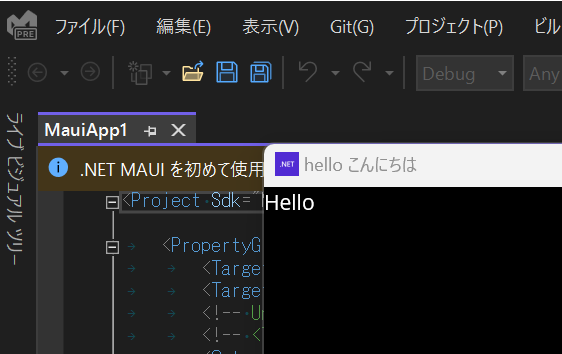
But I also have a fully ja-JP system and culture. What culture are you running under?

This is a machine with a US culture ... not a japanese one I'll try it on a ja-jp system
Hi. We tried it on a Japanese machine (must be installed from a Japanese ISO) ... we see Japanese ... but not text in other languages. Please, can you try this string:
test ÄÖöä фыва טוב かたかな a
We saw question marks for the Hebrew text. On an us-en machine, the Japanese (and other non European are in ???) I am wondering if there is some type of code-page issue. Perhaps things are not set to use Unicode throughout
Thanks
Verified this issue with Visual Studio Enterprise 17.7.0 Preview 4.0. Can repro on windows platform with sample project. https://github.com/greemi01/maui-repro
