
maui
 maui copied to clipboard
 dotnet
Toolbar items are affected from previous page on Android
Description
I have a page with three primary items and three secondary items:
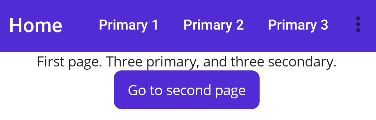
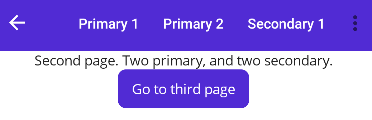
This page is correct. But when navigating to second page, there should be two primary and two secondaries, but instead there is three primaries:
And the third page should have one primary and one secondary items, but both are shown as primary:
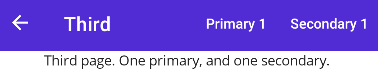
My guess is that the new page will have always has the same amount as primary items as the previous page.
This issue is only on Android. It works as expected on Windows at least.
Steps to Reproduce
- Create a new MAUI app.
- Update the main page:
<ContentPage xmlns="http://schemas.microsoft.com/dotnet/2021/maui"
             xmlns:x="http://schemas.microsoft.com/winfx/2009/xaml"
             x:Class="MauiIssues.MainPage">

    <ContentPage.ToolbarItems>
        <ToolbarItem Text="Primary 1" />
        <ToolbarItem Text="Primary 2" />
        <ToolbarItem Text="Primary 3" />
        <ToolbarItem Text="Secondary 1"
                     Order="Secondary" />
        <ToolbarItem Text="Secondary 2"
                     Order="Secondary" />
        <ToolbarItem Text="Secondary 3"
                     Order="Secondary" />
    </ContentPage.ToolbarItems>

    <VerticalStackLayout>
        <Label
            Text="First page. Three primary, and three secondary."
            VerticalOptions="Center"
            HorizontalOptions="Center" />

        <Button
            x:Name="ButtonNavigate"
            Text="Go to second page"
            Clicked="ButtonNavigate_Clicked"
            HorizontalOptions="Center" />

    </VerticalStackLayout>
</ContentPage>
public partial class MainPage : ContentPage
{
	public MainPage()
	{
		InitializeComponent();
	}

	private async void ButtonNavigate_Clicked(object sender, EventArgs e)
	{
        await Shell.Current.GoToAsync(nameof(SecondaryPage));
	}
}
- Add second page:
<ContentPage xmlns="http://schemas.microsoft.com/dotnet/2021/maui"
             xmlns:x="http://schemas.microsoft.com/winfx/2009/xaml"
             x:Class="MauiIssues.SecondaryPage"
             Title="Second">
    <ContentPage.ToolbarItems>
        <ToolbarItem Text="Primary 1" />
        <ToolbarItem Text="Primary 2" />
        <ToolbarItem Text="Secondary 1"
                     Order="Secondary" />
        <ToolbarItem Text="Secondary 2"
                     Order="Secondary" />
    </ContentPage.ToolbarItems>

    <VerticalStackLayout>
        <Label
            Text="Second page. Two primary, and two secondary."
            VerticalOptions="Center"
            HorizontalOptions="Center" />

        <Button
            x:Name="ButtonNavigate"
            Text="Go to third page"
            Clicked="ButtonNavigate_Clicked"
            HorizontalOptions="Center" />

    </VerticalStackLayout>
</ContentPage>
public partial class SecondaryPage : ContentPage
{
	public SecondaryPage()
	{
		InitializeComponent();
	}

	private async void ButtonNavigate_Clicked(object sender, EventArgs e)
	{
		await Shell.Current.GoToAsync(nameof(ThirdPage));
	}
}
- Add third page:
<ContentPage xmlns="http://schemas.microsoft.com/dotnet/2021/maui"
             xmlns:x="http://schemas.microsoft.com/winfx/2009/xaml"
             x:Class="MauiIssues.ThirdPage"
             Title="Third">
    <ContentPage.ToolbarItems>
        <ToolbarItem Text="Primary 1" />
        <ToolbarItem Text="Secondary 1"
                     Order="Secondary" />
    </ContentPage.ToolbarItems>

    <VerticalStackLayout>
        <Label
            Text="Third page. One primary, and one secondary."
            VerticalOptions="Center"
            HorizontalOptions="Center" />
    </VerticalStackLayout>
</ContentPage>
public partial class ThirdPage : ContentPage
{
	public ThirdPage()
	{
		InitializeComponent();
	}
}
Link to public reproduction project repository
https://github.com/pekspro/MauiIssues/tree/10452_Toolbar_items_are_affected_from_previous_page
Version with bug
6.0.486 (current)
Last version that worked well
Unknown/Other
Affected platforms
Android
Affected platform versions
Android 11
Did you find any workaround?
Adding the code below to an affected page does solve the problem. But there will be some flickering on navigation.
#if ANDROID
    protected override void OnNavigatedTo(NavigatedToEventArgs args)
    {
        base.OnNavigatedTo(args);

        var secondayToolBarItems = ToolbarItems.Where(x => x.Order == ToolbarItemOrder.Secondary).ToList();

        foreach (var item in secondayToolBarItems)
        {
            ToolbarItems.Remove(item);
        }

        Application.Current.Dispatcher.Dispatch(() =>
        {
            foreach (var item in secondayToolBarItems)
            {
                ToolbarItems.Add(item);
            }
        });
    }
#endif
Relevant log output
No response

We've moved this issue to the Backlog milestone. This means that it is not going to be worked on for the coming release. We will reassess the backlog following the current release and consider this item at that time. To learn more about our issue management process and to have better expectation regarding different types of issues you can read our Triage Process.

I understand the desire to prioritize certain issues, but this bug is causing significant inconvenience. Is there any way we can move this issue to a higher priority in the roadmap so it can be addressed as soon as possible?

@justcivah, I share your pain. If you upvote this issue might get more attention :-).
For me ToolbarItems is one of the hardest issues. For some days ago I tried to dynamically add and remove toolbar items. In debugging, the ToolbarItems list looked right but the UI wasn’t always in sync. Unfortunately, I haven’t found an easy way to solve this despite spending hours on that problem.
Just came across this issue too. Page 1 has a "+" sign (good), navigate to page 2 where it's supposed to be "edit" and it's still a "+" even though it uses the "edit" command I gave it.


Same problem! The child page's "Save" is displayed as the parents "Edit"-icon.
+1 on upvoting priority list

This issue exists for more than a year. https://github.com/dotnet/maui/issues/7823 and still no patch. A production ready code can't be fully ready because of this. Please take this issue in the priority list.

Have been doing some tests with the current main branch where cannot reproduce the issue.

@PureWeen I've seen some changes in some recent related PRs, could we go through this together?
Probably fixed by https://github.com/dotnet/maui/pull/12888, here https://github.com/dotnet/maui/pull/12888/files#diff-953760fc28b84326460f63e7ca19e18a6554962c946d851a456948b1b5db3e85R1509-R1516

I tested this on main/net8 as well and I'm not seeing it reproduced.
Fairly sure this was fixed by the changes made on this PR.
I've marked that PR as backport suggested so we can review the risks to backporting.
I've also added some additional workarounds you can try out on the description.
	public static MauiApp CreateMauiApp()
	{
		var builder = MauiApp.CreateBuilder();
		builder
			.UseMauiApp<App>()
			.ConfigureFonts(fonts =>
			{
				fonts.AddFont("OpenSans-Regular.ttf", "OpenSansRegular");
				fonts.AddFont("OpenSans-Semibold.ttf", "OpenSansSemibold");
			})
			.ConfigureMauiHandlers(handlers =>
			{
				bool fixing = false;
				ToolbarHandler.Mapper.ModifyMapping("ToolbarItems", (handler, toolbar, action) =>
				{
					if (Shell.Current is null)
					{
						action.Invoke(handler, toolbar);
						return;
					}

					if (fixing)
					{
						action?.Invoke(handler, toolbar);
					}
					else
					{
						fixing = true;
						var bar = (Shell.Current as IToolbarElement).Toolbar;
						bar.GetType().GetMethod("ApplyChanges", BindingFlags.Public | BindingFlags.NonPublic | BindingFlags.Instance | BindingFlags.FlattenHierarchy)
						.Invoke(bar, null);
						fixing = false;
					}
				});
			});
Or
Install this nuget https://www.nuget.org/packages/PureWeen.Maui.FixesAndWorkarounds
builder.ConfigureMauiWorkarounds();
/// or
builder.ConfigureShellWorkarounds();
