

 dotnet
VS 17.3.4 Breaks Android build with - Manifest file at 'obj\Debug\net6.0-android\android-arm\staticwebassets.build.json' not found
Description
Since updating to VS 17.3.4 I can't build any MAUI Android projects on my machine.
I have verified this on two devices running VS - before updating to VS 17.3.4 it was building ok - post update to 17.3.4 the build errors show for android.
I am unable to verify if this affects iOS but the build errors seem to point only at android.
This is happening on dotnet --version 6.0.401
Steps to Reproduce
- Update to VS 17.3.4
- Create a brand new MAUI project (I used MAUI blazor for testing)
- Attempt a build
- Fails
Link to public reproduction project repository
https://github.com/jordanwilcox/maui-build-error-android-17.3.4
Version with bug
SDK 6.0.401
Last version that worked well
SDK 6.0.400
Affected platforms
Android
Affected platform versions
All android platforms
Did you find any workaround?
Workaround found by @cupsos by changing global.json in solution to sdk version 6.0.400
Relevant log output
1>C:\Program Files\dotnet\sdk\6.0.401\Sdks\Microsoft.NET.Sdk.Razor\targets\Microsoft.NET.Sdk.Razor.StaticWebAssets.targets(680,7): error : Manifest file at 'obj\Debug\net6.0-android\android-arm\staticwebassets.build.json' not found.
1>C:\Program Files\dotnet\sdk\6.0.401\Sdks\Microsoft.NET.Sdk.Razor\targets\Microsoft.NET.Sdk.Razor.StaticWebAssets.targets(680,7): error : Manifest file at 'obj\Debug\net6.0-android\android-x86\staticwebassets.build.json' not found.
1>Done building project "MauiApp1.csproj" -- FAILED.
1>C:\Program Files\dotnet\sdk\6.0.401\Sdks\Microsoft.NET.Sdk.Razor\targets\Microsoft.NET.Sdk.Razor.StaticWebAssets.targets(680,7): error : Manifest file at 'obj\Debug\net6.0-android\android-x64\staticwebassets.build.json' not found.
1>Done building project "MauiApp1.csproj" -- FAILED.
1>C:\Program Files\dotnet\sdk\6.0.401\Sdks\Microsoft.NET.Sdk.Razor\targets\Microsoft.NET.Sdk.Razor.StaticWebAssets.targets(680,7): error : Manifest file at 'obj\Debug\net6.0-android\android-arm64\staticwebassets.build.json' not found.
1>Done building project "MauiApp1.csproj" -- FAILED.


Closing VS, deleting bin and obj folder works for the first build, then the error appears again

I'm on the same boat.
If you want to use VS 17.3.4 with MAUI now, try this.
- Install SDK 6.0.400
- Specify SDK version as
6.0.400at global.json
{
    "sdk": {
        "version": "6.0.400"
    }
}
Maybe SDK issue?
Edit:
Windows update KB5017915 pushing SDK 6.0.400 to 6.0.401 and will not work above.
Do not install KB5017915 if you want keep 6.0.400.
I just tried SDK 6.0.304 but no luck.
For who can't find 6.0.400


Same issue. Uninstalled 17.3.4 and installed 17.3.2 again and now it's totally bricked. Reinstalled 17.3.4, same errors again as @jordanwilcox stated in initial post.
Tried to install the 6.0.400 SDK and put it in the global.json but doesn't work.
Global.json was in the wrong directory for some reason. Works again now with 6.0.400
Also seems like it's rebuilding everytime you deploy to a local Android device. Takes ages to test things. Edit: fast deploy was automatically disabled after the update...

But SDK has been correctly updated from Visual Studio. No need to do separete setup

Despite the build errors, If I run the app, it works on Windows (Android not tested).


I'm on the same boat.
If you want to use VS 17.3.4 with MAUI now, try this.
- Install SDK 6.0.400
- Specify SDK version as
6.0.400at global.json{ "sdk": { "version": "6.0.400" } }Maybe SDK issue?
Helped me! Just needed to add the global.json in the solution folder to use the SDK version 6.0.400. Thanks.
I'm on the same boat.
If you want to use VS 17.3.4 with MAUI now, try this.
- Install SDK 6.0.400
- Specify SDK version as
6.0.400at global.json{ "sdk": { "version": "6.0.400" } }Maybe SDK issue?
Thank you this works for me too, I have updated the main ticket with this workaround to help others. 😊

It's already 6.0.401 :) if you follow the link !
Yeah, can't find 6.0.400, hope it gets fixed soon

Ok guys, for the meantime, I was able to make it to work, just did a search for file staticwebassets.build.json and found it at folder net6.0-android, so just copied it at folders where building was breaking and now it is working, cheers.

Ok guys, for the meantime, I was able to make it to work, just did a search for file staticwebassets.build.json and found it at folder net6.0-android, so just copied it at folders where building was breaking and now it is working, cheers.
I found the 6.0.400 SDK at a different website third-party but it still did not work for me. This workaround did, however.
Here's the link to the third-party site in case someone gets any use out of it: https://versionsof.net/core/6.0/6.0.8/

obj\Debug\net6.0-android\staticwebassets.build.json Copy obj\Debug\net6.0-android\android-arm64\staticwebassets.build.json

tried both the sdk and the file copy one. it still complains about missing dependencies now

The problem still remains!
What is this ridiculous game? No one from Microsoft has replied, please answer :/



EDIT: Actually, other errors appeared a few builds later, but removing then re-adding the Nugets helped getting the Solution to build Updating Solution's Nuget Packages is the only thing momentarily that worked for me. Notes:
- I was getting that Android error when trying to build for iOS Simulator!?
- Visual Studio for Mac (Preview)

this work for me, download & install sdk 6.0.400 https://download.visualstudio.microsoft.com/download/pr/9a1d2e89-d785-4493-aaf3-73864627a1ea/245bdfaa9c46b87acfb2afbd10ecb0d0/dotnet-sdk-6.0.400-win-x64.exe
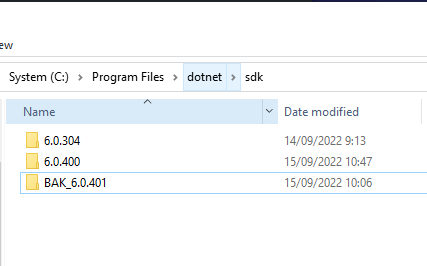
rename sdk 6.0.401 in C:\Program Files\dotnet\sdk

Updated nuget packages still won't work.
Seem to me that it's related to project dependencies or MAUI + Blazor.
i managed to build a MAUI project that is not MAUI + Blazor and don't have references to other projects even without Global.json modifications.
(i can see the line You are using a preview version of .NET so probably it's using 7.0.100-preview.7 which is the latest preview available in my machine)
this work for me, download & install sdk 6.0.400 https://download.visualstudio.microsoft.com/download/pr/9a1d2e89-d785-4493-aaf3-73864627a1ea/245bdfaa9c46b87acfb2afbd10ecb0d0/dotnet-sdk-6.0.400-win-x64.exe
rename sdk 6.0.401 in C:\Program Files\dotnet\sdk
Thanks, that fixed it for me !

Same issue. Trying to be productive with Maui/Blazor is tedious.
I renamed 6.0.401 sdk to bak_6.0.401 and am able to run without doing anything else.

@acxsasx Give it two years, all new MS products are sketchy at the start, look at .NET core for example.