

 dotnet
[Issue, ML.net CLI] 330GB csv file of data cause a OutOfMemoryException (1/2)
System Information (please complete the following information):
- OS & Version: Win8, latest version as of this bug entry
- ML.NET Version: 16.13.9
- .NET Version:6.0.303
Describe the bug When I start ML.net from CLI, I get a OutOfMemoryException I have 64GB Ram, I have a 330GB csv file of data.
I tried with To Reproduce Steps to reproduce the behavior:
- Generate a 330GB file with 4209 columns with random data
- open prompt
- type in command line: mlnet classification --train-time 75600 --name SampleClassification --log-file-path c:\Log_data.txt --has-header true --label-col 4209 --ignore-cols 0,1,4206,4207,4208 --dataset "c:\data.csv" --test-dataset "c:\test_data.csv"
- See error log at the end of this message with the OutOfMemoryException
Expected behavior I expect ml.net to continue and feed the data as it stream it, so there should be no OutOfMemoryException When I monitor the mknet.exe prices with task manager, the mlnet.exe process doesn't go high at all, like less than ~14GB. So something is not right as I have 64GB and also it shouldn't matter isn't it as .
Screenshots, Code, Sample Projects Additional context Here is the log Start Training start nni training Experiment output folder: C:\Users\W\AppData\Local\Temp\AutoML-NNI\Experiment-GET3JS System.FormatException: Parsing failed with an exception: Stream reading encountered exception ---> System.FormatException: Stream reading encountered exception ---> System.OutOfMemoryException: Exception of type 'System.OutOfMemoryException' was thrown. at System.Text.StringBuilder.ToString() at System.IO.StreamReader.ReadLine() at Microsoft.ML.Data.TextLoader.Cursor.LineReader.ThreadProc() --- End of inner exception stack trace --- at Microsoft.ML.Data.TextLoader.Cursor.LineReader.GetBatch() at Microsoft.ML.Data.TextLoader.Cursor.ParallelState.Parse(Int32 tid) at Microsoft.ML.Data.TextLoader.Cursor.ParallelState.ThreadProc(Object obj) --- End of inner exception stack trace --- at Microsoft.ML.Data.TextLoader.Cursor.ParseParallel(ParallelState state)+MoveNext() at Microsoft.ML.Data.TextLoader.Cursor.MoveNextCore() at Microsoft.ML.Data.RootCursorBase.MoveNext() at Microsoft.ML.ModelBuilder.AutoMLService.Proposer.Controller.CountRows(IDataView data, Int64 maxRows) in //src/Microsoft.ML.ModelBuilder.AutoMLService/Proposer/Controller.cs:line 174 at Microsoft.ML.ModelBuilder.AutoMLService.Proposer.Controller.Initialize() in //src/Microsoft.ML.ModelBuilder.AutoMLService/Proposer/Controller.cs:line 111 at Microsoft.ML.ModelBuilder.AutoMLService.Experiments.LocalAutoMLExperiment.ExecuteAsync(IDataView trainData, IDataView validateData, ColumnInformation columnInformation, CancellationToken cancellationToken, CancellationToken timeout) in //src/Microsoft.ML.ModelBuilder.AutoMLService/Experiments/LocalAutoMLExperiment.cs:line 138 at Microsoft.ML.ModelBuilder.AutoMLEngine.StartTrainingAsync(TrainingConfiguration config, PathConfiguration pathConfig, CancellationToken userCancellationToken) in //src/Microsoft.ML.ModelBuilder.AutoMLService/AutoMLEngineService/AutoMLEngine.cs:line 160 at Microsoft.ML.CLI.Runners.AutoMLRunner.ExecuteAsync() in //src/mlnet/Runners/AutoMLRunner.cs:line 88 at Microsoft.ML.CLI.Program.TrainAsync(TrainingConfiguration trainingConfiguration, PathConfiguration pathConfig, AutoMLServiceLogLevel logLevel) in //src/mlnet/Program.cs:line 348 at Microsoft.ML.CLI.Program.AutoMLCommandRunner(AutoMLCommand command, Boolean skipGenerateConsoleApp) in //src/mlnet/Program.cs:line 329 at Microsoft.ML.CLI.Program.<>c.<<CreateRootCommandLineBuilder>b__4_0>d.MoveNext() in //src/mlnet/Program.cs:line 89 --- End of stack trace from previous location --- at System.CommandLine.Invocation.CommandHandler.GetExitCodeAsync(Object value, InvocationContext context) at System.CommandLine.Invocation.ModelBindingCommandHandler.InvokeAsync(InvocationContext context) at System.CommandLine.Invocation.InvocationPipeline.<>c__DisplayClass4_0.<<BuildInvocationChain>b__0>d.MoveNext() --- End of stack trace from previous location --- at System.CommandLine.Builder.CommandLineBuilderExtensions.<>c__DisplayClass23_0.<<UseParseErrorReporting>b__0>d.MoveNext() --- End of stack trace from previous location --- at Microsoft.ML.CLI.Program.<>c__DisplayClass4_0.<<CreateRootCommandLineBuilder>b__9>d.MoveNext() in /_/src/mlnet/Program.cs:line 290 --- End of stack trace from previous location --- at System.CommandLine.Builder.CommandLineBuilderExtensions.<>c.<<UseSuggestDirective>b__24_0>d.MoveNext() --- End of stack trace from previous location --- at System.CommandLine.Builder.CommandLineBuilderExtensions.<>c__DisplayClass22_0.<<UseParseDirective>b__0>d.MoveNext() --- End of stack trace from previous location --- at System.CommandLine.Builder.CommandLineBuilderExtensions.<>c__DisplayClass11_0.<<UseDebugDirective>b__0>d.MoveNext() --- End of stack trace from previous location --- at System.CommandLine.Builder.CommandLineBuilderExtensions.<>c.<<RegisterWithDotnetSuggest>b__10_0>d.MoveNext() --- End of stack trace from previous location --- at System.CommandLine.Builder.CommandLineBuilderExtensions.<>c__DisplayClass14_0.<<UseExceptionHandler>b__0>d.MoveNext() Check out log file for more information: c:\Log_data.txt Exiting ...
C:\Users\W>'

Looks like the OOM happens even before training start
@michaelgsharp is CountRows using stream data or it load IDataview in memory

I also tried with MLnet --version: 16.13.9+3066041f1761935763bdd267a9bcbb64cb3ec543 and I got the same Exception as above
Sometimes, I get a different OutOfMemoryException stack trace:
Start Training
start nni training
Experiment output folder: C:\Users\W\AppData\Local\Temp\AutoML-NNI\Experiment-GNJIOK
|     Trainer                              MicroAccuracy  MacroAccuracy  Duration #Iteration                     |
System.InvalidOperationException: Event we were waiting on was subject to an exception
 ---> System.FormatException: Parsing failed with an exception: Stream reading encountered exception
 ---> System.FormatException: Stream reading encountered exception
 ---> System.OutOfMemoryException: Exception of type 'System.OutOfMemoryException' was thrown.
   at System.Text.StringBuilder.ToString()
   at System.IO.StreamReader.ReadLine()
   at Microsoft.ML.Data.TextLoader.Cursor.LineReader.ThreadProc()
   --- End of inner exception stack trace ---
   at Microsoft.ML.Data.TextLoader.Cursor.LineReader.GetBatch()
   at Microsoft.ML.Data.TextLoader.Cursor.ParallelState.Parse(Int32 tid)
   at Microsoft.ML.Data.TextLoader.Cursor.ParallelState.ThreadProc(Object obj)
   --- End of inner exception stack trace ---
   at Microsoft.ML.Data.TextLoader.Cursor.ParseParallel(ParallelState state)+MoveNext()
   at Microsoft.ML.Data.TextLoader.Cursor.MoveNextCore()
   at Microsoft.ML.Data.RootCursorBase.MoveNext()
   at Microsoft.ML.Data.CacheDataView.Filler(DataViewRowCursor cursor, ColumnCache[] caches, OrderedWaiter waiter)
   --- End of inner exception stack trace ---
   at Microsoft.ML.Internal.Utilities.OrderedWaiter.Wait(Int64 position, CancellationToken token)
   at Microsoft.ML.Data.CacheDataView.GetPermutationOrNull(Random rand)
   at Microsoft.ML.Data.CacheDataView.GetRowCursorWaiterCore[TWaiter](TWaiter waiter, Func`2 predicate, Random rand)
   at Microsoft.ML.Data.CacheDataView.GetRowCursor(IEnumerable`1 columnsNeeded, Random rand)
   at Microsoft.ML.Transforms.RowShufflingTransformer.GetRowCursorCore(IEnumerable`1 columnsNeeded, Random rand)
   at Microsoft.ML.Data.TransformBase.GetRowCursor(IEnumerable`1 columnsNeeded, Random rand)
   at Microsoft.ML.Transforms.GenerateNumberTransform.GetRowCursorSet(IEnumerable`1 columnsNeeded, Int32 n, Random rand)
   at Microsoft.ML.Transforms.RangeFilter.GetRowCursorSet(IEnumerable`1 columnsNeeded, Int32 n, Random rand)
   at Microsoft.ML.Data.DataViewUtils.TryCreateConsolidatingCursor(DataViewRowCursor& curs, IDataView view, IEnumerable`1 columnsNeeded, IHost host, Random rand)
   at Microsoft.ML.Data.TransformBase.GetRowCursor(IEnumerable`1 columnsNeeded, Random rand)
   at Microsoft.ML.Transforms.ColumnSelectingTransformer.SelectColumnsDataTransform.GetRowCursor(IEnumerable`1 columnsNeeded, Random rand)
   at Microsoft.ML.Data.IO.BinarySaver.RowsPerBlockHeuristic(IDataView data, ColumnCodec[] actives)
   at Microsoft.ML.Data.IO.BinarySaver.SaveData(Stream stream, IDataView data, Int32[] colIndices)
   at Microsoft.ML.Data.DataSaverUtils.SaveDataView(IChannel ch, IDataSaver saver, IDataView view, Stream stream, Boolean keepHidden)
   at Microsoft.ML.BinaryLoaderSaverCatalog.SaveAsBinary(DataOperationsCatalog catalog, IDataView data, Stream stream, Boolean keepHidden)
   at Microsoft.ML.ModelBuilder.AutoMLService.Proposer.ResampleStrategyProposer.Initialize(String outputFolder)
   at Microsoft.ML.ModelBuilder.AutoMLService.Proposer.ResampleStrategyProposer.Propose(TrialParameter trialParameter)
   at Microsoft.ML.ModelBuilder.AutoMLService.Proposer.Controller.Propose()
   at Microsoft.ML.ModelBuilder.AutoMLService.Experiments.LocalAutoMLExperiment.ExecuteAsync(IDataView trainData, IDataView validateData, ColumnInformation columnInformation, CancellationToken cancellationToken, CancellationToken timeout)
   at Microsoft.ML.ModelBuilder.AutoMLEngine.StartTrainingAsync(TrainingConfiguration config, PathConfiguration pathConfig, CancellationToken userCancellationToken)
   at Microsoft.ML.CLI.Runners.AutoMLRunner.ExecuteAsync() in /_/src/mlnet/Runners/AutoMLRunner.cs:line 88
   at Microsoft.ML.CLI.Program.TrainAsync(TrainingConfiguration trainingConfiguration, PathConfiguration pathConfig, AutoMLServiceLogLevel logLevel) in /_/src/mlnet/Program.cs:line 348
   at Microsoft.ML.CLI.Program.AutoMLCommandRunner(AutoMLCommand command, Boolean skipGenerateConsoleApp) in /_/src/mlnet/Program.cs:line 329
   at Microsoft.ML.CLI.Program.<>c.<<CreateRootCommandLineBuilder>b__4_0>d.MoveNext() in /_/src/mlnet/Program.cs:line 89
--- End of stack trace from previous location ---
   at System.CommandLine.Invocation.CommandHandler.GetExitCodeAsync(Object value, InvocationContext context)
   at System.CommandLine.Invocation.ModelBindingCommandHandler.InvokeAsync(InvocationContext context)
   at System.CommandLine.Invocation.InvocationPipeline.<>c__DisplayClass4_0.<<BuildInvocationChain>b__0>d.MoveNext()
--- End of stack trace from previous location ---
   at System.CommandLine.Builder.CommandLineBuilderExtensions.<>c__DisplayClass23_0.<<UseParseErrorReporting>b__0>d.MoveNext()
--- End of stack trace from previous location ---
   at Microsoft.ML.CLI.Program.<>c__DisplayClass4_0.<<CreateRootCommandLineBuilder>b__9>d.MoveNext() in /_/src/mlnet/Program.cs:line 290
--- End of stack trace from previous location ---
   at System.CommandLine.Builder.CommandLineBuilderExtensions.<>c.<<UseSuggestDirective>b__24_0>d.MoveNext()
--- End of stack trace from previous location ---
   at System.CommandLine.Builder.CommandLineBuilderExtensions.<>c__DisplayClass22_0.<<UseParseDirective>b__0>d.MoveNext()
--- End of stack trace from previous location ---
   at System.CommandLine.Builder.CommandLineBuilderExtensions.<>c__DisplayClass11_0.<<UseDebugDirective>b__0>d.MoveNext()
--- End of stack trace from previous location ---
   at System.CommandLine.Builder.CommandLineBuilderExtensions.<>c.<<RegisterWithDotnetSuggest>b__10_0>d.MoveNext()
--- End of stack trace from previous location ---
   at System.CommandLine.Builder.CommandLineBuilderExtensions.<>c__DisplayClass14_0.<<UseExceptionHandler>b__0>d.MoveNext()
Check out log file for more information: G:\log_data.txt
Exiting ...
Related issue on c# instead of CLI https://github.com/dotnet/machinelearning/issues/6297
@wil70 what kind of data do you have inside the csv file? does it contain strings with length greater than 2G? In .NET, the string length is limited to 2G (int.MaxValue).

Hi @tarekgh , All the fields are "double" except 1 of the fields is a "string" which has 3 characters maximum ie. DOO,-0.85748191341578595,-1.0763921379331161,-3,-1,... UUU,-1.153315959380012,-1.2316112856397838,0,1,... ... I hope this help TY!
Thanks @wil70. In this case it looks to me you are running into legitimate OutOfMemoryException https://docs.microsoft.com/en-us/dotnet/standard/garbage-collection/performance#issue-an-out-of-memory-exception-is-thrown. I suggest you try to check the GC state when getting this exception. either through a profiler or a debugger or using the GC APIs https://docs.microsoft.com/en-us/dotnet/api/system.gcmemoryinfo?view=net-6.0.
Thanks @tarekgh I would expect ML.NET CLI to stream data via a IDataView Each of my row is only ~4000 floats + 3 letter string, I wouldn't expect the memory to blow up with such small data.
Note: I have 64GB on this machine
What is the biggest dataset that has been handled with ML.NET CLI? and ML.NET via c# api?
Thanks Wil
More or less related issues:
- https://github.com/dotnet/machinelearning/issues/6309
- https://github.com/dotnet/machinelearning/issues/6297
- https://github.com/dotnet/machinelearning/issues/6309
@wil70 I am trying to diagnose the issue with you as I don't have your data to try it.
From the stack you have sent, I am seeing:
 ---> System.OutOfMemoryException: Exception of type 'System.OutOfMemoryException' was thrown.
   at System.Text.StringBuilder.ToString()
   at System.IO.StreamReader.ReadLine()
   at Microsoft.ML.Data.TextLoader.Cursor.LineReader.ThreadProc()
This suggests the thrown exception is this one https://source.dot.net/#System.Private.CoreLib/src/libraries/System.Private.CoreLib/src/System/Text/StringBuilder.cs,357 or https://source.dot.net/#System.Private.CoreLib/src/libraries/System.Private.CoreLib/src/System/Text/StringBuilder.cs,343. This is why initially I was trying to find out if your data somehow malformed. You mentioned your csv is 330GB in size. You can try to double check the formatting in the whole file ensuring the data inside this file is formed correctly (and every line ended with EOL character). You may even write small code parsing this file offline without ML.NET by reading every line inside this file (something like this sample).
If you can send how the exact layout of your data I can try to reproduce and look more at what exactly is going on. You may share the first few lines in your data, and I can try to generate the rest matching this format.
Thanks @tarekgh
I will write a little program to mimic the data, it is basically 4209 columns with random data: the first column is a string of 3 character, all the other columns are double. Some of the double might be double.NaN and they are outputted as NaN in the csv file... I'm wondering if that can be the cause?
Thanks
Wilhelm
Some of the double might be double.NaN and they are outputted as NaN in the csv file... I'm wondering if that can be the cause?
The stack is not suggesting this is the problem but when I have the data, we can know exactly what is wrong.
Thanks @tarekgh
Here is a sample of 24 random lines (500KB) of the 330GB input file. The best would be to add random data of the same nature/type in a file until it reaches 330GB. Basically, the first and last columns are string, all the number in between can be considered double. There are a bunch of double.NaN depending on the rows.
Issue_6288_small_data_sample.csv
Note 1: I think the 330GB file is correct as at least the c# code with LightGbm is finding result Note 2: I'm not able to train with the CLI (this issue) but I'm able to train with c# + LigthGbm, and all other trainers fail even with c#. see #https://github.com/dotnet/machinelearning/issues/6297 Note 3: Once all of this work, I will try with a 2TB input file and more columns (probably 10 times more columns for the 2TB than the 330GB file).
Thanks Wil
@wil70 thanks for the info. I have tried it myself and I can repro it with 100GB data file on my system.
I am seeing OOO exception stacks in different places like:
 ---> System.OutOfMemoryException: Exception of type 'System.OutOfMemoryException' was thrown.
   at System.GC.AllocateNewArray(IntPtr typeHandle, Int32 length, GC_ALLOC_FLAGS flags)
   at System.GC.<AllocateUninitializedArray>g__AllocateNewUninitializedArray|66_0[T](Int32 length, Boolean pinned)
   at System.Text.StringBuilder.ExpandByABlock(Int32 minBlockCharCount)
   at System.Text.StringBuilder.Append(Char* value, Int32 valueCount)
   at System.Text.StringBuilder.Append(Char[] value, Int32 startIndex, Int32 charCount)
   at System.IO.StreamReader.ReadLine()
   at Microsoft.ML.Data.TextLoader.Cursor.LineReader.ThreadProc()
and
 ---> System.OutOfMemoryException: Exception of type 'System.OutOfMemoryException' was thrown.
   at System.Text.StringBuilder.ToString()
   at System.IO.StreamReader.ReadLine()
   at Microsoft.ML.Data.TextLoader.Cursor.LineReader.ThreadProc()
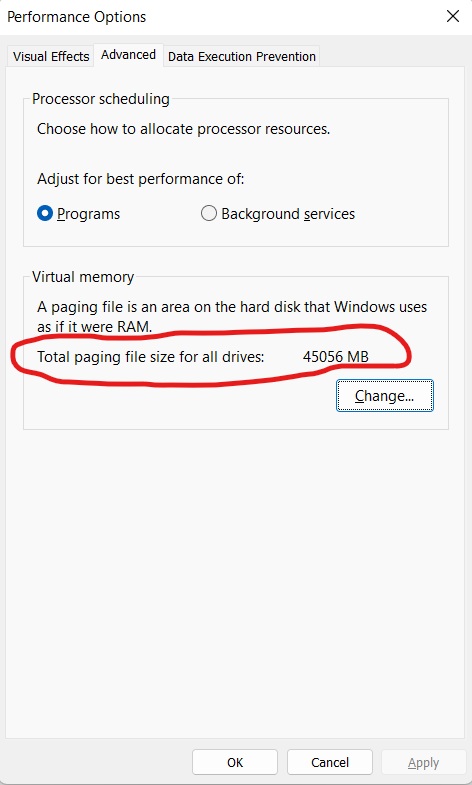
The issue here is not ML.NET (either CLI or C#). The issue is the system limitation coming from the OS (Windows in this case). As the training uses exceptionally large data, that will need allocating a lot of memory. On Windows the memory allocation will depend on how big the pagefile maximum size setting is. Note, the page files are global for the entire system which means all running applications will be contributing to such file too. If any application is trying to allocate memory which can exceed the maximum size of the page file, it will fail the allocation and in managed code will start experiencing the OutOfMemoryException.
What you may try to do is first ensure you have enough space on the disk. second try to adjust the system settings to increase the page file maximum size to allow big memory allocations. Here is the image of the settings dialog from Windows 11 machine. You can reach this setting from System Settings->Advanced->Performance Settings->Advanced
Thanks @tarekgh ! How did you figure this out?
I have 64GB RAM on the machine and 34GB on Virtual memory, I will increase it and try - TY! It seems my max was set to 1,144,296MB as Custom Size on the F drive, but maybe it went above which seems a lot of somehow it didn't increase to the max
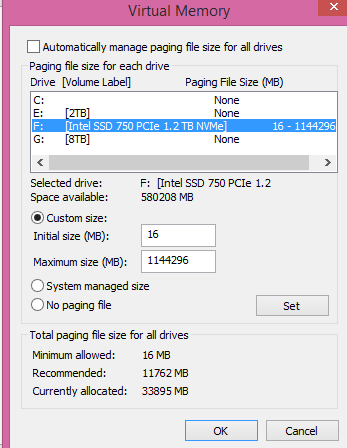
If I set "System managed size" instead of "custom size", will windows be able to increase as ML.net ask for more?
Note: I'm only running ML.net, I'm not running anything else in parallel to keep the ressources for ML.net
Interresting - Thank you @tarekgh
If I set "System managed size" instead of "custom size", will windows be able to increase as ML.net ask for more?
For the 330GB data, I don't think the system will allow that much size automatically. Try to use custom size and specify a substantial number allow 330GB size swapping. Thanks!
Thanks @tarekgh
I tried over the weekend with "System managed" and it failed quickly. It would be great if microsoft os could handle this.
I tried with Custom size, like 50 to 70GB on c drive and 500 to 1000GB on f drive, it did run longer.

The input file is 330gb, so I'm wondering as AutoML.net try model after model if it doesn't clear well the memory?
Thanks
Wil
Start Training start nni training [##### ] Time left: 34452s [##### ] Time left: 34447s [##### ] Time left: 34445s [##### ] Time left: 34445s [##### ] Time left: 34424s [##### ] Time left: 34424s [##### ] Time left: 34035s [####### ] Time left: 34034s [####### ] Time left: 33964s [####### ] Time left: 33964s [####### ] Time left: 33952s [########## ] Time left: 32896s [########### ] Time left: 32784s [########### ] Time left: 32763s [########### ] Time left: 32648s [########### ] Time left: 32637s [########### ] Time left: 32637s [########### ] Time left: 32629s [########### ] Time left: 32621s [########### ] Time left: 32601s [########### ] Time left: 32599s [############### ] Time left: 31383s [############### ] Time left: 31304s [############### ] Time left: 31304s [############### ] Time left: 31299s [############### ] Time left: 31299s [############### ] Time left: 31299s [############### ] Time left: 31299s [############### ] Time left: 31299s [############### ] Time left: 31283s [############### ] Time left: 31283s [############### ] Time left: 31279s [############### ] Time left: 31279s System.InvalidOperationException: Event we were waiting on was subject to an exception ---> System.FormatException: Parsing failed with an exception: Stream reading encountered exception ---> System.FormatException: Stream reading encountered exception ---> System.OutOfMemoryException: Exception of type 'System.OutOfMemoryException' was thrown. at System.Text.StringBuilder.ToString() at System.IO.StreamReader.ReadLine() at Microsoft.ML.Data.TextLoader.Cursor.LineReader.ThreadProc() --- End of inner exception stack trace --- at Microsoft.ML.Data.TextLoader.Cursor.LineReader.GetBatch() at Microsoft.ML.Data.TextLoader.Cursor.ParallelState.Parse(Int32 tid) at Microsoft.ML.Data.TextLoader.Cursor.ParallelState.ThreadProc(Object obj) --- End of inner exception stack trace --- at Microsoft.ML.Data.TextLoader.Cursor.ParseParallel(ParallelState state)+MoveNext() at Microsoft.ML.Data.TextLoader.Cursor.MoveNextCore() at Microsoft.ML.Data.RootCursorBase.MoveNext() at Microsoft.ML.Data.CacheDataView.Filler(DataViewRowCursor cursor, ColumnCache[] caches, OrderedWaiter waiter) --- End of inner exception stack trace --- at Microsoft.ML.Internal.Utilities.OrderedWaiter.Wait(Int64 position, CancellationToken token) at Microsoft.ML.Data.CacheDataView.GetPermutationOrNull(Random rand) at Microsoft.ML.Data.CacheDataView.GetRowCursorWaiterCore[TWaiter](TWaiter waiter, Func2 predicate, Random rand)
at Microsoft.ML.Data.CacheDataView.GetRowCursor(IEnumerable1 columnsNeeded, Random rand) at Microsoft.ML.Transforms.RowShufflingTransformer.GetRowCursorCore(IEnumerable1 columnsNeeded, Random rand)
at Microsoft.ML.Data.TransformBase.GetRowCursor(IEnumerable1 columnsNeeded, Random rand) at Microsoft.ML.Transforms.GenerateNumberTransform.GetRowCursorSet(IEnumerable1 columnsNeeded, Int32 n, Random rand)
at Microsoft.ML.Transforms.RangeFilter.GetRowCursorSet(IEnumerable1 columnsNeeded, Int32 n, Random rand) at Microsoft.ML.Data.DataViewUtils.TryCreateConsolidatingCursor(DataViewRowCursor& curs, IDataView view, IEnumerable1 columnsNeeded, IHost host, Random rand)
at Microsoft.ML.Data.TransformBase.GetRowCursor(IEnumerable1 columnsNeeded, Random rand) at Microsoft.ML.Transforms.ColumnSelectingTransformer.SelectColumnsDataTransform.GetRowCursor(IEnumerable1 columnsNeeded, Random rand)
at Microsoft.ML.Data.IO.BinarySaver.RowsPerBlockHeuristic(IDataView data, ColumnCodec[] actives)
at Microsoft.ML.Data.IO.BinarySaver.SaveData(Stream stream, IDataView data, Int32[] colIndices)
at Microsoft.ML.Data.DataSaverUtils.SaveDataView(IChannel ch, IDataSaver saver, IDataView view, Stream stream, Boolean keepHidden)
at Microsoft.ML.BinaryLoaderSaverCatalog.SaveAsBinary(DataOperationsCatalog catalog, IDataView data, Stream stream, Boolean keepHidden)
at Microsoft.ML.ModelBuilder.AutoMLService.Proposer.ResampleStrategyProposer.Initialize(String outputFolder) in //src/Microsoft.ML.ModelBuilder.AutoMLService/Proposer/ResampleStrategyProposer.cs:line 102
at Microsoft.ML.ModelBuilder.AutoMLService.Proposer.ResampleStrategyProposer.Propose(TrialParameter trialParameter) in //src/Microsoft.ML.ModelBuilder.AutoMLService/Proposer/ResampleStrategyProposer.cs:line 55
at Microsoft.ML.ModelBuilder.AutoMLService.Proposer.Controller.Propose() in //src/Microsoft.ML.ModelBuilder.AutoMLService/Proposer/Controller.cs:line 65
at Microsoft.ML.ModelBuilder.AutoMLService.Experiments.LocalAutoMLExperiment.ExecuteAsync(IDataView trainData, IDataView validateData, ColumnInformation columnInformation, CancellationToken cancellationToken, CancellationToken timeout) in //src/Microsoft.ML.ModelBuilder.AutoMLService/Experiments/LocalAutoMLExperiment.cs:line 163
at Microsoft.ML.ModelBuilder.AutoMLEngine.StartTrainingAsync(TrainingConfiguration config, PathConfiguration pathConfig, CancellationToken userCancellationToken) in //src/Microsoft.ML.ModelBuilder.AutoMLService/AutoMLEngineService/AutoMLEngine.cs:line 160
at Microsoft.ML.CLI.Runners.AutoMLRunner.ExecuteAsync() in //src/mlnet/Runners/AutoMLRunner.cs:line 88
at Microsoft.ML.CLI.Program.TrainAsync(TrainingConfiguration trainingConfiguration, PathConfiguration pathConfig, AutoMLServiceLogLevel logLevel) in //src/mlnet/Program.cs:line 348
at Microsoft.ML.CLI.Program.AutoMLCommandRunner(AutoMLCommand command, Boolean skipGenerateConsoleApp) in //src/mlnet/Program.cs:line 329
at Microsoft.ML.CLI.Program.<>c.<<CreateRootCommandLineBuilder>b__4_0>d.MoveNext() in //src/mlnet/Program.cs:line 89
--- End of stack trace from previous location ---
at System.CommandLine.Invocation.CommandHandler.GetExitCodeAsync(Object value, InvocationContext context)
at System.CommandLine.Invocation.ModelBindingCommandHandler.InvokeAsync(InvocationContext context)
at System.CommandLine.Invocation.InvocationPipeline.<>c__DisplayClass4_0.<<BuildInvocationChain>b__0>d.MoveNext()
--- End of stack trace from previous location ---
at System.CommandLine.Builder.CommandLineBuilderExtensions.<>c__DisplayClass23_0.<<UseParseErrorReporting>b__0>d.MoveNext()
--- End of stack trace from previous location ---
at Microsoft.ML.CLI.Program.<>c__DisplayClass4_0.<<CreateRootCommandLineBuilder>b__9>d.MoveNext() in //src/mlnet/Program.cs:line 290
--- End of stack trace from previous location ---
at System.CommandLine.Builder.CommandLineBuilderExtensions.<>c.<<UseSuggestDirective>b__24_0>d.MoveNext()
--- End of stack trace from previous location ---
at System.CommandLine.Builder.CommandLineBuilderExtensions.<>c__DisplayClass22_0.<<UseParseDirective>b__0>d.MoveNext()
--- End of stack trace from previous location ---
at System.CommandLine.Builder.CommandLineBuilderExtensions.<>c__DisplayClass11_0.<<UseDebugDirective>b__0>d.MoveNext()
--- End of stack trace from previous location ---
at System.CommandLine.Builder.CommandLineBuilderExtensions.<>c.<<RegisterWithDotnetSuggest>b__10_0>d.MoveNext()
--- End of stack trace from previous location ---
at System.CommandLine.Builder.CommandLineBuilderExtensions.<>c__DisplayClass14_0.<<UseExceptionHandler>b__0>d.MoveNext()
Check out log file for more information: S:\CATS\files\data_analysis\output\Log_ALL_INST_smallAttributes.txt
Exiting ...
`
The input file is 330gb, so I'm wondering as AutoML.net try model after model if it doesn't clear well the memory?
I expect this is not the case. But it could be the model loading and caching the whole data into the memory. looking at the stack and seeing Microsoft.ML.Data.CacheDataView which suggests what I am saying. Considering you are using an excessively big data set, caching loaded data will cause out of memory for sure.
CC @luisquintanilla @LittleLittleCloud in case they know more about that.
Thanks @tarekgh
Arg, I was hoping being able to use a much bigger input file later
Right now I'm not using the "-cache" which means it default to "Automatic" by default. I could try with "-cache Off" if you think that would help?
--cache <Auto|Off|On> Specify [On|Off|Auto] for cache to be turned on, off, or auto-determined (default).
Thanks
Wil
@wil70 yes, it is worth trying to turn off the cache option. Thank you for your patience and trials.
@terlochan, Here you go with --cache Off I hope this help TY! Wil
2022-09-07 22:36:05.7438 INFO Check out log file for more information: c:\output\log.txt (Microsoft.ML.CLI.Program+<>c__DisplayClass4_0.<CreateRootCommandLineBuilder>b__7)
2022-09-07 22:36:05.7438 INFO Exiting ... (Microsoft.ML.CLI.Program+<>c__DisplayClass4_0.<CreateRootCommandLineBuilder>b__7)
2022-09-08 08:00:38.1674 DEBUG Set log file path to c:\output\log.txt (Microsoft.ML.CLI.Commands.MLCommand.set_LogFilePath)
2022-09-08 08:01:15.7140 DEBUG Set log file path to c:\output\log.txt (Microsoft.ML.CLI.Commands.MLCommand.set_LogFilePath)
2022-09-08 08:01:56.0343 INFO Start Training (Microsoft.ML.CLI.Runners.AutoMLRunner+<ExecuteAsync>d__8.MoveNext)
2022-09-08 08:01:56.2187 INFO start nni training (Microsoft.ML.CLI.Utilities.PBarConsolePrinter.Print)
2022-09-08 08:01:56.2588 INFO Experiment output folder: C:\Users\Wilhelm\AppData\Local\Temp\AutoML-NNI\Experiment-M5PI59 (Microsoft.ML.CLI.Utilities.PBarConsolePrinter.Print)
2022-09-08 08:01:56.2588 DEBUG row count is unknown, count it explicitly (Microsoft.ML.CLI.Runners.AutoMLRunner.Instance_DiagnosticDataReceived)
2022-09-08 08:16:43.1825 DEBUG count elapse 886919ms (Microsoft.ML.CLI.Runners.AutoMLRunner.Instance_DiagnosticDataReceived)
2022-09-08 08:16:43.1825 INFO |     Trainer                              MicroAccuracy  MacroAccuracy  Duration #Iteration                     | (Microsoft.ML.CLI.Utilities.PBarConsolePrinter.Print)
2022-09-08 08:23:19.3495 ERROR System.InvalidOperationException: Event we were waiting on was subject to an exception
 ---> System.FormatException: Parsing failed with an exception: Stream reading encountered exception
 ---> System.FormatException: Stream reading encountered exception
 ---> System.OutOfMemoryException: Exception of type 'System.OutOfMemoryException' was thrown.
   at System.Text.StringBuilder.ToString()
   at System.IO.StreamReader.ReadLine()
   at Microsoft.ML.Data.TextLoader.Cursor.LineReader.ThreadProc()
   --- End of inner exception stack trace ---
   at Microsoft.ML.Data.TextLoader.Cursor.LineReader.GetBatch()
   at Microsoft.ML.Data.TextLoader.Cursor.ParallelState.Parse(Int32 tid)
   at Microsoft.ML.Data.TextLoader.Cursor.ParallelState.ThreadProc(Object obj)
   --- End of inner exception stack trace ---
   at Microsoft.ML.Data.TextLoader.Cursor.ParseParallel(ParallelState state)+MoveNext()
   at Microsoft.ML.Data.TextLoader.Cursor.MoveNextCore()
   at Microsoft.ML.Data.RootCursorBase.MoveNext()
   at Microsoft.ML.Data.CacheDataView.Filler(DataViewRowCursor cursor, ColumnCache[] caches, OrderedWaiter waiter)
   --- End of inner exception stack trace ---
   at Microsoft.ML.Internal.Utilities.OrderedWaiter.Wait(Int64 position, CancellationToken token)
   at Microsoft.ML.Data.CacheDataView.GetPermutationOrNull(Random rand)
   at Microsoft.ML.Data.CacheDataView.GetRowCursorWaiterCore[TWaiter](TWaiter waiter, Func`2 predicate, Random rand)
   at Microsoft.ML.Data.CacheDataView.GetRowCursor(IEnumerable`1 columnsNeeded, Random rand)
   at Microsoft.ML.Transforms.RowShufflingTransformer.GetRowCursorCore(IEnumerable`1 columnsNeeded, Random rand)
   at Microsoft.ML.Data.TransformBase.GetRowCursor(IEnumerable`1 columnsNeeded, Random rand)
   at Microsoft.ML.Transforms.GenerateNumberTransform.GetRowCursorSet(IEnumerable`1 columnsNeeded, Int32 n, Random rand)
   at Microsoft.ML.Transforms.RangeFilter.GetRowCursorSet(IEnumerable`1 columnsNeeded, Int32 n, Random rand)
   at Microsoft.ML.Data.DataViewUtils.TryCreateConsolidatingCursor(DataViewRowCursor& curs, IDataView view, IEnumerable`1 columnsNeeded, IHost host, Random rand)
   at Microsoft.ML.Data.TransformBase.GetRowCursor(IEnumerable`1 columnsNeeded, Random rand)
   at Microsoft.ML.Transforms.ColumnSelectingTransformer.SelectColumnsDataTransform.GetRowCursor(IEnumerable`1 columnsNeeded, Random rand)
   at Microsoft.ML.Data.IO.BinarySaver.RowsPerBlockHeuristic(IDataView data, ColumnCodec[] actives)
   at Microsoft.ML.Data.IO.BinarySaver.SaveData(Stream stream, IDataView data, Int32[] colIndices)
   at Microsoft.ML.Data.DataSaverUtils.SaveDataView(IChannel ch, IDataSaver saver, IDataView view, Stream stream, Boolean keepHidden)
   at Microsoft.ML.BinaryLoaderSaverCatalog.SaveAsBinary(DataOperationsCatalog catalog, IDataView data, Stream stream, Boolean keepHidden)
   at Microsoft.ML.ModelBuilder.AutoMLService.Proposer.ResampleStrategyProposer.Initialize(String outputFolder) in /_/src/Microsoft.ML.ModelBuilder.AutoMLService/Proposer/ResampleStrategyProposer.cs:line 102
   at Microsoft.ML.ModelBuilder.AutoMLService.Proposer.ResampleStrategyProposer.Propose(TrialParameter trialParameter) in /_/src/Microsoft.ML.ModelBuilder.AutoMLService/Proposer/ResampleStrategyProposer.cs:line 55
   at Microsoft.ML.ModelBuilder.AutoMLService.Proposer.Controller.Propose() in /_/src/Microsoft.ML.ModelBuilder.AutoMLService/Proposer/Controller.cs:line 65
   at Microsoft.ML.ModelBuilder.AutoMLService.Experiments.LocalAutoMLExperiment.ExecuteAsync(IDataView trainData, IDataView validateData, ColumnInformation columnInformation, CancellationToken cancellationToken, CancellationToken timeout) in /_/src/Microsoft.ML.ModelBuilder.AutoMLService/Experiments/LocalAutoMLExperiment.cs:line 163
   at Microsoft.ML.ModelBuilder.AutoMLEngine.StartTrainingAsync(TrainingConfiguration config, PathConfiguration pathConfig, CancellationToken userCancellationToken) in /_/src/Microsoft.ML.ModelBuilder.AutoMLService/AutoMLEngineService/AutoMLEngine.cs:line 160
   at Microsoft.ML.CLI.Runners.AutoMLRunner.ExecuteAsync() in /_/src/mlnet/Runners/AutoMLRunner.cs:line 88
   at Microsoft.ML.CLI.Program.TrainAsync(TrainingConfiguration trainingConfiguration, PathConfiguration pathConfig, AutoMLServiceLogLevel logLevel) in /_/src/mlnet/Program.cs:line 348
   at Microsoft.ML.CLI.Program.AutoMLCommandRunner(AutoMLCommand command, Boolean skipGenerateConsoleApp) in /_/src/mlnet/Program.cs:line 329
   at Microsoft.ML.CLI.Program.<>c.<<CreateRootCommandLineBuilder>b__4_0>d.MoveNext() in /_/src/mlnet/Program.cs:line 89
--- End of stack trace from previous location ---
   at System.CommandLine.Invocation.CommandHandler.GetExitCodeAsync(Object value, InvocationContext context)
   at System.CommandLine.Invocation.ModelBindingCommandHandler.InvokeAsync(InvocationContext context)
   at System.CommandLine.Invocation.InvocationPipeline.<>c__DisplayClass4_0.<<BuildInvocationChain>b__0>d.MoveNext()
--- End of stack trace from previous location ---
   at System.CommandLine.Builder.CommandLineBuilderExtensions.<>c__DisplayClass23_0.<<UseParseErrorReporting>b__0>d.MoveNext()
--- End of stack trace from previous location ---
   at Microsoft.ML.CLI.Program.<>c__DisplayClass4_0.<<CreateRootCommandLineBuilder>b__9>d.MoveNext() in /_/src/mlnet/Program.cs:line 290
--- End of stack trace from previous location ---
   at System.CommandLine.Builder.CommandLineBuilderExtensions.<>c.<<UseSuggestDirective>b__24_0>d.MoveNext()
--- End of stack trace from previous location ---
   at System.CommandLine.Builder.CommandLineBuilderExtensions.<>c__DisplayClass22_0.<<UseParseDirective>b__0>d.MoveNext()
--- End of stack trace from previous location ---
   at System.CommandLine.Builder.CommandLineBuilderExtensions.<>c__DisplayClass11_0.<<UseDebugDirective>b__0>d.MoveNext()
--- End of stack trace from previous location ---
   at System.CommandLine.Builder.CommandLineBuilderExtensions.<>c.<<RegisterWithDotnetSuggest>b__10_0>d.MoveNext()
--- End of stack trace from previous location ---
   at System.CommandLine.Builder.CommandLineBuilderExtensions.<>c__DisplayClass14_0.<<UseExceptionHandler>b__0>d.MoveNext() (Microsoft.ML.CLI.Program+<>c__DisplayClass4_0.<CreateRootCommandLineBuilder>b__7)
2022-09-08 08:23:27.4475 DEBUG System.InvalidOperationException: Event we were waiting on was subject to an exception
 ---> System.FormatException: Parsing failed with an exception: Stream reading encountered exception
 ---> System.FormatException: Stream reading encountered exception
 ---> System.OutOfMemoryException: Exception of type 'System.OutOfMemoryException' was thrown.
   at System.Text.StringBuilder.ToString()
   at System.IO.StreamReader.ReadLine()
   at Microsoft.ML.Data.TextLoader.Cursor.LineReader.ThreadProc()
   --- End of inner exception stack trace ---
   at Microsoft.ML.Data.TextLoader.Cursor.LineReader.GetBatch()
   at Microsoft.ML.Data.TextLoader.Cursor.ParallelState.Parse(Int32 tid)
   at Microsoft.ML.Data.TextLoader.Cursor.ParallelState.ThreadProc(Object obj)
   --- End of inner exception stack trace ---
   at Microsoft.ML.Data.TextLoader.Cursor.ParseParallel(ParallelState state)+MoveNext()
   at Microsoft.ML.Data.TextLoader.Cursor.MoveNextCore()
   at Microsoft.ML.Data.RootCursorBase.MoveNext()
   at Microsoft.ML.Data.CacheDataView.Filler(DataViewRowCursor cursor, ColumnCache[] caches, OrderedWaiter waiter)
   --- End of inner exception stack trace ---
   at Microsoft.ML.Internal.Utilities.OrderedWaiter.Wait(Int64 position, CancellationToken token)
   at Microsoft.ML.Data.CacheDataView.GetPermutationOrNull(Random rand)
   at Microsoft.ML.Data.CacheDataView.GetRowCursorWaiterCore[TWaiter](TWaiter waiter, Func`2 predicate, Random rand)
   at Microsoft.ML.Data.CacheDataView.GetRowCursor(IEnumerable`1 columnsNeeded, Random rand)
   at Microsoft.ML.Transforms.RowShufflingTransformer.GetRowCursorCore(IEnumerable`1 columnsNeeded, Random rand)
   at Microsoft.ML.Data.TransformBase.GetRowCursor(IEnumerable`1 columnsNeeded, Random rand)
   at Microsoft.ML.Transforms.GenerateNumberTransform.GetRowCursorSet(IEnumerable`1 columnsNeeded, Int32 n, Random rand)
   at Microsoft.ML.Transforms.RangeFilter.GetRowCursorSet(IEnumerable`1 columnsNeeded, Int32 n, Random rand)
   at Microsoft.ML.Data.DataViewUtils.TryCreateConsolidatingCursor(DataViewRowCursor& curs, IDataView view, IEnumerable`1 columnsNeeded, IHost host, Random rand)
   at Microsoft.ML.Data.TransformBase.GetRowCursor(IEnumerable`1 columnsNeeded, Random rand)
   at Microsoft.ML.Transforms.ColumnSelectingTransformer.SelectColumnsDataTransform.GetRowCursor(IEnumerable`1 columnsNeeded, Random rand)
   at Microsoft.ML.Data.IO.BinarySaver.RowsPerBlockHeuristic(IDataView data, ColumnCodec[] actives)
   at Microsoft.ML.Data.IO.BinarySaver.SaveData(Stream stream, IDataView data, Int32[] colIndices)
   at Microsoft.ML.Data.DataSaverUtils.SaveDataView(IChannel ch, IDataSaver saver, IDataView view, Stream stream, Boolean keepHidden)
   at Microsoft.ML.BinaryLoaderSaverCatalog.SaveAsBinary(DataOperationsCatalog catalog, IDataView data, Stream stream, Boolean keepHidden)
   at Microsoft.ML.ModelBuilder.AutoMLService.Proposer.ResampleStrategyProposer.Initialize(String outputFolder) in /_/src/Microsoft.ML.ModelBuilder.AutoMLService/Proposer/ResampleStrategyProposer.cs:line 102
   at Microsoft.ML.ModelBuilder.AutoMLService.Proposer.ResampleStrategyProposer.Propose(TrialParameter trialParameter) in /_/src/Microsoft.ML.ModelBuilder.AutoMLService/Proposer/ResampleStrategyProposer.cs:line 55
   at Microsoft.ML.ModelBuilder.AutoMLService.Proposer.Controller.Propose() in /_/src/Microsoft.ML.ModelBuilder.AutoMLService/Proposer/Controller.cs:line 65
   at Microsoft.ML.ModelBuilder.AutoMLService.Experiments.LocalAutoMLExperiment.ExecuteAsync(IDataView trainData, IDataView validateData, ColumnInformation columnInformation, CancellationToken cancellationToken, CancellationToken timeout) in /_/src/Microsoft.ML.ModelBuilder.AutoMLService/Experiments/LocalAutoMLExperiment.cs:line 163
   at Microsoft.ML.ModelBuilder.AutoMLEngine.StartTrainingAsync(TrainingConfiguration config, PathConfiguration pathConfig, CancellationToken userCancellationToken) in /_/src/Microsoft.ML.ModelBuilder.AutoMLService/AutoMLEngineService/AutoMLEngine.cs:line 160
   at Microsoft.ML.CLI.Runners.AutoMLRunner.ExecuteAsync() in /_/src/mlnet/Runners/AutoMLRunner.cs:line 88
   at Microsoft.ML.CLI.Program.TrainAsync(TrainingConfiguration trainingConfiguration, PathConfiguration pathConfig, AutoMLServiceLogLevel logLevel) in /_/src/mlnet/Program.cs:line 348
   at Microsoft.ML.CLI.Program.AutoMLCommandRunner(AutoMLCommand command, Boolean skipGenerateConsoleApp) in /_/src/mlnet/Program.cs:line 329
   at Microsoft.ML.CLI.Program.<>c.<<CreateRootCommandLineBuilder>b__4_0>d.MoveNext() in /_/src/mlnet/Program.cs:line 89
--- End of stack trace from previous location ---
   at System.CommandLine.Invocation.CommandHandler.GetExitCodeAsync(Object value, InvocationContext context)
   at System.CommandLine.Invocation.ModelBindingCommandHandler.InvokeAsync(InvocationContext context)
   at System.CommandLine.Invocation.InvocationPipeline.<>c__DisplayClass4_0.<<BuildInvocationChain>b__0>d.MoveNext()
--- End of stack trace from previous location ---
   at System.CommandLine.Builder.CommandLineBuilderExtensions.<>c__DisplayClass23_0.<<UseParseErrorReporting>b__0>d.MoveNext()
--- End of stack trace from previous location ---
   at Microsoft.ML.CLI.Program.<>c__DisplayClass4_0.<<CreateRootCommandLineBuilder>b__9>d.MoveNext() in /_/src/mlnet/Program.cs:line 290
--- End of stack trace from previous location ---
   at System.CommandLine.Builder.CommandLineBuilderExtensions.<>c.<<UseSuggestDirective>b__24_0>d.MoveNext()
--- End of stack trace from previous location ---
   at System.CommandLine.Builder.CommandLineBuilderExtensions.<>c__DisplayClass22_0.<<UseParseDirective>b__0>d.MoveNext()
--- End of stack trace from previous location ---
   at System.CommandLine.Builder.CommandLineBuilderExtensions.<>c__DisplayClass11_0.<<UseDebugDirective>b__0>d.MoveNext()
--- End of stack trace from previous location ---
   at System.CommandLine.Builder.CommandLineBuilderExtensions.<>c.<<RegisterWithDotnetSuggest>b__10_0>d.MoveNext()
--- End of stack trace from previous location ---
   at System.CommandLine.Builder.CommandLineBuilderExtensions.<>c__DisplayClass14_0.<<UseExceptionHandler>b__0>d.MoveNext() (Microsoft.ML.CLI.Program+<>c__DisplayClass4_0.<CreateRootCommandLineBuilder>b__7)
2022-09-08 08:23:27.4475 INFO Check out log file for more information: c:\output\log.txt (Microsoft.ML.CLI.Program+<>c__DisplayClass4_0.<CreateRootCommandLineBuilder>b__7)
2022-09-08 08:23:27.4475 INFO Exiting ... (Microsoft.ML.CLI.Program+<>c__DisplayClass4_0.<CreateRootCommandLineBuilder>b__7)
@LittleLittleCloud with --cache off parameter, I am seeing CacheDataView still used in the stack. Any thoughts on how we can avoid caching the data in general?
CC @luisquintanilla
and next may be treat it the cache as an intermediate buffer between the disk and the ram so you do not wear off the drive too fast and still gain some speed. IF this is loaded linearly then that won't be useful, but if some algo train huge dataset by batches then that might help...not sure.
