

 dotnet
Microsoft.Data.Analysis DataFrame.Join infinite loop
.Net Core 3.1 Microsoft.Data.Analysis Nuget package version: 0.19.1
This code results in a hang in DataFrame.Join:
using Microsoft.Data.Analysis; using System; using System.Linq;
namespace TestDataFRame { internal class Program { static void Main(string[] args) { DateTime?[] dates1 = { new DateTime(2022, 03, 01), new DateTime(2022, 03, 02), new DateTime(2022, 03, 03) }; double?[] closePrices = { 10.5, 12.4, 11.3 };
        DateTime?[] dates2 = { new DateTime(2022, 03, 01), new DateTime(2022, 03, 02), new DateTime(2022, 03, 03), new DateTime(2022, 03, 04) };
        double[] shortPercentages = { 2.34, 2.36, 3.01, 3.04 };

        DataFrame dataFrame1 = new DataFrame();
        dataFrame1.Columns.Add(new PrimitiveDataFrameColumn<DateTime>("Date", dates1));
        dataFrame1.Columns.Add(new DoubleDataFrameColumn("ClosePrice", closePrices));

        var numbers1 = dataFrame1.Columns.GetDoubleColumn("ClosePrice").ToArray();

        DataFrame dataFrame2 = new DataFrame();
        dataFrame2.Columns.Add(new PrimitiveDataFrameColumn<DateTime>("Date", dates2));
        dataFrame2.Columns.Add(new DoubleDataFrameColumn("ShortPercentage", shortPercentages));

        var numbers2 = dataFrame2.Columns.GetDoubleColumn("ShortPercentage").ToArray();

        DataFrame dataFrame = dataFrame1.Join(dataFrame2, "Date", "Date", joinAlgorithm: JoinAlgorithm.FullOuter);
    }
}
}

Hi @olavt
Sorry to hear you're having issues joining your data. I was able to repro. When using the Join method, it seems like the library has a hard time performing the operation when the columns from both DataFrames have the same name. If the column names are different, the operation completes successfully. Thanks for reporting this issue.
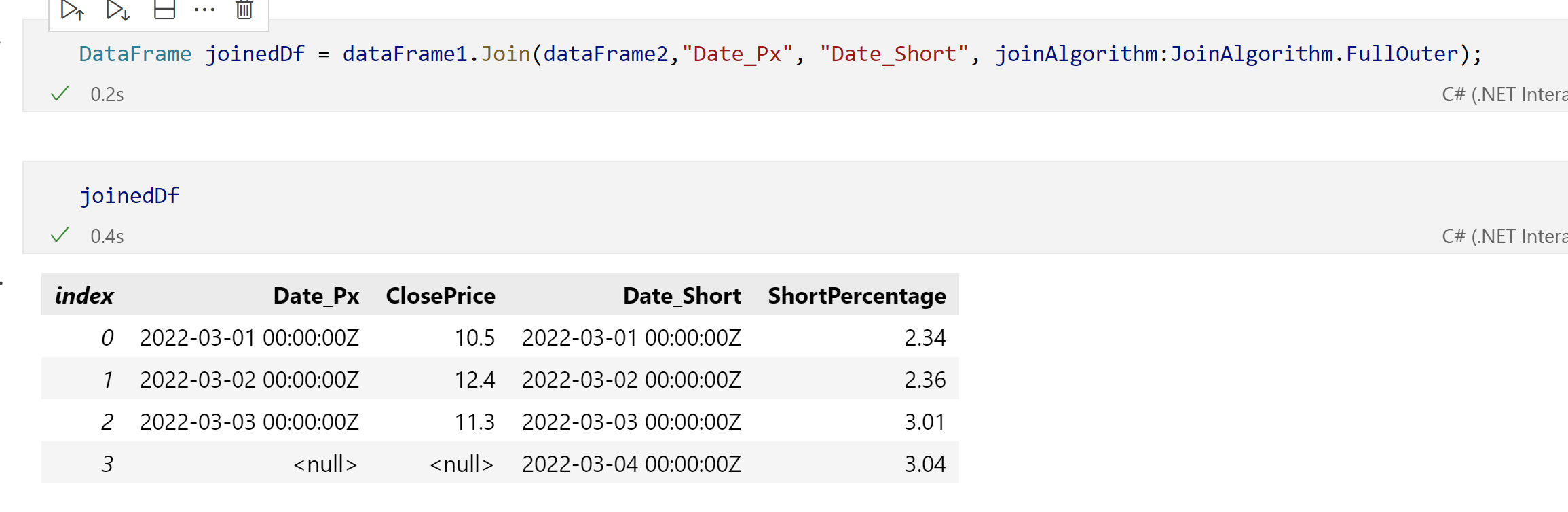

Yes, joining the datasets with different column names works. I would however expect to be able to join the datasets and have one resulting Date column rather than two different ones. How can I achieve that?
In the current implementation of the DataFrame, both columns are persisted. One way for you to get a single columns is, after the merge, create a new column with the distinct date values and drop the original columns from the merged DataFrame.
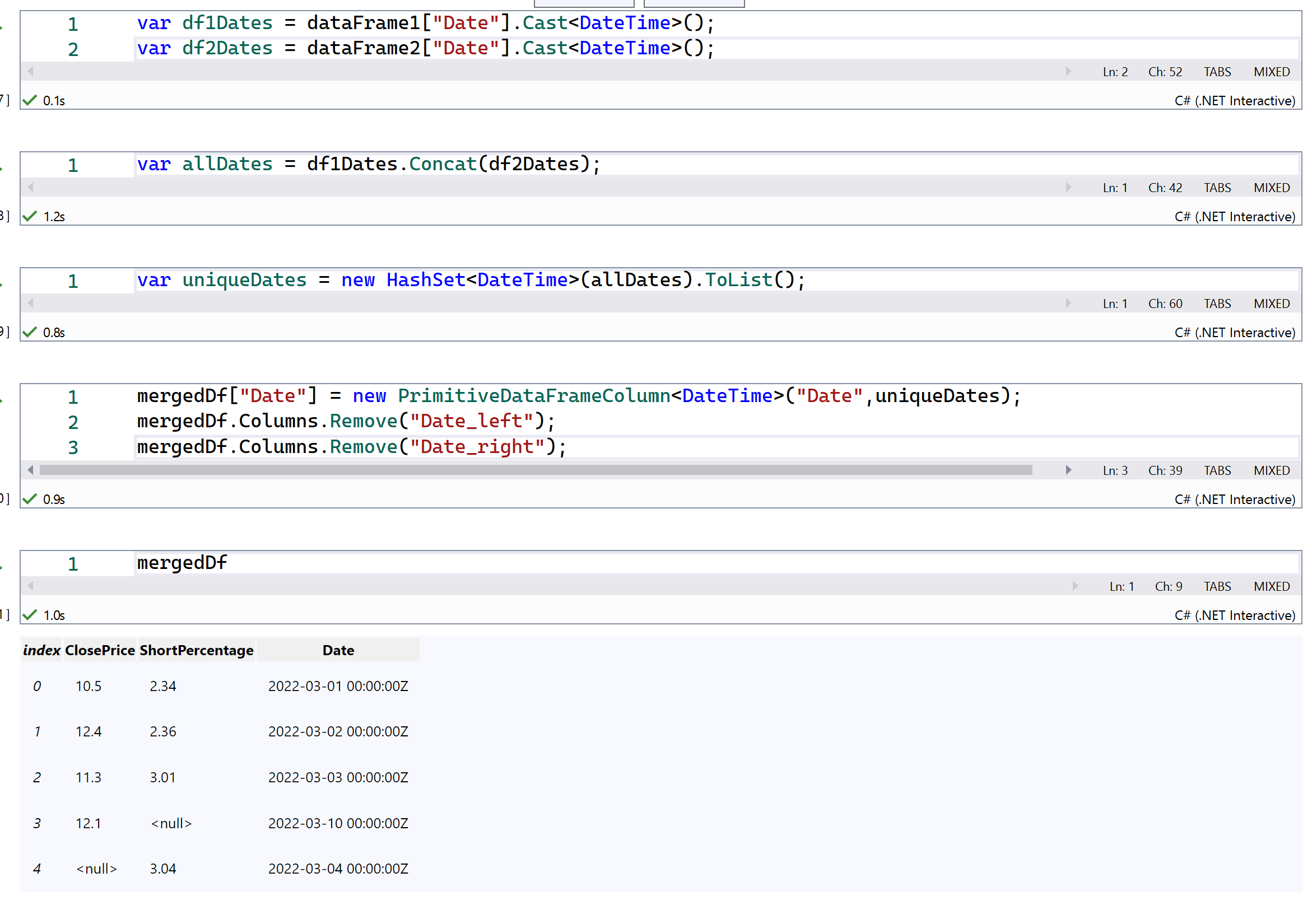
Hmm, that solution does not look pretty. What is the difference between Merge and Join? I would have expected the Join to be able to join on a "common" column in two DataFrames and create one resulting column. I would be scared reading the above code and it's unclear that the dates in the resulting column would match the rows.
I believe the main difference is Join combines the data based on the index and Merge does it based on the columns you specify.
This is what a Joined DataFrame would look like.
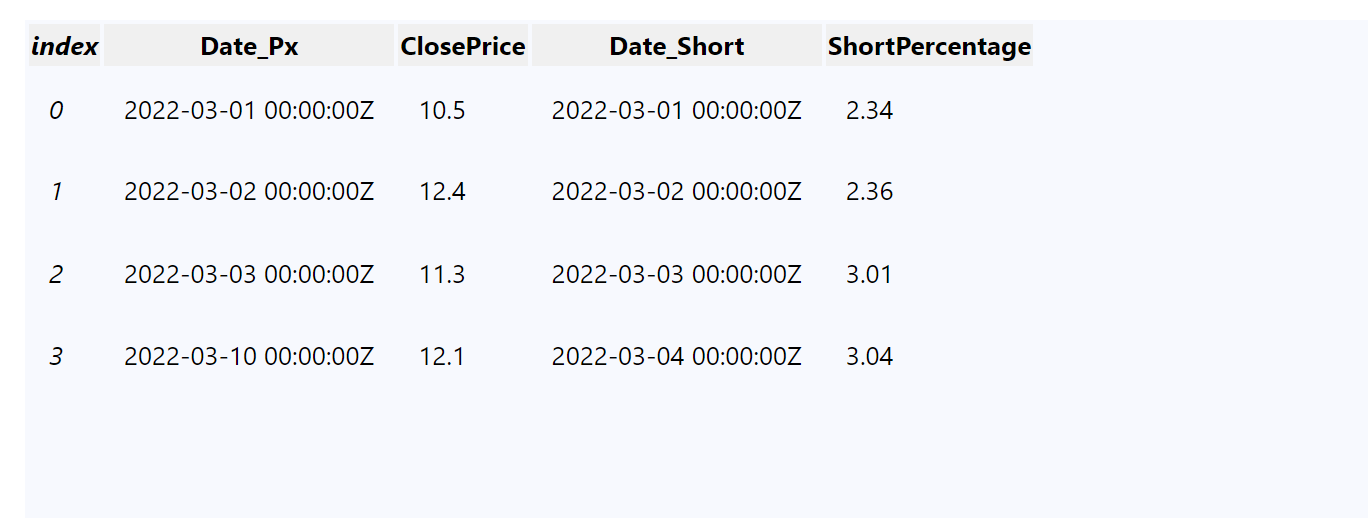
This is what a Merged DataFrame would look like

According to my testing, both the Merge and Join produces the same result in the code below:
        DateTime?[] dates1 = { new DateTime(2022, 03, 01), new DateTime(2022, 03, 02), new DateTime(2022, 03, 03) };
        double?[] closePrices = { 10.5, 12.4, 11.3 };

        DateTime?[] dates2 = { new DateTime(2022, 03, 01), new DateTime(2022, 03, 02), new DateTime(2022, 03, 03), new DateTime(2022, 03, 04) };
        double[] shortPercentages = { 2.34, 2.36, 3.01, 3.04 };

        DataFrame dataFrame1 = new DataFrame();
        dataFrame1.Columns.Add(new PrimitiveDataFrameColumn<DateTime>("Date", dates1));
        dataFrame1.Columns.Add(new DoubleDataFrameColumn("ClosePrice", closePrices));

        var numbers1 = dataFrame1.Columns.GetDoubleColumn("ClosePrice").ToArray();

        DataFrame dataFrame2 = new DataFrame();
        dataFrame2.Columns.Add(new PrimitiveDataFrameColumn<DateTime>("Date_short", dates2));
        dataFrame2.Columns.Add(new DoubleDataFrameColumn("ShortPercentage", shortPercentages));

        var numbers2 = dataFrame2.Columns.GetDoubleColumn("ShortPercentage").ToArray();

        DataFrame dataFrame = dataFrame1.Merge<DateTime>(dataFrame2, "Date", "Date_short", joinAlgorithm: JoinAlgorithm.FullOuter);
        var dates = dataFrame.Columns.GetPrimitiveColumn<DateTime>("Date").ToArray();

        dataFrame = dataFrame1.Join(dataFrame2, "Date", "Date_short", joinAlgorithm: JoinAlgorithm.FullOuter);
        dates = dataFrame.Columns.GetPrimitiveColumn<DateTime>("Date").ToArray();
Yeah, we have an issue with the naming of the join/merge API's. I haven't looked closely enough at join to know exactly how it works, but it does NOT work on column names. If you want to do it based on column names you need to use merge instead. This threw me off, and will probably throw of anyone familiar with this type of stuff IMO. Especially because if @luisquintanilla is correct in that join is based on index no one will expect that I don't think. Not only will they probably use it incorrectly, the join results could verily easily be not at all what they are expecting. Honestly I would vote for a rename in this case, but its something that we need to discuss.
The reason you are getting an infinite loop is that for join it doesn't want the name of the columns you want to join on (because join here is not based on the columns...), it wants the suffix to append to the columns of same name in the 2 datasets. So when you provide a value that is the same for both suffixes, our code is looping until all the columns are unique, and this can never happen when you continue to append identical values to both sides.
For the behavior you are looking for, you are going to want to use merge and not join. There is a simpler workaround than what luis suggested for all types except a full outer join (not sure this would work there as I haven't fully tested it but I don't think it will). Since in left/right/inner joins at least 1 of the columns will be 100% correct, you can do this:
var dataFrame = dataFrame1.Merge(dataFrame2, new[] { "Date" }, new[] { "Date" }, joinAlgorithm: JoinAlgorithm.Inner);
dataFrame.Columns.Remove("Date_right");
dataFrame.Columns.SetColumnName(dataFrame.Columns["Date_left"], "Date");
That will remove the extra column and rename the remaining one back to your original value. Just change the "left/right" based on the type of join you perform. Again, this won't work on an outer join, but for for left/right/inner it will work fine.

According to my testing, both the Merge and Join produces the same result in the code below:
@olavt That's correct, because you have a different number of indices, so it looks the same when you use Join. If you were to add another row to the the first DataFrame, you'd get the results I shared where the 3rd index contains different dates. If the Date column was used as the index, Join might make sense and work as expected but that's not the case here causing the results where indices have different data to not work as expected.