
interactive
 interactive copied to clipboard
 dotnet
No syntax highlighting for fresh install in Jupyter Notebook
Describe the bug
I installed the .NET interactive kernel as described by this page.. The installation was successful and I can run .NET code no problem, but it looks like the syntax highlighting is missing:
Please complete the following:
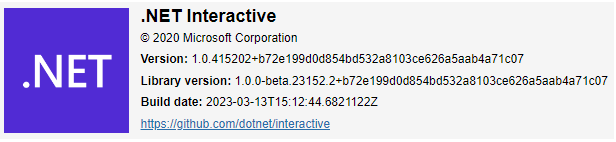
Which version of .NET Interactive are you using? (In a notebook, run the #!about magic command. ):
- OS
- [ ] Windows 11
- [x] Windows 10
- [ ] macOS
- [ ] Linux (Please specify distro)
- [ ] iOS
- [ ] Android
- Browser
- [x] Chrome
- [ ] Edge
- [ ] Firefox
- [ ] Safari
- Frontend
- [x] Jupyter Notebook
- [ ] Jupyter Lab
- [ ] nteract
- [ ] Visual Studio Code
- [ ] Visual Studio Code Insiders
- [ ] Visual Studio
- [ ] Other (please specify)
Screenshots


Syntax highlighting in Jupyter is not provided or affected by the .NET Interactive kernel, so I'm marking this as external. This must be related to the Jupyter install itself.

@jonsequitur But it should work right? Provided I fix the Jupyter installation?
Yes, there's usually basic syntax highlighting for C# in Jupyter Notebook and Jupyter Lab.
Ok. I just posted in https://discourse.jupyter.org/t/net-interactive-syntax-highlighting-issues/18431. Maybe someone will be able to help there.
Yes, brand new notebooks in a fresh conda environment, with a fresh install of .NET interactive. But the behavior is a bit more subtle than I had initially thought. I might get syntax highlighting on some cells, but not on others. If I refresh my browser using Ctrl + R the highlighting reappears on those other cells.
I can't yet pinpoint/predict all the situations in which the highlighting disappears. But I have noticed that it disappears quite reliably from the topmost cell when I split cells using Ctrl+Shift+-. There may be other situations as well.
As far as I can tell the highlighting for Python kernels is just fine and does not exhibit this behavior. Only the .NET kernels are problematic. So I don't think that this is a Jupyter issue. Perhaps someone could try reproducing this?
@jonsequitur Any updates on this? It really makes the jupyter .NET scripting experience less than ideal:
Only after I refresh the browser does some syntax highlighting appear:
And even then objects from the System namespace still have no highlighting
Now is 2024-03-06, I have exactly the same problem as described above. Still not solved.

Interestingly, I can have R syntax highlighted correctly but couldn't do that for Python (pylance).
