

 dotnet
Hide the 'index' column in a dataframe/table?
The package and version I'm asking about:

Question
How do I hide the index column in the output below?
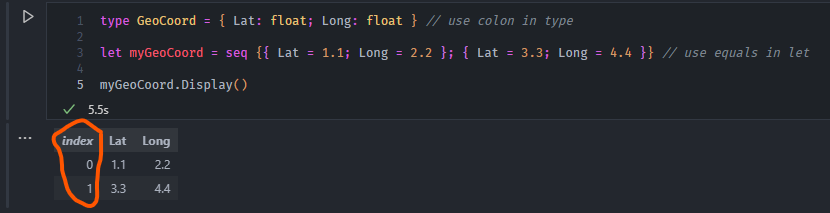

Currently, the only way to do this is to register a custom formatter that generates the HTML table. It's fairly simple to do this for a specific type and a bit more involved to change this for all IEnumerable types.
A couple of relevant pieces of code:
https://github.com/dotnet/interactive/blob/a206f434beda79e25b9e8efed63ba0121515fbb1/src/Microsoft.DotNet.Interactive.Formatting/Html.cs#L212-L220
https://github.com/dotnet/interactive/blob/main/src/Microsoft.DotNet.Interactive.Formatting/HtmlFormatter%7BT%7D.cs#L110-L294

@jonsequitur Would it possible to just remove index altogether before sending it to Display()?
I would like to selectively view the index in the output. Creating a custom formatter for all possible types that would output a table would be more cumbersome. I also found out that I can't create formatters for Measure types.
I also found out that I can't create formatters for Measure types.
Can you provide a code sample of what you're trying to do?