

 dotnet
MissingMethodException when running tests in the FSharp compiler repo
It appears that I can't run tests from the FSharp repo anymore (not sure since when, it's been a while), I get:
System.MissingMethodException : Method not found: 'Microsoft.FSharp.Core.FSharpOption`1<FsCheck.Replay> FsCheck.Config.get_Replay()'.
First run I did, after building, which went smooth:
> git checkout main
> git clean -xdf
> git fetch upstream
> build
Received the following errors with build -testFSharpCore (only first dozen or so shown):
D:\Projects\OpenSource\VisualFSharp\src\Compiler\SyntaxTree\LexHelpers.fsi(12,22): error FS0039: The namespace 'Parser' is not defined. Maybe you want one of the following:?   PPParser [D:\Projects\OpenSource\VisualFSharp\src\Compiler\FSharp.Compiler.Service.fsproj]
D:\Projects\OpenSource\VisualFSharp\src\Compiler\SyntaxTree\LexHelpers.fsi(69,115): error FS0039: The type 'token' is not defined. [D:\Projects\OpenSource\VisualFSharp\src\Compiler\FSharp.Compiler.Service.fsproj]
D:\Projects\OpenSource\VisualFSharp\src\Compiler\SyntaxTree\LexHelpers.fsi(69,115): error FS0039: The type 'token' is not defined. [D:\Projects\OpenSource\VisualFSharp\src\Compiler\FSharp.Compiler.Service.fsproj]
D:\Projects\OpenSource\VisualFSharp\src\Compiler\SyntaxTree\LexHelpers.fsi(76,13): error FS0039: The type 'token' is not defined. [D:\Projects\OpenSource\VisualFSharp\src\Compiler\FSharp.Compiler.Service.fsproj]
D:\Projects\OpenSource\VisualFSharp\src\Compiler\SyntaxTree\LexHelpers.fsi(114,66): error FS0039: The type 'token' is not defined. [D:\Projects\OpenSource\VisualFSharp\src\Compiler\FSharp.Compiler.Service.fsproj]
D:\Projects\OpenSource\VisualFSharp\src\Compiler\SyntaxTree\LexHelpers.fsi(116,57): error FS0039: The type 'token' is not defined. [D:\Projects\OpenSource\VisualFSharp\src\Compiler\FSharp.Compiler.Service.fsproj]
D:\Projects\OpenSource\VisualFSharp\src\Compiler\SyntaxTree\LexHelpers.fs(17,22): error FS0039: The namespace 'Parser' is not defined. Maybe you want one of the following:?   PPParser [D:\Projects\OpenSource\VisualFSharp\src\Compiler\FSharp.Compiler.Service.fsproj]
D:\Projects\OpenSource\VisualFSharp\src\Compiler\SyntaxTree\LexHelpers.fs(47,68): error FS0039: The type 'token' is not defined. [D:\Projects\OpenSource\VisualFSharp\src\Compiler\FSharp.Compiler.Service.fsproj]
D:\Projects\OpenSource\VisualFSharp\src\Compiler\SyntaxTree\LexHelpers.fs(50,15): error FS0072: Lookup on object of indeterminate type based on information prior to this program point. A type annotation may be needed prior to this program point to constrain the type of the object. This may allow the lookup to be resolved. [D:\Projects\OpenSource\VisualFSharp\src\Compiler\FSharp.Compiler.Service.fsproj]
D:\Projects\OpenSource\VisualFSharp\src\Compiler\SyntaxTree\LexHelpers.fs(53,23): error FS0039: The value or constructor 'IDENT' is not defined. Maybe you want one of the following:?   Ident?   IfdefNot?   int?   IfdefAnd?   IEvent [D:\Projects\OpenSource\VisualFSharp\src\Compiler\FSharp.Compiler.Service.fsproj]
Running the same command again, i.e. just build -testFSharpCore again, removes the above errors, but give me these instead (only the first few):
[xUnit.net 00:00:03.21]     FSharp.Core.UnitTests.Collections.CollectionModulesConsistency.findBack is consistent [FAIL]
[xUnit.net 00:00:03.22]     FSharp.Core.UnitTests.Collections.CollectionModulesConsistency.tryLast is consistent [FAIL]
[xUnit.net 00:00:03.22]     FSharp.Core.UnitTests.Collections.CollectionModulesConsistency.last is consistent [FAIL]
[xUnit.net 00:00:03.22]     FSharp.Core.UnitTests.Collections.CollectionModulesConsistency.zip3 is consistent for collections with equal length [FAIL]
[xUnit.net 00:00:03.22]     FSharp.Core.UnitTests.Collections.CollectionModulesConsistency.splitInto is consistent [FAIL]
[xUnit.net 00:00:03.22]     FSharp.Core.UnitTests.Collections.CollectionModulesConsistency.tail is consistent [FAIL]
[xUnit.net 00:00:03.22]     FSharp.Core.UnitTests.Collections.CollectionModulesConsistency.mapFold is consistent [FAIL]
[xUnit.net 00:00:03.23]     FSharp.Core.UnitTests.Collections.CollectionModulesConsistency.indexed is consistent [FAIL]
[xUnit.net 00:00:03.23]     FSharp.Core.UnitTests.Collections.CollectionModulesConsistency.sortWith actually sorts (but is inconsistent in regards of stability) [FAIL]
  Failed FSharp.Core.UnitTests.Collections.CollectionModulesConsistency.findBack is consistent [129 ms]
  Error Message:
   System.MissingMethodException : Method not found: 'Microsoft.FSharp.Core.FSharpOption`1<FsCheck.Replay> FsCheck.Config.get_Replay()'.
  Stack Trace:
     at FSharp.Core.UnitTests.Collections.CollectionModulesConsistency.smallerSizeCheck[a](a testable)
   at FSharp.Core.UnitTests.Collections.CollectionModulesConsistency.findBack is consistent() in D:\Projects\OpenSource\VisualFSharp\tests\FSharp.Core.UnitTests\FSharp.Core\Microsoft.FSharp.Collections\CollectionModulesConsistency.fs:line 281
  Failed FSharp.Core.UnitTests.Collections.CollectionModulesConsistency.tryLast is consistent [2 ms]
  Error Message:
   System.MissingMethodException : Method not found: 'Microsoft.FSharp.Core.FSharpOption`1<FsCheck.Replay> FsCheck.Config.get_Replay()'.
  Stack Trace:
     at FSharp.Core.UnitTests.Collections.CollectionModulesConsistency.smallerSizeCheck[a](a testable)
   at FSharp.Core.UnitTests.Collections.CollectionModulesConsistency.tryLast is consistent() in D:\Projects\OpenSource\VisualFSharp\tests\FSharp.Core.UnitTests\FSharp.Core\Microsoft.FSharp.Collections\CollectionModulesConsistency.fs:line 1183
  Failed FSharp.Core.UnitTests.Collections.CollectionModulesConsistency.last is consistent [2 ms]
  Error Message:
   System.MissingMethodException : Method not found: 'Microsoft.FSharp.Core.FSharpOption`1<FsCheck.Replay> FsCheck.Config.get_Replay()'.
  Stack Trace:
     at FSharp.Core.UnitTests.Collections.CollectionModulesConsistency.smallerSizeCheck[a](a testable)
   at FSharp.Core.UnitTests.Collections.CollectionModulesConsistency.last is consistent() in D:\Projects\OpenSource\VisualFSharp\tests\FSharp.Core.UnitTests\FSharp.Core\Microsoft.FSharp.Collections\CollectionModulesConsistency.fs:line 561
Repro steps
As mentioned above: get a clean repo, and attempt to run the tests using build -testFSharpCore.
Expected behavior
Test run and typically succeed.
Actual behavior
Compiling was fine, at least the first time around.
Known workaround
Looking for them. If I check earlier reports, like this one #10968, it appears that the cause is the wrong version of FSharp.Core being picked up somehow.
Related information
- Operating system: Win 10 or 11
- VS 2022 installed, also earlier versions present, but not used
- .NET Runtime kind: uses latest, it is downloaded by the
build.cmdand placed in.dotnetdir. - Editing Tools: none, just using commandline (Developer Command Prompt for VS 2022).

On the first report here I apparently had 6.0.203, not 6.0.302 for .NET SDK. While there was no error on this specifically, changing it and clean + build + build tests did get rid of the first set of errors above (the ones with Parser being missing).
If the slightly older SDK was indeed the cause, I'd suggest we add some kind of check that blocks build if the correct SDK is not present.
However, the main one is still very much there, making it impossible to run tests locally. It appears to me that somehow FsCheck is linked with the wrong FSharp.Core version, leading to this kind of errors, but I'm not sure:
System.MissingMethodException : Method not found: 'Microsoft.FSharp.Core.FSharpOption`1<FsCheck.Replay> FsCheck.Config.get_Replay()'.
@abelbraaksma
Hm, weird, tried it on clean vm (windows sandbox), with latest VS2022, .NET 6.0.301 and .NET7-preview5 installed - I am able to build, run -testFsharpCore, and can run/debug in VS just fine.
Is the behaviour the same if you build it in normal powershell, and not in the developer command prompt?

@abelbraaksma if it still happens, or you see wierdness like this again, please grab the binlog files from: fsharp\artifacts\log\release and drop them here, so long as there is no personal info of course.
The binfiles may tell us where we are sourcing the various fsharp.cores. It is so hard to guess what might happen for these mysterious build issues.
Thanks
Kevin

@vzarytovskii contacted me on Slack. But yes, @KevinRansom , the issue persists. I highly suspect that somehow an earlier version of Vore dol gets referenced for some unclear reason (through dependencies). I’d like to get to the bottom of this, as other volunteers might be off put by errors like these. I’ll try find the logs.
@vzarytovskii , I did try all other environments (PS, normal cmd prompt, admin, dev cmd prompt etc), but none succeeded. Same error each time.
Yeah, that's highly suspicious, if you could attach binlog(s) from the build, it will be much easier for us to figure out what the issue is.
@KevinRansom and @vzarytovskii here are the log files Log_Debug_folder.zip.
Before I recreated these, I updated my VS in hopes that there was some bug caused by me being out of date. I forgot how to investigate these logs myself, there's probably some viewer I need for binlog.
@KevinRansom, I've tried looking at the logs and it came to my attention that there are two runs: one for .NET Framework 4.7.2, and one for .NET Core.
I found that, when I run dotnet test just inside the FSharp.Core.UnitTest directory, for some reason the run is inverted (Core first, Framework sedond). This showed the following output:
Test run for D:\projects\OpenSource\fsharp6\artifacts\bin\FSharp.Core.UnitTests\Debug\net6.0\win-net6.0\FSharp.Core.UnitTests.dll (.NETCoreApp,Version=v6.0)
Microsoft (R) Test Execution Command Line Tool Version 17.2.0 (x64)
Copyright (c) Microsoft Corporation.  All rights reserved.

Starting test execution, please wait...
A total of 1 test files matched the specified pattern.
[xUnit.net 00:00:03.87]     FSharp.Core.UnitTests.Control.MailboxProcessorType.PostAndAsyncReply_Cancellation [SKIP]
  Skipped FSharp.Core.UnitTests.Control.MailboxProcessorType.PostAndAsyncReply_Cancellation [1 ms]
[xUnit.net 00:01:41.72]     FSharp.Core.UnitTests.Control.AsyncModule.AwaitWaitHandle.Timeout [SKIP]
  Skipped FSharp.Core.UnitTests.Control.AsyncModule.AwaitWaitHandle.Timeout [1 ms]

Passed!  - Failed:     0, Passed:  5830, Skipped:     2, Total:  5832, Duration: 4 m 8 s - FSharp.Core.UnitTests.dll (net6.0)
Test run for D:\projects\OpenSource\fsharp6\artifacts\bin\FSharp.Core.UnitTests\Debug\net472\win-net6.0\FSharp.Core.UnitTests.dll (.NETFramework,Version=v4.7.2)
Microsoft (R) Test Execution Command Line Tool Version 17.2.0 (x64)
Copyright (c) Microsoft Corporation.  All rights reserved.

Starting test execution, please wait...
A total of 1 test files matched the specified pattern.
[xUnit.net 00:00:38.61]     FSharp.Core.UnitTests.Control.AsyncModule.AwaitWaitHandle.Timeout [SKIP]
  Skipped FSharp.Core.UnitTests.Control.AsyncModule.AwaitWaitHandle.Timeout [1 ms]
[xUnit.net 00:01:30.11]     FSharp.Core.UnitTests.RecordTypes+RecordTypesTestClass.struct records support let binds using  [FAIL]
[xUnit.net 00:01:30.11]     FSharp.Core.UnitTests.RecordTypes+RecordTypesTestClass.struct records support [<CustomComparison>] [FAIL]
  Failed FSharp.Core.UnitTests.RecordTypes+RecordTypesTestClass.struct records support let binds using  [41 ms]
  Error Message:
So, this clearly shows that the .NET Core is successful:"
Passed! - Failed: 0, Passed: 5830, Skipped: 2, Total: 5832, Duration: 4 m 8 s - FSharp.Core.UnitTests.dll (net6.0)
and that the errors only start after the Framework run starts:
Test run for D:\projects\OpenSource\fsharp6\artifacts\bin\FSharp.Core.UnitTests\Debug\net472\win-net6.0\FSharp.Core.UnitTests.dll (.NETFramework,Version=v4.7.2)
Meanwhile, mysteriously the errors of trying to load the sln files in VS 2022 have disappeared (after several cleans and calls to build.cmd, I couldn't repeat the error anymore). However, for posterity and in case somebody else encounters this and does find out what is going on, here's a little analysis of that:
A bunch of errors like the following immediately pop up after opening the solution:
Error MSB4064 The "OutputRefAssembly" parameter is not supported by the "Fsc" task loaded from assembly: FSharp.Build, Version=12.0.4.0, Culture=neutral, PublicKeyToken=b03f5f7f11d50a3a from the path: C:\Program Files\Microsoft Visual Studio\2022\Community\Common7\IDE\CommonExtensions\Microsoft\FSharp\Tools\FSharp.Build.dll. Verify that the parameter exists on the task, the <UsingTask> points to the correct assembly, and it is a settable public instance property. FSharp.Core D:\Projects\OpenSource\FSharp6\artifacts\Bootstrap\fsc\Microsoft.FSharp.Targets 341
And each and every dependency shows an error-icon (without any clue what the error icons are about):
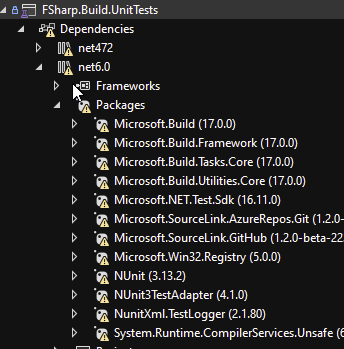
And finally, there was also this error, which suggested that, even though the libraries are compiled for NetStandard 2.0, it somehow tries to load a NetStandard 2.1 version, which doesn't exist in the artifacts directory:
Could not load file or assembly 'netstandard, Version=2.1.0.0, ... [etc]
This issue started prior to the updating to .NET 7 SDK as done as part of https://github.com/dotnet/fsharp/pull/13441. After I pulled those changes in, the build.cmd now gave me a clear error that I needed to update the SDK, requiring a manual download.
We should probably update the readme.md, it still says that .NET 6 SDK is needed.
TLDR: after pulling that in, installing the preview .NET 7 SDK, all the original errors disappeared. Still not sure what was behind all those dependency errors above, as I have not been able to find where these are logged.
There's now still an issue with running any test for .NET Framework (which automatically run with -testFSharpCore) that has Check.QuickThrowOnFailure in it, they all fail with and InvalidCastException (similar to https://github.com/Microsoft/fsharplu/issues/14). I'll create a new issue for that as it may not be related.
 FSharp.Core.UnitTests.DiscriminatedUnionTypes+UnionsFSCheckTests.struct unions are comparable
   Source: DiscriminatedUnionType.fs line 141
   Duration: 96 ms

  Message:
    System.InvalidCastException : Unable to cast object of type 'Arrow@249-1[System.Int32,Microsoft.FSharp.Core.FSharpFunc`2[System.Int32,FsCheck.Property]]' to type 'Testable`1[Microsoft.FSharp.Core.FSharpFunc`2[System.Int32,Microsoft.FSharp.Core.FSharpFunc`2[System.Int32,FsCheck.Property]]]'.

  Stack Trace:
    IntrinsicFunctions.UnboxGeneric[T](Object source)
    Runner.check[a](Config config, a p)
    Check.QuickThrowOnFailure[Testable](Testable property)
Going to close it for the time being? I couldn't reproduce it with latest main/dev17.4
@vzarytovskii yes, that’s fine, the fix for FsCheck also fixed this. If we haven’t done so already, we should update the prerequisites in the readme. But this doesn’t have to stay open for that.
I think we should also mention somewhere that running tests locally always runs them twice: once for dotnet and once for framework. I haven’t yet figured out how to run only one of the two.