

 dotnet
Refactor Rename doesn't work for simple type rename
Consider this simple example:
type MyType() =
    member x.DoNothing(d:MyType) = ()

let a = MyType()
let b = new MyType() // alternative syntax
a.DoNothing(b)
Try renaming MyType to something else. It won't work, it will miss most of the references. I reproduced this bug in the latest versions of VS2019 and VS2022. Am I missing something obvious?

I believe the problem is that rename is not considering the type MyType and its constructor MyType() to be the same thing for the purposes of renaming.
This should be covered by ItemsAreEffectivelyEqual in the implementation.

Actually I tried to repro in latest VS2022 and the rename refactor worked just fine. Are you sure it's not working for you?
https://user-images.githubusercontent.com/7204669/170979014-423b9924-3ac0-4be9-8c13-289b257693aa.mp4
Yes, that's exactly what's happening, it's considering the (unit -> MyType) function to be unrelated.
For some reason the refactoring works correctly if it's a script:
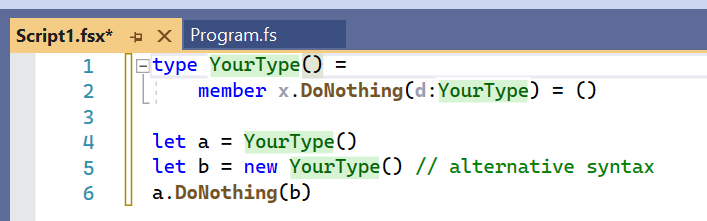
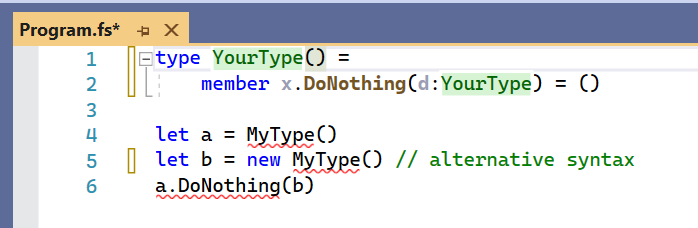
But it fails if it's an ordinary .fs inside a project:

Furthermore, in the screenshot above it's only missing the construction without the new keyword. In my initial test it was missing both. To reproduce this behavior it's a matter of removing the new keyword, restarting Visual Studio and waiting for the project to fully load. Then add the new keyword back and do the refactoring, it will get missed this time around:

FindAllReferences behaves differently than GetUsesOfSymbolInFile, it is not even symmetric. FindAllReferences (what powers rename), when applied on the 4 occurences of this sample, always returns something else.
Depending on the starting point used:
Type definiton -> finds method argument and "b" "b" -> finds "a" "a" -> finds "b"

@0101 works on renaming right now, there are some different paths when used on type definitions, or on usages. Probably makes sense to sync with him

Yep we did yesterday. Right now it all hints towards the "optimized" code path for Rename (and also find references) not returning all hits.
The naive way of making things correct would make them slow, so it will get tricky :((
I didn't really dig deep into this, but both Rename and Find all references use SymbolHelpers.getSymbolUsesInProjects as far as I can tell. Also give the same results for the repro code here. (Except when you use Find all references that doesn't include the occurrence where you issued the command, but I suppose that's expected.)
And that one then calls FSharpChecker.FindBackgroundReferencesInFile, so the issue must be there. Probably in how the symbols uses are stored in the ItemKeyStore.
@T-Gro not sure which "optimized" code path you mean, but this one hasn't been merged (and also behaves identically in this case).
Optimized code path for FindBackgroundReferencesInFile which then uses ItemKey.fs and binary blobs.