

 dotnet
Core 3.1.* streaming results - slower, and higher memory usage than 2.2.*
I used Entity Framework Core 2.2.* to stream results from a database over Web API. The speed that results were returned was "very good" and the memory usage we also "very good".
When I switched to EF Core 3.1.8 (no other code changes), the speed the results were returned was "very poor" compared to 2.2.* and the memory usage was also "very poor" compared to 2.2.*.
In my test, 2.2.* was about twice as fast as 3.1.8 and consumed about a quarter of the memory. The linked blog post below shows the numbers.
Steps to reproduce
Using .NET 3.1 create a Web API application. Seed a database with "Products". Add a controller like below. Use EF Core 2.2.6. Measure speed of return of results and memory usage. Use EF Core 3.1.8. Measure speed of return of results and memory usage.
[Route("api/[controller]")]
[ApiController]
public class ProductsController : ControllerBase
{
    private readonly SalesContext _salesContext;

    public ProductsController(SalesContext salesContext)
    {
        _salesContext = salesContext;
    }

    [HttpGet("streaming/{count}")]
    public ActionResult GetStreamingFromService(int count)
    {
        IQueryable<Product> products = _salesContext.Products.OrderBy(o => o.ProductId).Take(count).AsNoTracking();
        return Ok(products);
    }
}
A functioning solution with database seeding is available here. There is a zip file linked at the top and bottom of the post.
Further technical details
EF Core version: 2.2.6 and 3.1.8 Database provider: Microsoft.EntityFrameworkCore.SqlServer Target framework: .NET Core 3.1 Operating system: Windows 10 IDE: Visual Studio 2019 16.7.3


@ajcvickers I re-ran the tests in .NET 5, same code as above.
The below image is the timing for <PackageReference Include="Microsoft.EntityFrameworkCore.SqlServer" Version="5.0.0-rc.1.20451.13" /> -
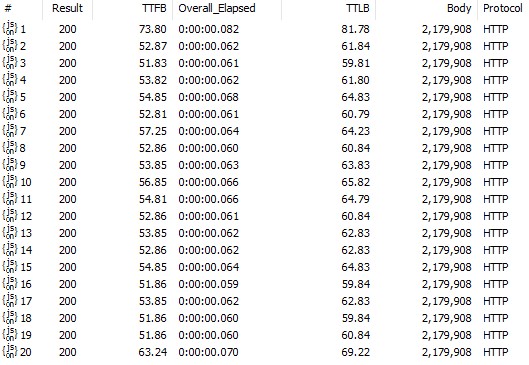
The below image is the timing for <PackageReference Include="Microsoft.EntityFrameworkCore.SqlServer" Version="2.2.6" /> -

I don't have the memory usage as I don't have the VS 2019 Preview.
@bryanjhogan I extracted your EF Core query code, and ran it via BenchmarkDotNet which is the best, reliable way to measure performance .NET. This method of benchmarking is important because it isolates EF Core (removing ASP.NET and anything else), and reliably measures the exact running time of the EF Core query, rather than a web request, which includes many more elements.
Although I can see a slight regression from 2.2 to 3.1 (around 10%), I'm definitely not seeing the numbers you're reporting. This doesn't mean that the problem you're reporting isn't real; but if EF really has regressed in such a significant way, that should show up on an isolated benchmark such as what I've written.
Could you please take a look at my code below and possibly give it a spin? If there are any discrepancies with the EF-related parts in your own scenario, that would explain the difference - otherwise something else is going on.
Results
BenchmarkDotNet=v0.12.1, OS=ubuntu 20.04
Intel Core i7-9750H CPU 2.60GHz, 1 CPU, 12 logical and 6 physical cores
.NET Core SDK=5.0.100-rc.2.20468.21
  [Host]     : .NET Core 3.1.7 (CoreCLR 4.700.20.36602, CoreFX 4.700.20.37001), X64 RyuJIT
  DefaultJob : .NET Core 3.1.7 (CoreCLR 4.700.20.36602, CoreFX 4.700.20.37001), X64 RyuJIT
Results for 2.2.6
| Method | Mean | Error | StdDev | Gen 0 | Gen 1 | Gen 2 | Allocated |
|---|---|---|---|---|---|---|---|
| Streaming | 18.00 ms | 0.866 ms | 2.525 ms | 1000.0000 | - | - | 9.94 MB |
Results for 3.1.8
| Method | Mean | Error | StdDev | Gen 0 | Gen 1 | Gen 2 | Allocated |
|---|---|---|---|---|---|---|---|
| Streaming | 19.27 ms | 0.428 ms | 1.242 ms | 1000.0000 | - | - | 11.47 MB |
Results for 5.0.0-rc1
| Method | Mean | Error | StdDev | Gen 0 | Gen 1 | Gen 2 | Allocated |
|---|---|---|---|---|---|---|---|
| Streaming | 19.38 ms | 0.386 ms | 0.734 ms | 1000.0000 | - | - | 11.45 MB |
Benchmark code
Code
[MemoryDiagnoser]
public class Program
{
    [Benchmark]
    public int Streaming()
    {
        using var ctx = new SalesContext();
        var count = 0;
        var products = ctx.Products.OrderBy(o => o.ProductId).Take(8000).AsNoTracking();
        foreach (var product in products)
            count++;
        return count;
    }

    static async Task Main(string[] args)
    {
        using var ctx = new SalesContext();
        await ctx.Database.EnsureCreatedAsync();
        ctx.Seed();

        BenchmarkRunner.Run<Program>();
    }
}

public class SalesContext : DbContext
{
    public DbSet<Product> Products { get; set; }

    protected override void OnConfiguring(DbContextOptionsBuilder optionsBuilder)
        => optionsBuilder.UseSqlServer(
            @"Server=localhost;Database=test;User=SA;Password=Abcd5678;Connect Timeout=60;ConnectRetryCount=0");
}

public class Product
{
    public int ProductId { get; set; }
    public string Name { get; set; }
    public ProductCategory ProductCategory { get; set; }
    public string Description { get; set; }

    public decimal Price { get; set; }

    public string SKU { get; set; }
    public string Code { get; set; }
}

public enum ProductCategory
{
    Clothing = 1,
    Footware = 2,
    Electronics = 3,
    Household = 4
}

public static class Seeder
{
    public static void Seed(this SalesContext salesContext)
    {
        if (!salesContext.Products.Any())
        {
            var fixture = new Fixture();
            fixture.Customize<Product>(product => product.Without(p => p.ProductId));
            //--- The next two lines add 10,000 rows to you database, this can take long time.
            List<Product> products = fixture.CreateMany<Product>(10000).ToList();
            salesContext.AddRange(products);
            salesContext.SaveChanges();
        }
    }
}
csproj
<Project Sdk="Microsoft.NET.Sdk">

  <PropertyGroup>
      <OutputType>Exe</OutputType>
      <TargetFramework>netcoreapp3.1</TargetFramework>

<!--      <EfCoreVersion>2.2.6</EfCoreVersion>-->
<!--      <MicrosoftExtensionsVersion>$(EfCoreVersion)</MicrosoftExtensionsVersion>-->

<!--      <EfCoreVersion>3.1.8</EfCoreVersion>-->
<!--      <MicrosoftExtensionsVersion>$(EfCoreVersion)</MicrosoftExtensionsVersion>-->

      <EfCoreVersion>5.0.0-rc.1.20451.13</EfCoreVersion>
      <MicrosoftExtensionsVersion>5.0.0-rc.1.20451.14</MicrosoftExtensionsVersion>
  </PropertyGroup>

  <ItemGroup>
      <PackageReference Include="Microsoft.EntityFrameworkCore.SqlServer" Version="$(EfCoreVersion)" />
      <PackageReference Include="BenchmarkDotNet" Version="0.12.1" />
      <PackageReference Include="AutoFixture" Version="4.11.0" />
  </ItemGroup>

</Project>

@roji I re-ran with your code and saw similar results. But my scenario is significantly different than the isolated case in your code sample.
The problem may only show up when EF is used the way I have described. Have you had a chance to run the queries inside a Web Api application - the zip I provided should startup with no modifications.
Perhaps it is the way I am using EF, and how the old and newer EF libraries interact with ASP.NET. I haven't seen other examples of this exact approach on the web or in the MS documentation.
The difference in speed and memory usage I see in the Web API application suggests to me the the newer EF libraries are materializing ALL the results before sending ANY result across the wire. While the EF 2.2.6 is sending results as they come out of the database, NOT materializing ALL before sending across the wire.
The way I am using EF to stream the results seems to "very fast" and "efficient" and I would not like to see that performance lost. It would be the difference between choosing EF for a project or not.
The difference in speed and memory usage I see in the Web API application suggests to me the the newer EF libraries are materializing ALL the results before sending ANY result across the wire. While the EF 2.2.6 is sending results as they come out of the database, NOT materializing ALL before sending across the wire.
If EF Core were doing anything like this (which I'm pretty sure it isn't), it would have shown up in the isolated BenchmarkDotNet benchmarks I posted above - note the memory allocation column in the results.
I haven't had time to run your sample - it's a very busy time with the EF Core 5.0 release winding down. But if you believe something is wrong within EF Core, would you be willing to investigate that further and reproduce it in the EF-only benchmarks I've posted? I'm not saying there isn't any problem here - but I duplicated your code as-is in my benchmark and can't see anything.
@roji, try to emulate this behavior, just count first 100 records. And then compare two versions.
       foreach (var product in products)
       {
           if (++count >= 100)
              break;
       }

I don't follow... what are the two versions that you want me to compare?
The benchmark I posted above streams 8000 entities from the database on each invocation, on the 3 versions of EF Core, with only a small perf difference. Isn't that enough to prove that nothing is wrong? Can you tweak my benchmark to show a problematic difference between 2.2 and 3.1?
@roji I'm in no hurry to resolve this or want you to dedicate any time this when you have more pressing issues.
My Web API application demonstrates the problem but doesn't isolate it beyond the change from EF Core 2.2.6 to a newer EF Core, not a single other line of code was changed by me. Maybe there is a problem with ASP.NET that manifests itself when I change between the EF versions, I don't know.
I will see if I can get your source code to behave the way mine does inside an ASP.NET application, but I feel we are not comparing apples to apples, my use case is inside a Web API application and the benchmark is not.
If this is a distraction, I'm happy to pause this and ping you in a few months.
@sdanyliv if you have the time and interest, can you try running the Web API application in the zip referenced in the first post and switch between EF Core 2.2.6 and the newer ones to see if you can reproduce the issue? I have been able to on three computers.
Sorry for inconvenience. I've proposed to emulate Time To First Byte, just get 100 or 1 record(s) and stop enumerating, If EF Core of different versions has problem with that - it should be uncovered.
@bryanjhogan this isn't a distraction at all (perf issues are very important to us) - I'm just asking for your help in isolating this to EF, if you have the time and are interested. It's always best to submit a minimal, isolated benchmark against the library where the perf issue is suspected.
If not, could you please post exactly which tool you're using to measure the webapp perf (and how you're configuring it etc.)?
@roji I'm happy to help if I can, and will try some variations of your code to see if I can produce the same problem narrowed to the nub of the issue.
I was using Fiddler to perform the web requests, the screenshots in the blog post are captured from that.
Thanks for your help @bryanjhogan! Looking forward to seeing your results. Let me know if you need any help with BenchmarkDotNet, it really is an awesome tool for benchmarking stuff.
@sdanyliv @roji Few things -
-
I ran a variety of tests on the EF Core libraries using BenchmarkDotNet. Some were similar to your code and in a few I added Microsoft.AspNetCore.Mvc, and put the EF calling code inside an action method and measured it. In all these cases I saw about a 10% decrease in speed when moving from EF Core 2.2.6 to EF Core 3.1.8.
-
In the scenario I described at the start of this bug report, using EF inside Web API and making HTTP requests, I suggested that EF Core 3 and later are materializing results before sending them across the wire.
I ran some more tests.
I seed the database with 500,000 records.
Test A - using EF Core 2.2.6 request 500,000 records from the Web API application using Fiddler. Test B - using EF Core 3.1.8 request 500,000 records from the Web API application using Fiddler.
Results -
Test A - memory usage was small.

Test B - memory usage was large. To me this is evidence that the results are materializing before being sent over the wire.

The memory usage shown in the two diagrams covers the period from application startup to completion of a single request to the action method.
To lend credence to my idea that results are materializing, here is the timing information from Fiddler. TTFB is time to first byte.
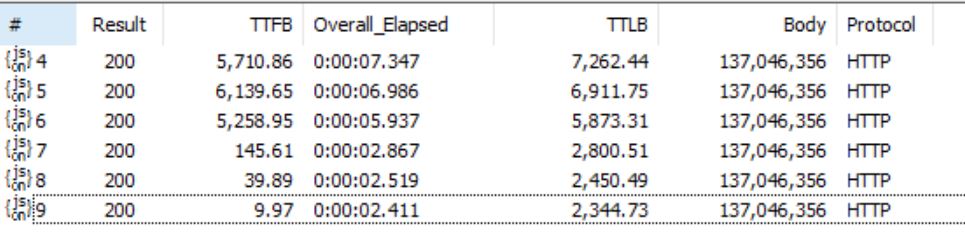
Results 4, 5, and 6 are from EF Core 3.1.8. Their TTFB is quite high.
Results 7, 8, and 9 are from EF Core 2.2.6. Their TTFB is way lower as is the overall time for the request to complete.
@bryanjhogan thanks for the extra investigation, I'll do my best to investigate this in the next few days.
Confirm, the same results using this web api project. In my case it was 146MB for 2.2 - working good. for 3.1.27 - memory jumped to over 500MB and web api crashed
System.InvalidOperationException: 'AsyncEnumerableReader' reached the configured maximum size of the buffer when enumerating a value of type 'Microsoft.EntityFrameworkCore.Query.Internal.EntityQueryable1[StreamEntityFrameworkCore31PerformanceProblem.Data.CompetitorPrice]'. This limit is in place to prevent infinite streams of 'IAsyncEnumerable<>' from continuing indefinitely. If this is not a programming mistake, consider ways to reduce the collection size, or consider manually converting 'Microsoft.EntityFrameworkCore.Query.Internal.EntityQueryable1[StreamEntityFrameworkCore31PerformanceProblem.Data.CompetitorPrice]' into a list rather than increasing the limit.
Removing EnableRetryOnFailure - memory 125MB. Still crashing.
For 2.2.6 - Postman reaches Maximum response size.

@LeszekKalibrate first, EF 3.1 is going out of support in less than a month. It's recommended to upgrade to 6.0 or 7.0, which incidentally also have significant query performance enhancements compared to 3.1.
Second, 3.1 changed related entity loading in a significant way, moving from split to single query by default; there's a good chance this may be related to the difference you're seeing, see the docs to understand this better.
Otherwise, a minimal, runnable code sample would allow us to investigate further exactly what's going on.
Hi, I found it there https://nodogmablog.bryanhogan.net/2020/09/entity-framework-core-3-1-bug-vs-2-2-speed-and-memory-during-streaming/
The link: https://nodogmablog.bryanhogan.net/2020/09/entity-framework-core-3-1-bug-vs-2-2-speed-and-memory-during-streaming/media/StreamEntityFrameworkCore31PerformanceProblem.zip
It is single entity / table.
Just add retry, in startup.cs:
opt.EnableRetryOnFailure(5, TimeSpan.FromMinutes(1), new Collection<int> { RetryErrorCodes.TimeoutExpired, RetryErrorCodes.CouldNotOpenConnection, RetryErrorCodes.TransportFailed, RetryErrorCodes.Deadlock })
Call it and see memory usage. Update EF Core to 3.1.27 and call it again.
.NET 5 looks the same.
I am testing NET 6 with EF 7.0 now.