

 dotnet
.NET 8.0 Preview 6
Please report any issues you find with .NET 8 Preview 6, either responding to this issue, creating a new issue or creating a new issue in one of the following repos:
- dotnet/aspnetcore - for ASP.NET Core questions
- dotnet/efcore - for Entity Framework Core questions
- dotnet/sdk - for CLI tools and questions
- dotnet/runtime - for runtime, API, or installer issues and questions
- dotnet/winforms - for WinForms issues
- dotnet/wpf - for WPF issues
- nuget/home - for NuGet questions and issues
Known Issues
If there are any issues with this release we will track them here and check issues off as they're resolved. See the linked issues for details on progress and resolution details.


Could not upgrade via winget, while there's update when use dotnet sdk check, maybe winget package need to be updated?

@luizfbicalho you can see the definition of our releases at https://dotnet.microsoft.com/platform/support/policy/dotnet-core#servicing. Preview 6 is not a go-live release. Those will be labeled as such and will be production ready.

Could not upgrade via
winget, while there's update when usedotnet sdk check, maybewingetpackage need to be updated?
The pull request for winget-pkgs had not been merged: https://github.com/microsoft/winget-pkgs/pull/111831
>> edit
merged, works now

Will this safely be installed side by side with .Net 7 on Mac?
https://github.com/dotnet/core/blob/main/release-notes/8.0/preview/8.0.0-preview.6.md#visual-studio-compatibility Visual Studio for Mac is currently not supported for .NET 8.0 Preview releases.
Apparently no longer true, see last comment from Matt Ward:
https://stackoverflow.com/questions/76656738/how-do-you-target-net-8-for-net-maui-project-on-visual-studio-for-mac
If you update to the latest Visual Studio for Mac 17.6.1 released today then you can get .NET 8 support if you enable it in preferences. learn.microsoft.com/en-us/visualstudio/releases/2022/… – Matt Ward 22 hours ago
Given that, is it safe to install for evaluation, with a path to switch back to .Net 7? Or should I expect to be restoring from Time Machine?
Given that, is it safe to install for evaluation, with a path to switch back to .Net 7? Or should I expect to be restoring from Time Machine?
@mrward who can help us here and I will also update our release assets as well
Great. This isn't about VS Mac though, it's about the .Net runtime. Can multiple versions of .Net be installed side by side on Mac?
VS Mac 17.6.1 added support for .NET 8. This support is not enabled by default. It can be enabled in Preferences - Other - Preview Features, by checking 'Use the .NET 8 SDK if installed' and then restarting VS Mac.

@kcoop Yes, you can install multiple versions of .NET side by side. VS Mac will use the latest .NET SDK by default (.NET 7 or .NET 8, depending on the setting in Preferences) but you can pin VS Mac to a specific .NET SDK version using a global.json file for the solution.
Great! Glad to hear it, will kick the tires now that I know the water's safe. And thanks for getting VS Mac out for this preview.
VS Mac 17.6.1 added support for .NET 8. This support is not enabled by default. It can be enabled in Preferences - Other - Preview Features, by checking 'Use the .NET 8 SDK if installed' and then restarting VS Mac.
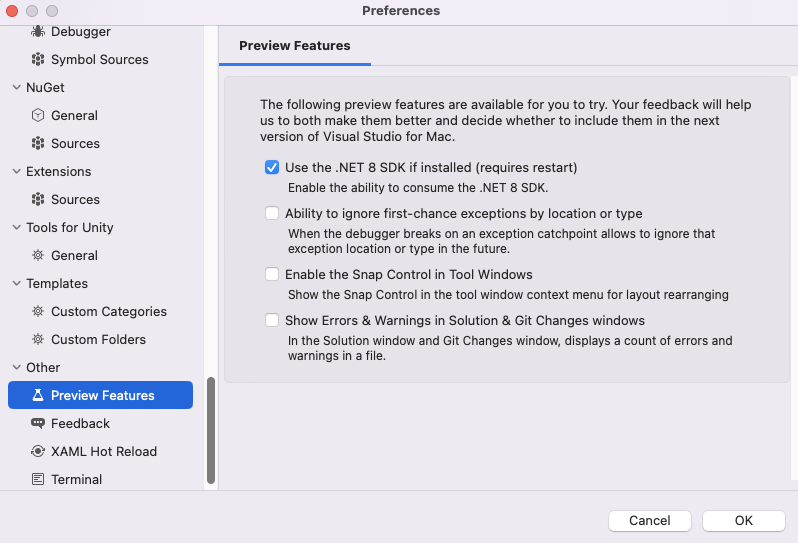
Given this, should we add VS for Mac info into the releases.json @rbhanda?
I have a console app that has a ProcessExit handler, which gets consistently triggered on programmatic calls to Environment.Exit(0) in both Debug/Release and Publish native AOT builds.
Debug/Release build output triggers the ProcessExit handler when the terminal window's close [x] button is clicked to close the app. However, Publish native AOT (win-x64) build output's version does not trigger the ProcessExit handler when the terminal window's close [x] button is clicked to close the app.
I was expecting the native AOT version to also trigger ProcessExit like the non-native AOT builds.
