aspnetcore
 aspnetcore copied to clipboard
 dotnet
Blazor (fail: Microsoft.WebAssembly.Diagnostics.DevToolsProxy[0] sending error response for id)
Is there an existing issue for this?
- [X] I have searched the existing issues
Describe the bug
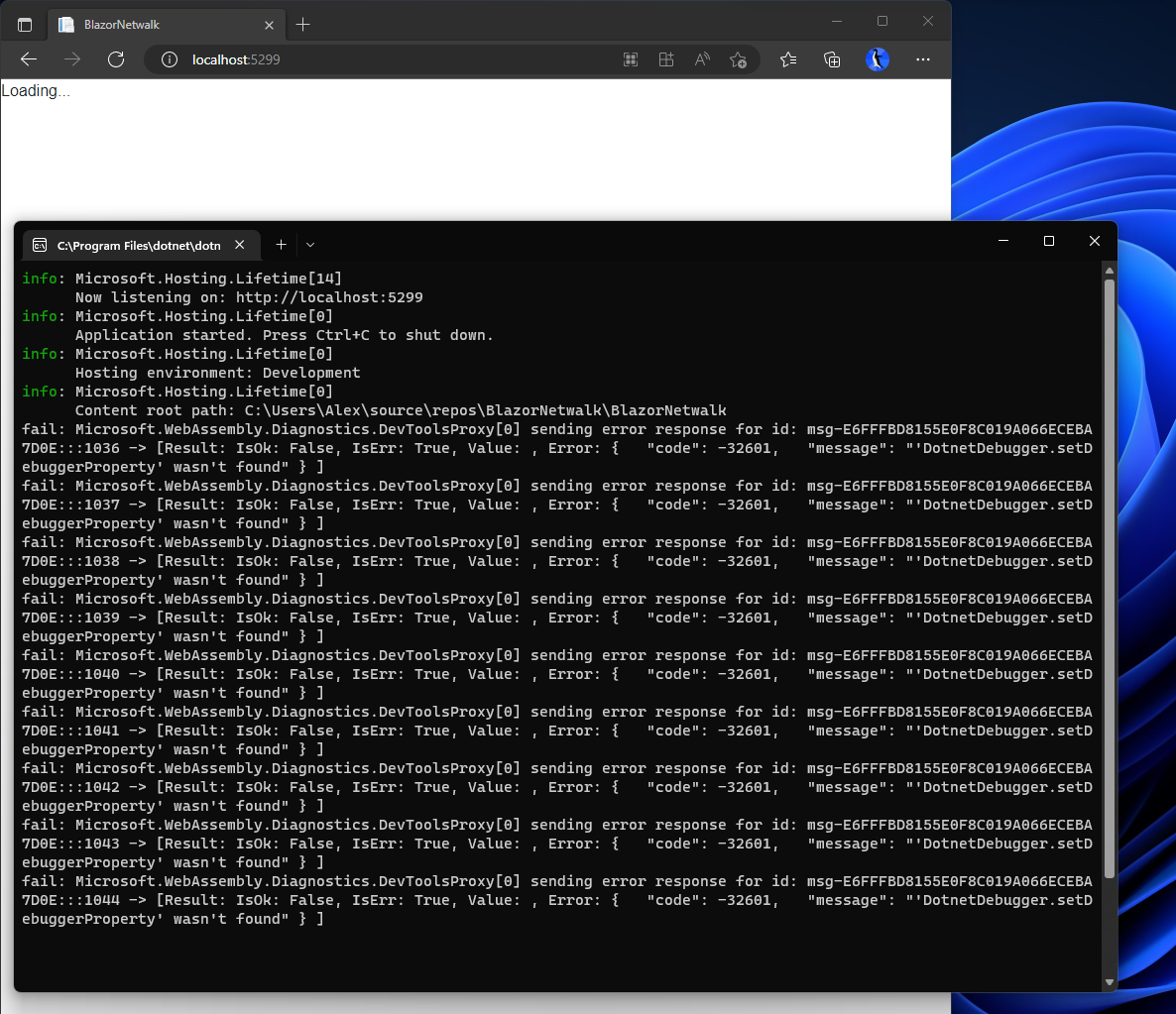
After upgrading my Blazor Webassembly project from .NET 6 to .NET 7 my web application is hanging at the "Loading..." stage and I get the following errors in the console window when I launch it in debug mode:
fail: Microsoft.WebAssembly.Diagnostics.DevToolsProxy[0] sending error response for id: msg-AD00D2F5932C12704B821A657E366CB4:::1036 -> [Result: IsOk: False, IsErr: True, Value: , Error: {   "code": -32601,   "message": "'DotnetDebugger.setDebuggerProperty' wasn't found" } ]
fail: Microsoft.WebAssembly.Diagnostics.DevToolsProxy[0] sending error response for id: msg-AD00D2F5932C12704B821A657E366CB4:::1037 -> [Result: IsOk: False, IsErr: True, Value: , Error: {   "code": -32601,   "message": "'DotnetDebugger.setDebuggerProperty' wasn't found" } ]
fail: Microsoft.WebAssembly.Diagnostics.DevToolsProxy[0] sending error response for id: msg-AD00D2F5932C12704B821A657E366CB4:::1038 -> [Result: IsOk: False, IsErr: True, Value: , Error: {   "code": -32601,   "message": "'DotnetDebugger.setDebuggerProperty' wasn't found" } ]
fail: Microsoft.WebAssembly.Diagnostics.DevToolsProxy[0] sending error response for id: msg-AD00D2F5932C12704B821A657E366CB4:::1039 -> [Result: IsOk: False, IsErr: True, Value: , Error: {   "code": -32601,   "message": "'DotnetDebugger.setDebuggerProperty' wasn't found" } ]
fail: Microsoft.WebAssembly.Diagnostics.DevToolsProxy[0] sending error response for id: msg-AD00D2F5932C12704B821A657E366CB4:::1040 -> [Result: IsOk: False, IsErr: True, Value: , Error: {   "code": -32601,   "message": "'DotnetDebugger.setDebuggerProperty' wasn't found" } ]
fail: Microsoft.WebAssembly.Diagnostics.DevToolsProxy[0] sending error response for id: msg-AD00D2F5932C12704B821A657E366CB4:::1041 -> [Result: IsOk: False, IsErr: True, Value: , Error: {   "code": -32601,   "message": "'DotnetDebugger.setDebuggerProperty' wasn't found" } ]
fail: Microsoft.WebAssembly.Diagnostics.DevToolsProxy[0] sending error response for id: msg-AD00D2F5932C12704B821A657E366CB4:::1042 -> [Result: IsOk: False, IsErr: True, Value: , Error: {   "code": -32601,   "message": "'DotnetDebugger.setDebuggerProperty' wasn't found" } ]
fail: Microsoft.WebAssembly.Diagnostics.DevToolsProxy[0] sending error response for id: msg-AD00D2F5932C12704B821A657E366CB4:::1043 -> [Result: IsOk: False, IsErr: True, Value: , Error: {   "code": -32601,   "message": "'DotnetDebugger.setDebuggerProperty' wasn't found" } ]
fail: Microsoft.WebAssembly.Diagnostics.DevToolsProxy[0] sending error response for id: msg-AD00D2F5932C12704B821A657E366CB4:::1044 -> [Result: IsOk: False, IsErr: True, Value: , Error: {   "code": -32601,   "message": "'DotnetDebugger.setDebuggerProperty' wasn't found" } ]
If I run it without debugging it doesn't work either. I did the upgrade by changing the Target framework from .NET 6.0 to .NET 7.0, and nothing else. If I change the Target framework back to .NET 6.0 it works again.
Here is a screenshot of what I described:
Expected Behavior
The application finishes loading and shows the webpage.
Steps To Reproduce
- Create a new Blazor WebAssembly App project with .NET 6 version
- Run the application, it works
- In the project properties change the Target framework to .NET 7.0
- Run the application, it does not work
Exceptions (if any)
No response
.NET Version
7.0.100
Anything else?
- Visual Studio 2022 17.4.1
- Windows 11 22H2 (Microsoft Windows [Version 10.0.22621.819])
.NET SDK: Version: 7.0.100 Commit: e12b7af219
Runtime Environment: OS Name: Windows OS Version: 10.0.22621 OS Platform: Windows RID: win10-x64 Base Path: C:\Program Files\dotnet\sdk\7.0.100\
Host: Version: 7.0.0 Architecture: x64 Commit: d099f075e4
.NET SDKs installed: 5.0.202 [C:\Program Files\dotnet\sdk] 6.0.111 [C:\Program Files\dotnet\sdk] 6.0.306 [C:\Program Files\dotnet\sdk] 7.0.100 [C:\Program Files\dotnet\sdk]
.NET runtimes installed: Microsoft.AspNetCore.App 6.0.11 [C:\Program Files\dotnet\shared\Microsoft.AspNetCore.App] Microsoft.AspNetCore.App 7.0.0 [C:\Program Files\dotnet\shared\Microsoft.AspNetCore.App] Microsoft.NETCore.App 6.0.4 [C:\Program Files\dotnet\shared\Microsoft.NETCore.App] Microsoft.NETCore.App 6.0.11 [C:\Program Files\dotnet\shared\Microsoft.NETCore.App] Microsoft.NETCore.App 7.0.0 [C:\Program Files\dotnet\shared\Microsoft.NETCore.App] Microsoft.WindowsDesktop.App 6.0.4 [C:\Program Files\dotnet\shared\Microsoft.WindowsDesktop.App] Microsoft.WindowsDesktop.App 6.0.11 [C:\Program Files\dotnet\shared\Microsoft.WindowsDesktop.App] Microsoft.WindowsDesktop.App 7.0.0 [C:\Program Files\dotnet\shared\Microsoft.WindowsDesktop.App]
Other architectures found: x86 [C:\Program Files (x86)\dotnet] registered at [HKLM\SOFTWARE\dotnet\Setup\InstalledVersions\x86\InstallLocation]
Environment variables: Not set
global.json file: Not found

@alex47 thanks for contacting us.
You should also update the packages in the project and clean your bin and obj folders. Otherwise, there is likely intermediate state that can cause issues.
Could you let us know if:
- This happens with a new project?
- This happens after you have upgraded all the packages and cleaned up the bin and obj folders of the solution?

Hi @alex47. We have added the "Needs: Author Feedback" label to this issue, which indicates that we have an open question for you before we can take further action. This issue will be closed automatically in 7 days if we do not hear back from you by then - please feel free to re-open it if you come back to this issue after that time.

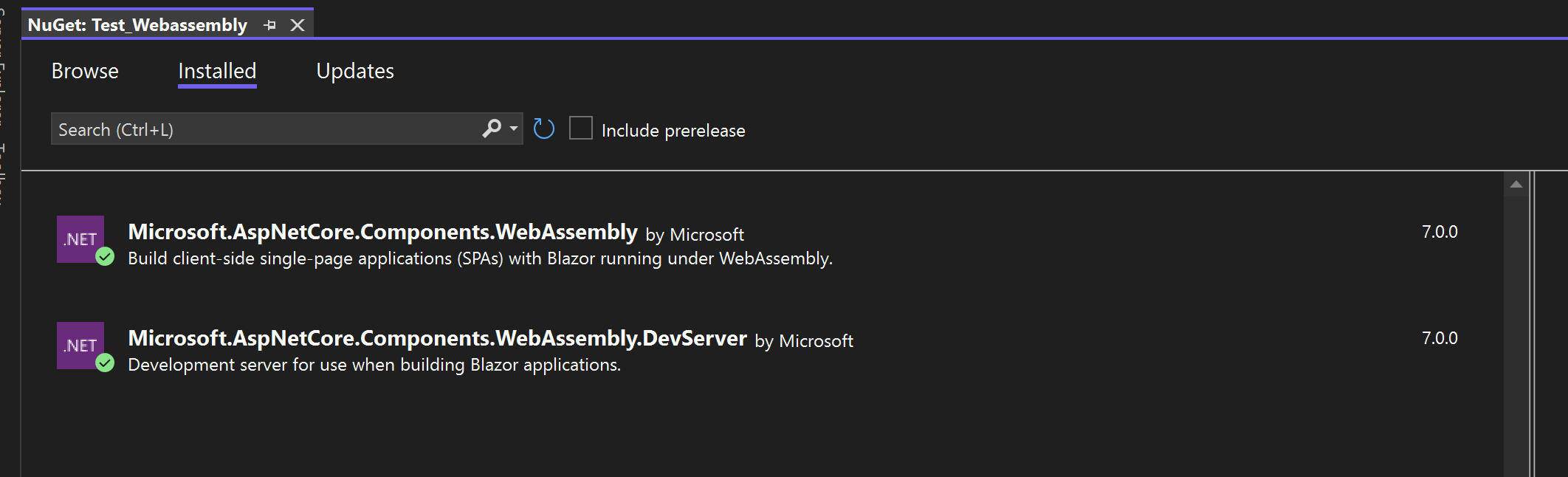
@javiercn Yes, it happens with a new project as well. After I upgraded these two nuget packages the problem went away. Thanks for pointing me to the right direction.